SQL Server

Azure SQL with AAD authentication

I though this had to be an easy task. Well, actually it is. If you find the right documentation and read it in the correct order 🙂

Basically I wanted to be able to login with my AAD (Azure Active Directory) user.
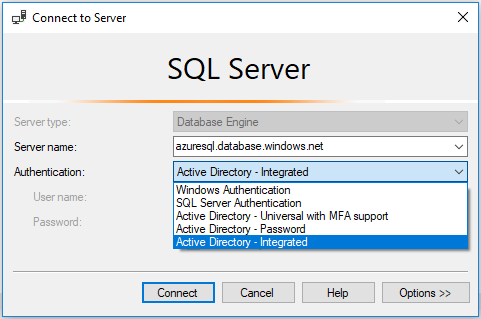
In the first step, the database needs to be configured for Azure Active Directory in order to add users in the second step.
RSS feed for Knowledgebase Articles

Shrink SQL log files

Depending on the configuration of you databases, the log files (*.ldf) can be very large. See Selecting a Recovery Model.

Should I continue reading?

If your databases are configured to use the FULL recovery model, the log files are very large and you need some free space, you can use this SQL script to shrink them. So keep on reading 🙂

The script will change the recovery model for a single database to SIMPLE and shrink the log files. At the end it will restore the recovery model to the setting it has been before.

Service Pack 1 for Microsoft SQL Server 2008

The SP1 has been released. You can download it here. (Release Notes)

Some changes to make the deployment easier:

  • Slipstream – You are now able to integrate the base installation with service packs (or Hotfixes) and install in a single step.
  • Service Pack Uninstall – You are now able to uninstall only the Service Pack (without removing the whole instance)
  • Report Builder 2.0 Click Once capability

SharePoint and Database Maintenance

In this post I would like to point to “an issue” with the Database Maintenance for Microsoft® SharePoint® Products and Technologies. It shows a stored procedure, which will defragment the index of a database.

How to defragment Windows SharePoint Services 3.0 databases and SharePoint Server 2007 databases

The problem is that it is mentioned nowhere, that the stored procedure requires the Enterprise version of the SQL Server 2005!

Install SQL Server 2008

Installing the new SQL Server is not very different from installing older version. You have some new options, don’t have to change the media anymore and have some nice wizards.

The SQL Server 2008 requires some components, which will be installed automatically during the setup process.

  • .NET Framework 3.5 SP1 (installed before SQL Server is being installed)
    • Hotfix for Windows Server 2003 (KB942288-v4 will be installed)
      • Powershell 1.0 (will be installed later)
      After installing the Hotfix, the System requires a reboot! The setup does not continue automatically after the restart. So you have to start it again.