
Using a custom field type in a BCS model
The BCS Team (Business Connectivity Services) wrote an blog post about using complex formatting and custom field types within your BCS model. Obviously this post was the source for the SDK article.
The example shows that you can use a custom field type to render data from external data sources this way:
<TypeDescriptor TypeName="Customer.Address" Name="CustomerAddress" DefaultDisplayName="Customer Address">
   <Properties>
       <Property Name="SPCustomFieldType" Type="Customer.Address">Customer Address</Property>
   </Properties>
</TypeDescriptor>
Well, to help you map this example to your data, I’ll write some more about the SPCustomFieldType property of the BCS model.
SharePoint 2010 Language Packs available for download
Yesterday MS has released the language packs to the public. What is a language pack?
Language packs enable site owners and site collection administrators to create SharePoint sites and site collections in multiple languages without requiring separate installations of Microsoft SharePoint Server 2010.
Word breakers and stemmers enable you to efficiently and effectively search across content on SharePoint sites and site collections in multiple languages without requiring separate installations of SharePoint Server 2010. Word breakers and stemmers are automatically installed on Web servers by Setup.
New Contoso Hyper-V with SharePoint 2010 RTM
Microsoft has published a new version of the Contoso VM for evaluating SharePoint 2010. Grab it here:
2010 Information Worker Demonstration and Evaluation Virtual Machine (RTM)
Take a close look at the Instructions on the download page.
Virtual machine “a” contains the following pre-configured software:
- Windows Server 2008 R2 Standard Evaluation Edition x64, running as an Active Directory Domain Controller for the “CONTOSO.COM” domain with DNS and WINS
- Microsoft SQL Server 2008 R2 Enterprise Edition with Analysis, Notification, and Reporting Services
- Microsoft Office Communication Server 2007 R2
- Microsoft Visual Studio 2010
- Microsoft SharePoint Server 2010 Enterprise Edition
- Microsoft Office Web Applications
- Microsoft FAST Search for SharePoint 2010
- Microsoft Project Server 2010
- Microsoft Office Professional Plus 2010
- Microsoft Visio 2010
- Microsoft Project 2010
- Microsoft Office Communicator 2007 R2
RSS feed for Knowledgebase Articles
The RSS Feed Product Index offers a feed with new KB articles for many products.
SharePoint relevant feeds are:
- Access Services in Microsoft SharePoint Server 2010
- Forefront Security for SharePoint
- SharePoint Administration Toolkit 3.0
- SharePoint Designer 2007
- SharePoint Portal Server 2001 Ok. I think this one can be skipped
- SharePoint Portal Server 2003 Still out there? Let’s migrate…
- SharePoint Server 2007
- Windows SharePoint Services 3.0
- SharePoint Server 2010
Some SQL feeds:
And Visual Studio
Evaluation Keys for SharePoint Server 2010, Search Server and Project Server
Looking through the SPModule Powershell Script, I found an interesting comment in the script:
Write-Verbose “You didn’t provide a PID Key, looks like I’ll have to give you a trial key.”
switch ($PhysicalSKU)
{
“OfficeServer” { $CurrentConfigXml.Configuration.PIDKEY.Value = “BR68M-F6WK6-W6BVB-GXQGB-W67BG” ; Write-Verbose “Using a SharePoint Standard Trial PID Key. You can upgrade to Enterprise trial from Central Admin if you want to.”; break}
“ProjectServer” { $CurrentConfigXml.Configuration.PIDKEY.Value = “9B4JM-6R6F8-2CMGW-T3T7W-6TYJW” ; Write-Verbose “Using a Project Server Trial PID Key.”; break}
“SearchServer” { $CurrentConfigXml.Configuration.PIDKEY.Value = “CX79M-QPKH7-7GFJQ-Y37T4-KKBRM” ; Write-Verbose “Using a Search Server Trial PID Key.”; break}
“WCServer” { Write-Error “There is no trial for WCServer, you must specify a retail PID Key.”; break}
default { Write-Verbose (“Your SKU doesn’t require a PIDKey: {0}” -f $PhysicalSKU)}
}
Warning: Vulnerability in Microsoft SharePoint Could Allow Elevation of Privilege
If you are running your own SharePoint infrastructure, you should take a look at a Security Advisory: http://www.microsoft.com/technet/security/advisory/983438.mspx
Microsoft is investigating new public reports of a possible vulnerability in Microsoft Windows SharePoint Services 3.0 and Microsoft Office SharePoint Server 2007. The vulnerability could allow an attacker to run arbitrary script that could result in elevation of privilege within the SharePoint site, as opposed to elevation of privilege within the workstation or server environment.
SiteDirectory for SharePoint 2010
SP 2010 does not bring a SiteDirectory template. Microsoft Consulting Services UK have released a CodePlex version of a SiteDirectory for SharePoint 2010: http://spsitedirectory2010.codeplex.com/
What is the Purpose of the Site Directory for SharePoint 2010?
SharePoint 2007 used to have a type of Site Called Site Directory which provided a directory of all sites that had been created. In SharePoint 2010, this feature has been dropped. This solution has been developed to fill the gap in SharePoint 2010. The solution follows the same basic principle of the Site Directory in SharePoint 2007 but adds some commonly requested features.
Do not install Office 2010 x64
Now you will think “Why not?”. Some time ago I read a blog post which said “If you are asking yourself if you want to install Office 2010 as 64bit version, you should install the x86 version”. Why that?
The reason is, that if you are asking yourself you worry about incompatibility with over software. And you are right! If you install x64, all add-ins you use have to be x64 as well. You should however install x64, if you need more than 2GB for Excel :-/ Or you use a SQL Server to store your data and install x86…
2010 available on MSDN
SharePoint and Office are now available via MSDN subscription:
http://msdn.microsoft.com/en-US/subscriptions/subscription-downloads.rss
Update:
Microsoft SharePoint Foundation 2010 (English)
SharePoint 2010 = RTM
As you can read on the SharePoint Team Blog, SharePoint 2010 has reached RTM status.
There is word about availability on MSDN.
Our Volume License customers with active Software Assurance (SA) on these products will be one of the first to receive the 2010 set of products. They will be able to download the product in English, French, Spanish, German, Russian, and Dutch via the Volume Licensing Service Center starting April 27. Other languages will be available on a rolling timeline. Customers without SA will be able to purchase the new products through Volume Licensing from Microsoft partners starting May 1.
Visual Studio 2010 with SharePoint 2010 Beta 2
A quick test shows that the just released Visual Studio 2010 works on my SP 2010 Beta 2 VM.
I could open a project, hit F5 to deploy it and debug successfully.
Working with large lists in SharePoint 2010
What is a large list? What might be the problem if I store 1 million documents in a document library? Is there an improvement from WSS 3 to SharePoint Foundation?
If you want answers to the questions, take a look at a great post at the “Microsoft Enterprise Content Management (ECM) Team Blog”.
A summary to the problem:
Any time you ask for content from SharePoint, you have to specify how it’s sorted – for example, the All Documents view in SharePoint 2007 asks for the top 100 results, sorted by filename. But items aren’t sorted by filename in the SharePoint content database – so, to bring you this view, SharePoint has to gather up all these million items, sort them, and finally display the 100 ones at the top of the sorted list.
Treffen der OWL SharePoint UserGroup
Am 13. April werden wir uns wieder um 18h in Paderborn treffen. (Net at Work Netzwerksysteme GmbH, Am Hoppenhof 32, Anfahrtsbeschreibung).
Als Thema ist ein Erfahrungsbereicht über die Migration von Lotus Domino/Notes nach SharePoint 2007 hören. Vielen Dank schon einmal an Campus Consult.
 Wir bitten um eine kurze Anmeldung per Email an ug-owl ( at ) mysharepoint ( . ) de.
Am 12. Mai ist SharePoint 2010 release Termin. Zum weltweiten Launch der neuen SharePoint-Suite hat sich die SharePointCommunity etwas Besonderes überlegt. Es werden die Usergroups aus München, SaarLorLux, Düsseldorf, Berlin, Stuttgart , Friedrichshafen, Hamburg, Stuttgart, Würzburg, Dresden und natürlich wir aus Ostwestfalen an einem SharePointCommunity-Launch teilnehmen. Derzeitig sieht die Planung es so vor, das die Usergroups sich ab etwa 16-16:30 Uhr treffen, damit die Live-Launch-Übertragung von Microsoft ab 17 Uhr gemeinsam verfolgt werden kann. Im Anschluss werden wir eine Live-Schaltung zu den einzelnen Usergrouptreffen machen, um die Gruppengedanken zum Event mit einzufangen.
The IWebPartField Interface versus the ASP.NET Lifecycle
A Webpart receives a filter value through the IWebPartField interface. The example over at MSDN was simple and clean. So I adopted the code to my Webpart.
A common scenario would be to create controls based on the received filter value. E.g. query a list for the passed filter value, and display the item from the query.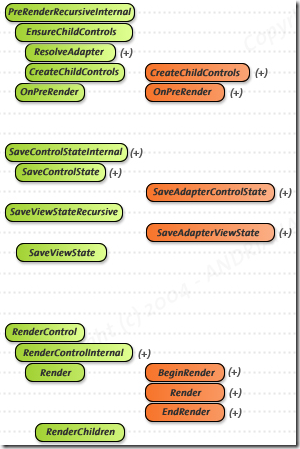
Problem
From the ASP.NET Lifecycle we know how to deal with controls. Create them in CreateChildControls, assign values in OnPreRender and let them being rendered in RenderContents. Now we have a problem. The passed value in our Webpart is not available at any place, where we can still add controls to the page. If we try to do in RenderContens, they are not shown. It’s too late.
Which SharePoint version am I running?
Solutions which were developed for SharePoint Services V3 will most likely continue to work if you use them in a SharePoint Foundation environment.
But how do you find out which version your are dealing with? This is a question which might be important if you use V3 CSS elements which are not available under SharePoint Foundation.
The SharePoint version can be found from from the SPFarm.Local.BuildVersion property. For SharePoint V3 you’ll need permissions to access the configuration database to read the local farm. Otherwise it will be null.