SharePoint 2013 SDK
How could I miss the release of the SharePoint 2013 SDK in November?
http://www.microsoft.com/en-us/download/details.aspx?id=30722
Anyway. Finally the non-preview version has been released 🙂
How could I miss the release of the SharePoint 2013 SDK in November?
http://www.microsoft.com/en-us/download/details.aspx?id=30722
Anyway. Finally the non-preview version has been released 🙂
In this post I will show you how you can use MSBuild to target your project for .NET 3.5 or .NET 4.0 and use a separate app.config file for each.
My Warmup Tool is supposed to work with SP2010 and SP2013. To achieve that compatibility, I have to change the TargetFramework of the project to be able to compile, as well as the app.config so the application uses the desired Framework. I didn’t want to change the values every time manually. An automated solution has to be possible. And it is. Some little changes to the project file and MSBuild will do all the work for you 🙂
Installing Updates for SharePoint 2013 will take a long time, if you don’t disable some services prior starting the update process by executing the hotfix exe file. To simplify the installation, and speeding it up, you can use a PowerShell script to stop the necessary services, and start the update.
You need to copy the code, and save it as e.g. Install_SharePoint_Update.ps1 in the same folder as the exe file. Start the script from the “SharePoint Management Shell”. It will take care of the services for you.
In many cases you pass an URL string to connect to SharePoint. In my case I wanted to verify the URL by using this code:
1: Uri requestUri;2: if (!Uri.TryCreate(absoluteUrl, UriKind.Absolute, out requestUri))3: throw new ArgumentException(absoluteUrl + " is no a valid URL.");4:5: SPWebApplication webApplication = SPWebApplication.Lookup(requestUri);And here comes the “but”. I did not know that the account, which is executing the code, needs permissions to the Configuration Database!
Dear SharePoint Crawler. Are you currently working?

Have you ever thought about the Features folder and when a folder will be created for one of you features? Well, I did 🙂
Why is this relevant, anyway? To be able to activate a feature on a given scope, it has to be installed first. That’s why.
| Action |
Great. After deploying the solution, the feature is automatically installed and can be used. I did expect this, because installing a feature is a rather uncommon task.
The new release brings support for Visual Studio 2013 🙂
The CKS – Development Tools Edition for Visual Studio 2012 and 2013 is a collection of Visual Studio templates, Server Explorer extensions and tools providing accelerated SharePoint 2010/2013 development based on Microsoft’s SharePoint 2010/2013 development tools.
http://visualstudiogallery.msdn.microsoft.com/cf1225b4-aa83-4282-b4c6-34feec8fc5ec?SRC=VSIDE
Visual Studio allow a F5 Deployment. I guess you all know that. The part where you have to think carefully is, when you add Features to your project.
Should you activate “Activate On Default”? Well, it depends (as always). Usually I don’t enable that setting, because features tend to be activated on scopes you won’t expect.
Take a WebApplication scoped feature for example. It might create SafeControl entries for your controls. Do you really want them to be added to an Extranet WebApplication if your solution is solely for an Intranet Application?
If you are indexing you DFS with SharePoint 2007/2010, you should take a look at this hotfix http://support.microsoft.com/kb/967671.
It addresses this issue “When you crawl the file shares in Microsoft Office SharePoint Server 2007 or Microsoft SharePoint Server 2010, you experience poor performance”.
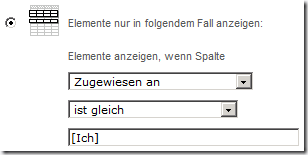
Developing solution with multiple languages (or a language which is not English) sometimes can be a bit painful. To configure a Webpart to display only my tasks, I would filter for [Me] or [Ich].
To achieve the same via code / CAML, you can filter by UserID and not the string “Me”.
1: <Where>2: <Eq>3: <FieldRef Name="AssignedTo" />4: <Value Type="Integer">5: <UserID />6: </Value>7: </Eq>8: </Where>9: <OrderBy>10: <FieldRef Name="Status" />11: <FieldRef Name="Priority" />12: </OrderBy>This is just a reminder for me, so I can find the information more quickly. But maybe this is useful for some of you as well 🙂
Events on SPListItems like ItemAdding or ItemAdded are nothing new. Many of you have already used them. Recently I had a requirement to create a new SPSite, when an item in a list has been created. So an ItemReceiver was my choice.
But the customer wants something special 🙂 During the creation process, which takes some seconds, the user should see a loading animation.
The Tools have been released for VS 2012. Great!
The CKS – Development Tools Edition for Visual Studio 2012 is a collection of Visual Studio templates, Server Explorer extensions and tools providing accelerated SharePoint 2010/2013 development based on Microsoft’s SharePoint 2010/2013 development tools.
The current 1.0 release includes the following features:
About the Community Kit for SharePoint
Finally! Now Available: Office Developer Tools for Visual Studio 2012
There are some points to mention, where the final release of the tools differ from previous preview releases:
The download link: http://aka.ms/OfficeDevToolsForVS2012
In diesem Jahre geht es rund mit Veranstaltungen. Nach der SharePoint Konferenz bin ich auch beim ShareCamp dabei und auf der ShareConf mit einem Vortrag dabei.
Mal schauen was noch so kommt 🙂
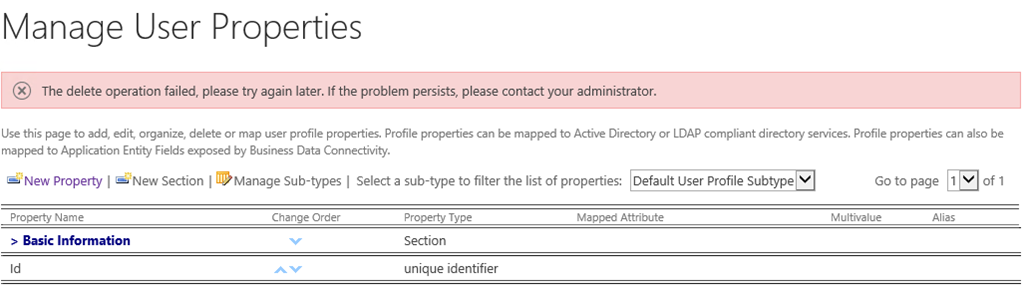
If you run into the problem that you can’t delete properties within the User Profile Service Application, an Exception like this will be shown:
To resolve the problem, grant “Full Control” permissions to the administrative Applicationpools group (WSS_WPG).
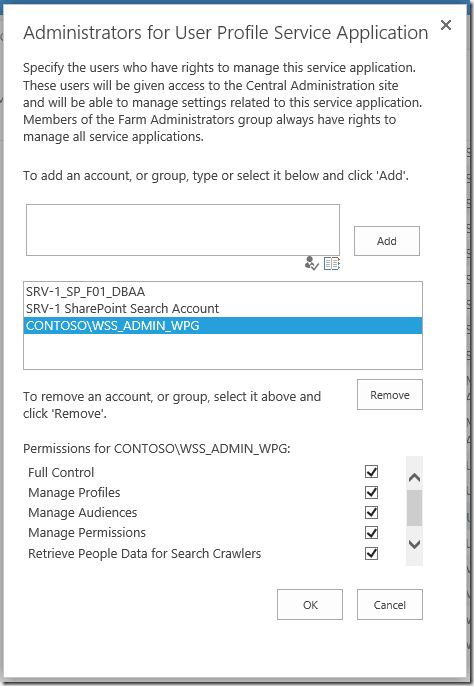
Now you should be able to delete properties again.