SharePoint

Widgets instead of Add-Ins/Apps?

The concept of Add-Ins (formally knows as Apps) in SharePoint puts logic as HTML and CSS to another page. This page is then rendered as iFrame to another SharePoint page. This approach has advantages and disadvantages. You have to decide yourself.

A very promising way to put stuff (or WebParts) onto a SharePoint page is the Widget Wrangler.

More information can be found on https://dev.office.com/blogs/introducing-widget-wrangler.

Conceptually Widget Wrangler implementation is based on similar thinking as PnP App Script Part implementation, which was released few years back as part of the PnP patterns (or at the time it was call App Model Samples). Advantages of this model is that you do not have deal with iFrame implementations and functionalities can be fully responsive, where needed. Also implementation of the capabilities is much simpler when your JavaScript is directly embedded to the page rendering logic without additional complexity.

Change in the User Resolution in SharePoint 2013 People Picker

After a SharePoint 2010 to SharePoint 2013 migration our users complained, that in the multiple Active Directory domain environment they havethe People Picker does not resolve the users the same way it did earlier. Only a subset of the users was resolved, users from a few domains were not included in the results at all.

Read more about it here.

Fix “Access Denied” on Registry and Filesystem

Today I installed the May CU on a SharePoint 2013 farm hosted in Azure. After the Installation was done (with a PowerShell script that disables some services to speed up the process), there were Exceptions opening the User Profile Service (UPS) settings page.

So I investigated the logs and found many entries about “Access Denied”. Some directly pointed to the registry hive “HKEY_LOCAL_MACHINE\SOFTWARE\Microsoft\Office Server\15.0” with the message Requested registry access is not allowed. or Getting Error Message for Exception System.Security.SecurityException: Requested registry access is not allowed., others about access to directories Access to the path ‘C:\Program Files\Microsoft Office Servers\15.0\Data\Office Server\CanonicalResources\ProjectionModels\EN_EN.mdl’ is denied.

Create the default groups via PowerShell

If your site is missing the three default groups “Visitors”, “Members” and “Owners”, you can create them easily with PowerShell or the Object Model.

Add-PSSnapin Microsoft.SharePoint.PowerShell

$web = Get-SPWeb https://your.site.url
if ($web.AssociatedVisitorGroup -eq $null) {
    Write-Host 'The Visitor Group does not exist. It will be created...' -ForegroundColor DarkYellow
    $currentLogin = $web.CurrentUser.LoginName

    if ($web.CurrentUser.IsSiteAdmin -eq $false){
        Write-Host ('The user '+$currentLogin+' needs to be a SiteCollection administrator, to create the default groups.') -ForegroundColor Red
        return
    }

    $web.CreateDefaultAssociatedGroups($currentLogin, $currentLogin, [System.String].Empty)
    Write-Host 'The default Groups have been created.' -ForegroundColor Green
} else {
    Write-Host 'The Visitor Group already exists.' -ForegroundColor Green
}


Update to the SharePoint Solution Deployer

A new version is out. If brings some great new extensions (two of them are from me 🙂 )

v5.0.4.6440 (2015-04-04)

  • New: All extensions added: Blocked file extensions, content type hub, custom crawl connector, features, logging configuration, managed metadata, re-ghost, search schema, secure store, site structure, CSOM extensions for files and 2013 workflows
  • Updated: SharePointVersions.xml
  • Updated: Typos in comments fixed and some code clean-up
  • First release based on GitHub repository

Grab your version from http://spsd.codeplex.com

Getting the PageTitle

Getting the PageTitle of a page should be just a property away would you think. I would call Page.Title to get the title of the current page.

Unfortunately Page.Title contains “\r\n           ” and the title of the page is in a new line, like this:

<title>
	
	RH Test

</title>

The property will only return the first row, which is not very helpful 🙁

So what can we do? Since the title is set through a control within a ContentPlacehoder, my way was to get the control and take the value from it. And… it worked. An extension method will traverse all controls, to find the desired one.

Updating the title within a SPItemEventReceiver with AfterProperties

Recently I had a problem setting the title field of a Page within the pages library. My requirement was to set the title with the value from the PageTitle field of the current item.

An ItemEventReceiver, which is executed synchronously to prevent save conflict exception or problems with published items, was supposed to do exactly that. But when I set the title property of the item via AfterProperties, the value did not get stored. I tried other fields, and they got written to the item just fine. After some trial-and-error and consulting the MSDN I found a solution.

Why I prefer WebApplication deployments over GAC deployments

This article is written with scope on SharePoint 2013. With SP 2013 the default TrustLevel in the web.config is set to “FullTrust”. On previous version the value is “WSS_Minimal”.

When you develop Farm-Solutions for SharePoint, you can deploy assemblies to the Global Assembly Cache (GAC) or configure the solution for a “bin-Deployment”.

The bin-way puts assemblies into the bin folder of the WebApplication, where the solution is deployed to.

You can switch the target of the assemblies by modifying the properties of a SharePoint project. The default value is GlobalAssemblyCache.

Migrate SharePoint Blog to WordPress

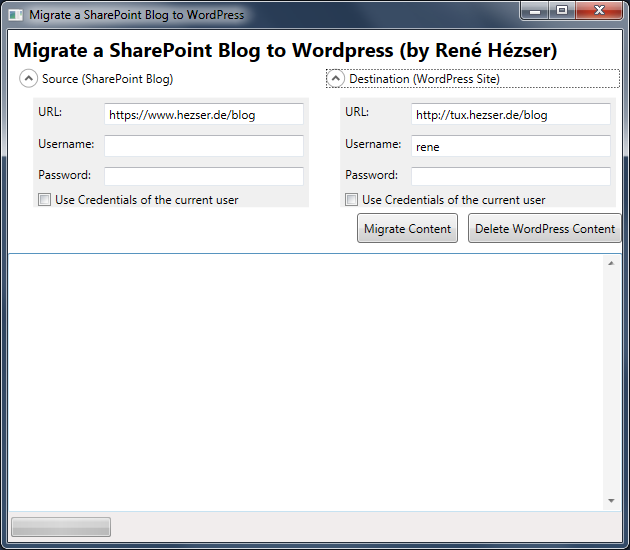
As promised here, this is a follow-up post with the tool I developed for the SharePoint to WordPress migration.

First, a screenshot:

Migrate SharePoint ot WordPress Screenshot

What is it, that we have to cover with a migration? Copying the posts is not enough. So I came up with this features:

Features

  • Copy posts
  • Copy comments
  • Copy resources like images and downloads
  • Create needed tags and categories
  • Modify links to local resource
  • deal with https, if links are absolute on the source blog and mixed with http
  • Using web services to connect to source and destination
  • URL rewriting (covered by a WordPress Plugin)
  • Delete all content from the destination blog (for migration testing)
  • Replace strings (with Regex)
  • a nice (WPF) GUI

Description

Originally I’ve build a plain console application. Then I thought that a console application would possibly scare some users. And after some time I wanted to do some WPF again. So I created a WPF application, to wrap all the functionality into a GUI. This way it will be easier to use for the folks out there, who do not like black console applications 😉 Since I am using web services to connect to both blogging platforms, the tool can be executed on any client computer. No access to a server session is required.

ChangePassword Webpart – new version available

The ChangePassword WebPart on CodePlex has been downloaded over 20.000 times. The new version has a couple of new features:

  • Easy Installation
  • SharePoint 2010 and 2013 (Foundation and Server)
  • Password strength indicator
  • Plugin support to extend functionality by custom code1
  • Warning if an unsecured connection is used
  • Copyright hint can be removed1
  • Auditing of password changes (and attempts)
  • Logging into the SharePoint logs

This is how it might look on your SharePoint:
ITaCS Password Changer
Documentation and downloads are available here.

Useful JavaScript to know when working with SharePoint Display Templates

This post has some really great examples for JavaScript helper methods and available properties for working with Display Templates in SharePoint 2013.

http://dotnetmafia.com/blogs/dotnettipoftheday/archive/2014/02/26/useful-javascript-for-working-with-sharepoint-display-templates-spc3000-spc14.aspx

If you ever had to decide if your script is running on a SharePoint Foundation, use this one:

// Determine if the host is SharePoint Foundation
if (!Srch.U.isSPFSKU()) { }

SharePoint App Deployment fails

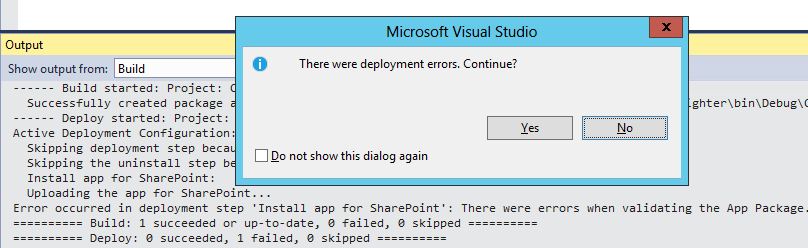
Visual Studio does not tell you much if an app deployment fails.

image

Fortunately SharePoint will log more information about the problem that occurred during the app deployment in the ULS-Log.

So if you run into the “There were deployment errors.” exception, take a look at the ULS-Log. In this particular case SharePoint didn’t like my JavaScript:

App Packaging: CreatePackage: Unexpected exception: There were errors when validating the App package: There were errors when validating the App Package. Other warnings / errors associated with this exception:  Custom action urls must start with "http:", "https:", "~appWebUrl" or "~remoteAppUrl".  The url "javascript:DoSomething();" is not in the right format.

The solution for warming up SharePoint

Most SharePoint Farms will have a solution for the long loading time after an Application Pool recycle or iisreset running. There are many different ways to preload websites, so your users have faster load times. So why another solution?

There are some questions, that I think have not been dealt with before:

  • Most solutions require some sort of Timer to be started (e.g. a Scheduled Task)
  • When should the warmup occur?
  • What about multiple WebFrontend Servers?
  • How about Claims support?
  • Which URLs have to be called? What about extended WebApplications?
  • New WebApplications require the warmup tool to be adjusted
  • Manuell warmup after Deployments
  • What about search?
  • Did the Farm warmup correctly?

Years ago I developed a console application, which warms up SharePoint by calling each Site within a SiteCollection. It has bee updated multiple times with new features.