How about using the available resources from SharePoint to translate some basic words and sentences? Well, it is quite easy to use the available resources. You need the Microsoft.SharePoint.Intl.dll and some lines of code to use the already translated resources:
// define yourself variables
private readonly CultureInfo _Cult;
private readonly Assembly _SharePoint_Intl_Assembly;
private readonly ResourceManager _SharePoint_RM;
private readonly ResourceManager _SharePoint_WebPartPage_RM;

// initialize them in your constructor
_SharePoint_Intl_Assembly = Assembly.Load("Microsoft.SharePoint.intl, Version=12.0.0.0, Culture=neutral, PublicKeyToken=71e9bce111e9429c");
_SharePoint_RM = new ResourceManager("Microsoft.SharePoint", _SharePoint_Intl_Assembly);
_SharePoint_WebPartPage_RM = new ResourceManager("Microsoft.SharePoint.WebPartPages.strings", _SharePoint_Intl_Assembly);

// get the current culture
internal static CultureInfo GetCultureInfo()
{
	CultureInfo newCultureInfo;
	try
	{
		uint localeID = SPContext.Current.RegionalSettings.LocaleId;
		newCultureInfo = new CultureInfo((int)localeID);
	}
	catch
	{
		newCultureInfo = new CultureInfo(1033);
	}
	return newCultureInfo;
}

// use the resources
string test = _SharePoint_RM.GetString("ExpireDateInPast", _Cult);
// will result in 'The Expire date is in the past.'
But how do you know how the resource name for your translated text might be? Your friend and helper is the Reflector. Open up the ‘Microsoft.SharePoint.Intl.dll’ from the ‘C:\WINDOWS\assembly\GAC_MSIL\Microsoft.SharePoint.intl\12.0.0.0__71e9bce111e9429__71e9bce111e9429c’ folder (navigate to that path with cmd.exe and copy the dll to some safe place like c:\temp).
Even if the Reporting Services are very powerfull, you might get to the point where you have to extend the building functionality. So why not write your own custom assembly with some additional code?
Create your assembly like this:
1: using System;<br> 2: using System.Security.Permissions;<br> 3: using Microsoft.SharePoint;<br> 4: <br> 5: public class MyNamespace<br> 6: {<br> 7: public class ReportingExtension<br> 8: {<br> 9: public ReportingExtension()<br> 10: {<br> 11: }<br> 12: <br> 13: public static string HelloWorld()<br> 14: {<br> 15: return "Hello World.";<br> 16: }<br> 17: <br> 18: [EnvironmentPermission(SecurityAction.Assert, Unrestricted = true)]<br> 19: [Microsoft.SharePoint.Security.SharePointPermission(SecurityAction.Assert, Unrestricted = true)]<br> 20: public static string getSomeListItem(string url, int itemID)<br> 21: {<br> 22: string returnvalue = string.Empty;<br> 23: try<br> 24: {<br> 25: using (SPSite site = new SPSite(url))<br> 26: using (SPWeb web = site.OpenWeb())<br> 27: {<br> 28: // do something<br> 29: returnvalue = "";<br> 30: }<br> 31: }<br> 32: catch (Exception ex)<br> 33: {<br> 34: return ex.ToString();<br> 35: }<br> 36: <br> 37: return returnvalue;<br> 38: }<br> 39: }<br> 40: }
The Reporting Services shipped with the Express Edition do not support all features. Unfortunately you can only access a local SQL instance. You can not use XML as Datasource, so no SharePoint Reporting 🙁
A list of supported and unsupported features can be found here.
Querying a XML Datasource
Query:
«/span>Query>
«/span>SoapAction>
http://ns.tld/MethodName</SoapAction>
«/span>Method
Namespace="
http://ns.tld/"
Name="
MethodName" />
«/span>ElementPath
IgnoreNamespaces="True">*</ElementPath>
</Query>
Passing Parameters
You only have to define your parameters in the parameter tab of your dataset. They are passed automatically to the Webservice Method. If you want to define your parameter yourself and not use a Reporting Services Parameter, just type
You can do Reporting on SharePoint Lists with SQL Server Reporting Services 2005 quite easy.
- Configure the Datasource with integrated Security
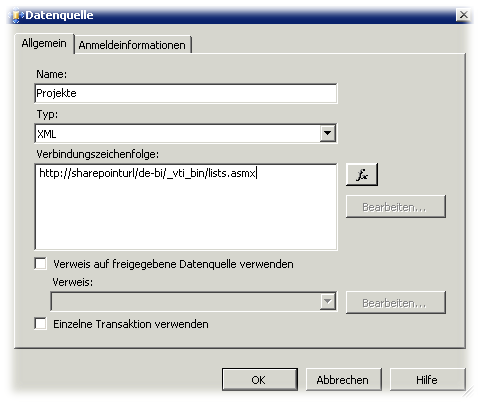
-
Define a query like
</div>

<Query>
<SoapAction>http://schemas.microsoft.com/sharepoint/soap/GetListItems</SoapAction>
<Method Namespace="http://schemas.microsoft.com/sharepoint/soap/" Name="GetListItems">
<Parameters>
<Parameter Name="listName">
<DefaultValue>SharePoint List Name</DefaultValue>
</Parameter>
</Parameters>
</Method>
<ElementPath IgnoreNamespaces="True">*</ElementPath>
</Query>
- Hit the “Field Refresh” Button to get the Field from your SharePoint List

- Drag your Fields in the Report
- Use the Code to eliminate “ID;#” and “
”,"
" from your Fields
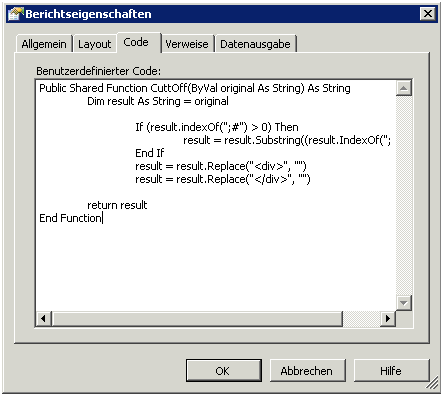
Use “=Code.CuttOff(Fields!ows_LinkTitle.Value)” in your Report to display your Fields
Mit diesem Diagramm möchte ich die Begriffe Web(site), Sitecollection und Webapplikation verdeutlichen.
<p>
  <strong>Name</strong>
</p></td>

<td style="padding-left:7px;padding-right:7px;border-top:solid #9bbb59 1.0pt;border-left:none;border-bottom:solid #9bbb59 2.25pt;border-right:solid #9bbb59 1.0pt">
  <p>
    <strong>Gemeint ist</strong>
  </p>
</td>

<td style="padding-left:7px;padding-right:7px;border-top:solid #9bbb59 1.0pt;border-left:none;border-bottom:solid #9bbb59 2.25pt;border-right:solid #9bbb59 1.0pt">
  <p>
    <strong>Objektmodell</strong>
  </p>
</td>
|
<p>
  <strong>Web</strong>
</p></td>

<td style="padding-left:7px;padding-right:7px;border-top:none;border-left:none;border-bottom:solid #9bbb59 1.0pt;border-right:solid #9bbb59 1.0pt">
  <p>
    Website
  </p>
</td>

<td style="padding-left:7px;padding-right:7px;border-top:none;border-left:none;border-bottom:solid #9bbb59 1.0pt;border-right:solid #9bbb59 1.0pt">
  <p>
    SPWeb
  </p>
</td>
|
<p>
  <strong>Webseite</strong>
</p></td>

<td style="padding-left:7px;padding-right:7px;border-top:none;border-left:none;border-bottom:solid #9bbb59 1.0pt;border-right:solid #9bbb59 1.0pt">
  <p>
    Website
  </p>
</td>

<td style="padding-left:7px;padding-right:7px;border-top:none;border-left:none;border-bottom:solid #9bbb59 1.0pt;border-right:solid #9bbb59 1.0pt">
  <p>
    SPWeb
  </p>
</td>
|
<p>
  <strong>Seite</strong>
</p></td>

<td style="padding-left:7px;padding-right:7px;border-top:none;border-left:none;border-bottom:solid #9bbb59 1.0pt;border-right:solid #9bbb59 1.0pt">
  <p>
    Website
  </p>
</td>

<td style="padding-left:7px;padding-right:7px;border-top:none;border-left:none;border-bottom:solid #9bbb59 1.0pt;border-right:solid #9bbb59 1.0pt">
  <p>
    SPWeb
  </p>
</td>
|
<p>
  <strong>Site</strong>
</p></td>

<td style="padding-left:7px;padding-right:7px;border-top:none;border-left:none;border-bottom:solid #9bbb59 1.0pt;border-right:solid #9bbb59 1.0pt">
  <p>
    Sitecollection
  </p>
</td>

<td style="padding-left:7px;padding-right:7px;border-top:none;border-left:none;border-bottom:solid #9bbb59 1.0pt;border-right:solid #9bbb59 1.0pt">
  <p>
    SPSite
  </p>
</td>
|
<p>
  <strong>Webseitensammlung</strong>
</p></td>

<td style="padding-left:7px;padding-right:7px;border-top:none;border-left:none;border-bottom:solid #9bbb59 1.0pt;border-right:solid #9bbb59 1.0pt">
  <p>
    Sitecollection
  </p>
</td>

<td style="padding-left:7px;padding-right:7px;border-top:none;border-left:none;border-bottom:solid #9bbb59 1.0pt;border-right:solid #9bbb59 1.0pt">
  <p>
    SPSite
  </p>
</td>
|
<p>
  <strong>Virtueller Server</strong>
</p></td>

<td style="padding-left:7px;padding-right:7px;border-top:none;border-left:none;border-bottom:solid #9bbb59 1.0pt;border-right:solid #9bbb59 1.0pt">
  <p>
    Webapplikation
  </p>
</td>

<td style="padding-left:7px;padding-right:7px;border-top:none;border-left:none;border-bottom:solid #9bbb59 1.0pt;border-right:solid #9bbb59 1.0pt">
  <p>
    SPVirtualServer
  </p>
</td>
|