
Modify blog post categories
If you plan to use the CKS:EBE (Enhanced Blog Edition), you might want to update the categories of your posts, because the EBE supports multiple categories for a post.
I’ve created a Windows Forms Application, which will help you with this task.
Features:
- Update categories for blog posts
- Select multiple categories
- Remove categories from blog post
- Add categories to the categories list
-
Modify the blog posts, without changing the modified date
-
- Add categories to the categories list
- Remove categories from blog post
- Select multiple categories
Is the current user anonymous?
If you want to find out if the current visitor is anonymous or logged on, you can use the context to get that information.
bool anonymous = Context.User.Identity.IsAuthenticated == false;
If you just go for SPWeb.Current.Web.CurrentUser, you will get logged on automatically to retrieve the current user.
Upload documents/pictures to a discussion lists
You might already know my Wiki Webpart, which allows you to upload pictures and documents to a Wiki while editing it.
What is it?
With this Solution you can upload images and documents from the new/edit form into existing picture/document libraries. After the file has been uploaded, a link will be inserted into the Body.
This is either a or a tag, depending on the uploaded file.
How does it work?
Anonymous access and elevated privileges
Accessing a SharePoint site or web with elevated privileges can be achieved in two ways. By passing a SPUserToken or with RunWithElevatedPrivileges.
string currentWebUrl = SPContext.Current.Web.Url; SPSite _siteElevated;SPSecurity.RunWithElevatedPrivileges(delegate { _siteElevated = new SPSite(currentWebUrl); });
_siteElevated = new SPSite(currentWebUrl, SPContext.Current.Site.SystemAccount.UserToken);
<p>
  As anonymous visitor you will not be able to access SPContext.Current.Site.SytemAccount.UserToken. So use SPSecurity to get elevated objects if you have anonymous access enabled.
</p>
SPQuery, ViewFields and empty fields
If you want your query to return empty columns, you have to add Nullable=’TRUE’ to the viewfields.
If you do not add the Nullable attribute, accessing the results of the query like this:
oListItemAvailable[“Field1”] will give an Exception.
I’ve made posted a comment about this on the page in the MSDN http://msdn.microsoft.com/en-us/library/microsoft.sharepoint.spquery.viewfields.aspx
Cancel the activation of a SPFeature
If you have ever created a SPFeatureReceiver class, you might have noticed, that there is no “FeatureActivating”. So what do you do to cancel an activation of your feature?
Just throw an exception within FeatureActivated. This will cancel the activation process, and not activate the feature.
throw new SPException(“The feature could not be activated.");
Supported field types as source for Lookup Fields
Lookup fields are great. They can show information from other lists. I have never noticed before, that the only two supported field types for lookups are SPFieldText and SPFieldCalculated.
All other field types can not be used as source for lookup fields.
Webpart to show Sitecollections/Subwebs
This Webpart will show Sitecollections from the current Webapplication or Subwebs from the current web.
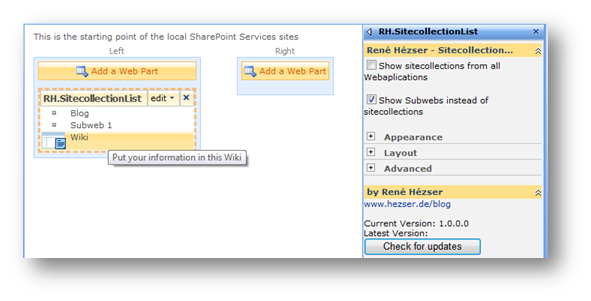
In the Webpart properties you can choose what the Webpart will show.
It uses the Logo URL of websites, if they are specified. The description of the website will show up as tooltip.
I am using the RepeatedControls class to build the items. This class really makes it easy to add entries by moving the layout functionality into an own class.
How-To create a JavaScript tooltip / popup
 If you want to create a tooltip to show additional information, you can use the SharePoint functionality to do so. E.g. on a list of websites you could show the website’s description, if the user moves the mouse over the element.
The JavaScript which will show the “Open Menu” text is “MMU_PopMenuIfShowing(this);”. It is referenced on all SharePoint sites through the call to Init.js in the header.
Updated MyAlerts Webpart
Great Sourcecontrol
Are you looking for a Sourcecontrol for your projects? Well, I was. Here is where I ended up: SourceGear Vault. It will store the your sourcecode in a SQL table, use the IIS for access, and brings along a client and Visual Studio integration. What could you want more?
And the best of it, it is free!
Quote:
Somebody said that Vault is free for a single user. Is this true? Yes. Both Fortress and Vault are free for use by a single user. Simply install the product and do not enter any serial numbers at all. When no serial numbers are present, Fortress and Vault behave as if there is exactly one user license. Note that this free license does not apply when the product is used by more than one person. If you have two people who need to use Vault, you will need to purchase two initial licenses. If you enter a serial number containing only one license, then the product will still have exactly one license present.
Programmatically creating a SPFieldCalculated
As you might already know, you can create new fields with SPFieldCollection.AddFieldAsXml(string schema). The schema contains the formula for the calculated field. There are some points to take care of, before you can add the field:
- make sure your referenced fieldnames are the display names and not the internal field names
- the formula has to be in the English format
Changing the fieldnames is an easy task. If you read the schema from a field and want to create a new one with the same formula, you will get something like “=if(fieldA,1,2)”.
Wiki Webpart 2.0
The next generation Wiki Webpart is there! Sounds good J The (stupid) name remains, but the core has changed.
What is it?
With the Wiki Webpart you can upload images and documents from a Wiki edit page into existing picture/document libraries. After the file has been uploaded, a link will be inserted into the Wiki Content.
This is either a or a tag, depending on the uploaded file.
TagCloud Webpart
Categorizing posts with keywords is not new. There are solutions which create a new column for your blog, where you can define categories.
 My Webpart will look in your posts for Technorati links. Many posts are tagged with Technorati links, so that you can look for a tag, and find posts on many blogs for this tag.
You can create Technorati links with the Live Writer, if you want to blog with it.
Picture Library and Exif data
As Jeremy Sublett wrote in his post Getting Date Information From Photos in SharePoint it would be great if SharePoint would respect the Exif data from a picture uploaded to a picture library. So I took his solution as starting point to wrap this functionality into a feature, which can be configured for each picture library.
So what does it do?
The “Date Picture Taken” value will be used from the Exif data of a picture after it has been uploaded.