
SPQuery with lookup columns returns no data
An SPQuery for lookup columns should be easy. Start the famous U2U Caml Editor, configure your query, and query the list.
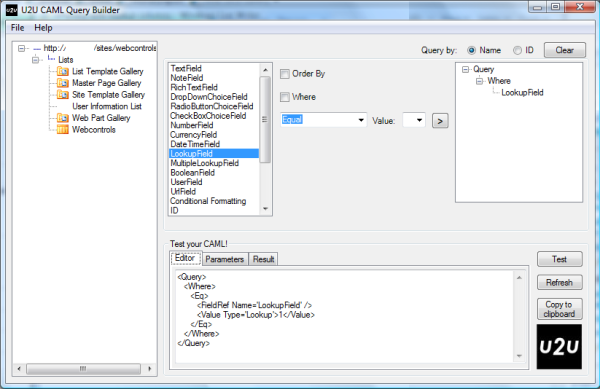
This query will get a result if the lookup column stores something like “1;#1”. But if its value is e.g. “1;#Title”, the query will not return an item.
So what can we do about it?
Add a LookupId=’TRUE’ to your query, so it will look like this:
SharePointConsole Updated
My SharePointConsole has some new commands.
If you don’t know it, it is a command line utility which allows you to perform some common tasks. Currently the theese commands are implemented:
- EnumContentTypes
- CreateContentType
- RenameContentType
- DeleteContentType
- DeleteAllListItems
- ShowInNewForm
- ShowInEditForm
- ShowInDisplayForm
- DeleteAllVersions
- RecycleAllVersions
- SetTitleWithFilename
- SetSearchCenterUrl
- SystemUpdate
- FeatureManager
- EmptyRecycleBin
 Download the SharePointConsole
Navigation for Wikis
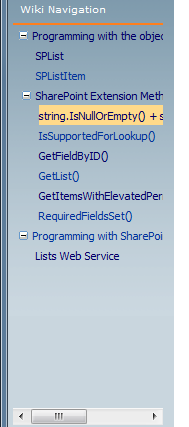
The Wiki functionality SharePoint offers is great for quickly writing down stuff. It is often used for Server documentation.
Creating new pages is easy, and you can link pages. The ability to format the text is nothing fancy, but most of the time enough 🙂
Uploading images can be done with my custom field type, which stores images and documents in existing libraries. After the upload, a link is inserted into the Wiki body. –> Custom Field – Upload Files and Images
Updated SDK
Microsoft has released a new version of the SharePoint SDK. Go and grab it 🙂
So what is new in the release?
WSS
- Expanded documentation of backup and restore features
- Complete documentation of Microsoft.SharePoint.Administration.Backup
- New documentation of the administrative object model
- Revised Web Part documentation
- More migration support
- Expanded and updated reference documentation
MOSS
- Custom Federated Search Web Part with a Credentials UI
- Federated Search SQL Server Connector
- Federated Search HTML to RSS Connector
- Federated Search Virtual Earth Map Connector
How To get the default page from a website
This post is a follow up for my post “ Get default page Url”.
When you access an SPWeb through a URL in your browser, you will be redirected to the default page like home.aspx.
Each SPWeb has a RootFolder. And this SPFolder has a property “WelcomePage”. This property stores the relative path to the default page like “wiki pages/home.aspx”.
1: SPContext.Current.Web.RootFolder.WelcomePage Summary: Common Coding Issues
The Best Practice MSDN page has some interesting hints to generate better code. In this post I write about some point of that article, provide samples and fix bugs which are in the MSDN article.
Caching
You should only cache thread safe objects. What’s that?
This means, that you should only cache objects, which can not be changed from the outside of your code. An itemCollection (as list.Items) is changed, if another user adds an item. But if you cache a DataTable which you can get from an itemCollection with list.Items.GetDataTable() it will not be changed later on, and can be cached.
Incompatible Web Part markup detected
For months the Webpart could be installed through a solution/feature without any problems. Then I had to change something in the code. When I tried to upgrade the solution to see the changes, the Webpart could not be added to a page anymore.
The assembly is deployed to the GAC through the solution. It has been upgraded.
Looking at the xml file in my solution did not show any errors. It looks fine.
SPWeb/SPSite.Dispose()
By now most of you should know that there is a SharePoint Diagnostics Tool. This really is a great tool, since it scans your assemblies for memory leaks.
You should also know, that there is an occasion you can create a memory leak which the tool will not recognize.
1: using (var site = new SPSite(“http://yoururl”))
<span class=lnum> 2: </span>{3: SPWeb web = null;
<span class=lnum> 4: </span> <span class=kwrd>try</span>
5: {
<span class=lnum> 6: </span> web = site.OpenWeb();
7: // do something with this web
<span class=lnum> 8: </span> <span class=rem>// ...</span>
9: // done. don't need it anymore. but i need another web
<span class=lnum> 10: </span> web = site.AllWebs[<span class=str>"webname"</span>];
11: }
<span class=lnum> 12: </span> <span class=kwrd>finally</span>
13: {
<span class=lnum> 14: </span> <span class=kwrd>if</span> (web != <span class=kwrd>null</span>) web.Dispose();
15: }
<span class=lnum> 16: </span>}
The SPWeb from line 6 will not be disposed in line 14, because in line 10 we assign another SPWeb to the web!
Issues in WSS V2
Responses to items in an Issue list (SPListIssue) are new version in WSS V3. WSS V2 lacks the ability to use versions for lists. So what did Microsoft do that an Issue list behaves like it is using versions?
In WSS V2 items in a single “thread” all have different ItemIDs. To group them together, all have the same IssueID. This is the ItemID from the original item.
A single issue in WSS V2 could look like this:
Custom Field – Upload Files and Images
If you know my WikiWebpart or DiscussionListUploader, you know that there are some occasions where you want to upload a file, and place a link to it to another field.
The above solutions are only for the certain list type.
My new custom field can be used on every list or library!
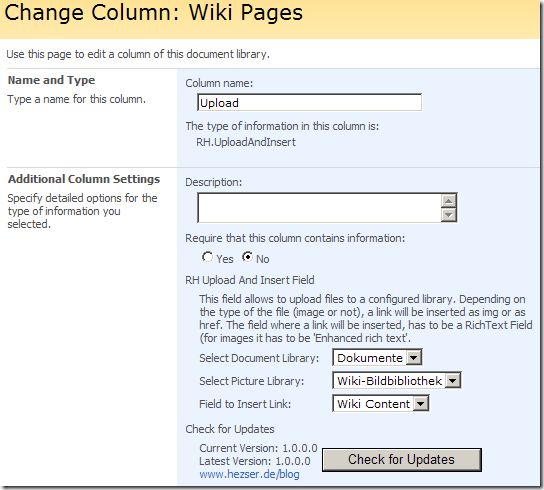
Just add the field to one of your lists/libraries:
How to use the SharePoint Web Controls – Update
My post How to use the SharePoint Web Controls has been updated.
It now shows how to use a generic control for each SPField, instead of picking the corresponding SharePoint Web Control.
1: BaseFieldControl webControl = field.FieldRenderingControl;
<span class=lnum> 2: </span>webControl.ListId = list.ID;
3: webControl.ItemId = item.ID;
<span class=lnum> 4: </span>webControl.FieldName = field.Title;
5: webControl.ID = GetControlID(field);
<span class=lnum> 6: </span>webControl.ControlMode = mode;
Thanks for all the great comments and ideas!
SharePoint Dispose Checker Tool
As I posted earlier, MS was working on a tool which will analyze your code if you are coding against SharePoint.
Here is a short description:
It provides assistance in correctly disposing of certain SharePoint objects to help you follow published best practice. This tool may not show all memory leaks in your code. Further investigation is advised if you continue to experience issues.
SPDisposeCheck.exe takes the path to a managed .DLL or .EXE or the path to a directory containing many managed assemblies. It will recursively search for and analyze each managed module attempting to detect coding patterns based on the MDSN article.
SharePoint Web Controls to access remote content
In my post How to use the SharePoint Web Controls I talked about using the SharePoint Web Controls to show and edit data in SharePoint lists.
Today I want to post a sample how to work on a list, which is in another web. The remote list will be the “User Information List” which exists on every rootWeb.
1: // connect to the rootweb, to read the users list
Coding with SharePoint? Things you should not do
Often there are multiple ways to get what you want. E.g. if you want to get a listitem, you could user list.GetItemById() or list.Items[x].
sowmyancs has posted an excellent article about performance for certain tasks –> Best Practices: SharePoint Object Model for Performance Tuning
Visual Studio 2008 extensions for SharePoint v1.3
As you can read on the Microsoft SharePoint Team Blog, a new version of the Visual Studio extensions have been released. This version is Community Technology Preview. And wow… yes… finally… x64 support!
The download is available here.
The final release of VSeWSS 1.3 is planned for the North American Spring of 2009.