
Update to “Upload Files and Images” field type
I’ve fixed a bug with my [Custom Field – Upload Files and Images][1].
[1]: “Custom Field – Upload Files and Images”
I’ve fixed a bug with my [Custom Field – Upload Files and Images][1].
[1]: “Custom Field – Upload Files and Images”
Jacob Reimers has written an C# API for accessing Google Analytics data.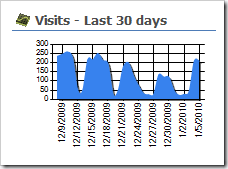
When I saw his post, I thought it would be great to fetch the latest data every day, and write it to a SharePoint list. Then you can use the data, without querying Google for every request.
You could then use the ChartPart for SharePoint to generate nice charts from your Google Analytics data.
Fabian hat es auf seinem Blog schon geschrieben. Deshalb werde ich auch über unser Projekt bloggen.
Zusammen schreiben wir ein Buch zum Thema Anwendungsentwicklung mit SharePoint 2010. Das Buch richtet sich an Entwickler, Anwender und Administratoren und hat das Ziel, Wege aufzuzeigen, mit denen Unternehmenslösungen mit SharePoint 2010 realisiert werden können.
It took me some time to find the solution to a problem, where a WPF application could not connect to a local SharePoint farm via SPFarm.Local. It always returned null.
Windows 7 was not the problem. I copied my application to a Windows Server 2008 VM to test.
In case somebody has the same problem, here is the solution:
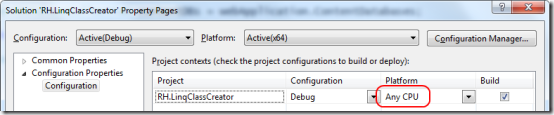
Make sure you have set the Platform to “Any CPU” and not x86 if you are using x64 assemblies.
Roger Lamb has posted an article about SharePoint objects, which must not be disposed. He also wrote about changes to SP 2010 regarding disposing objects.
More on his blog: http://blogs.msdn.com/rogerla/archive/2009/11/30/sharepoint-2007-2010-do-not-dispose-guidance-spdisposecheck.aspx
Tim Heuer has written 7 posts about Silverlight development. So if you haven’t started with Silverlight but plan to, have a look at his post series.
Today I’ve created a CodePlex project for some of my SharePoint developments. Interesting to see what I’ve done so far 🙂
The link is http://renehezser.codeplex.com/
Webparts
Custom Fields
Features
Control Adapter
Event Handler
Tools
Writing a Windows Service is very easy. Deploying it with a Setup is an easy task as well.
But be careful what option you set for the failure behavior!
In my case I installed the service with “Windows Installer XML (WiX) toolset”.

Do not use critical as ErrorControl value. It will force a reboot of the server, if the services fails to start.
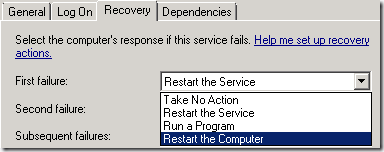
Fortunately booting with “Last known good configuration” worked for me and I could uninstall the service…
With this code you can get the central administration webapplication.
1: private static SPWebApplication GetCentralAdministrationWebApplication()
<span class=lnum> 2: </span>{ 3: SPWebService cS = SPWebService.ContentService;
<span class=lnum> 4: </span> var service = cS.Farm.Services.GetValue<SPWebService>(<span class=str>"WSS_Administration"</span>);
5: SPWebApplicationCollection webApplications = service.WebApplications;
<span class=lnum> 6: </span> <span class=kwrd>foreach</span> (SPWebApplication webApplication <span class=kwrd>in</span> webApplications)
7: {
<span class=lnum> 8: </span> <span class=kwrd>return</span> webApplication;
9: }
<span class=lnum> 10: </span> <span class=kwrd>return</span> <span class=kwrd>null</span>;
11: } If you have a better way, let me know 🙂
An ASP.NET Controls has a ClientID property. SharePoint Controls inherit from the ASP.NET Controls. The property will give you the ID, the rendered control will have in the HTML source. There is one thing to remember:
The ClientID is valid only, if the control has been added to the Controls of the Page!
| ID **before** adding the control | ID **after** adding the control | FilterButton | **ctl00\_m\_Webpart1_**FilterButton |
So if you need the ClientID e.g. to pass it to a JavaScript to be able to find the control, make sure you grab the ClientID after the control has been added to the Page.
Carsten Keutmann has released a new version of his great WSPBuilder. Here are the new features:
The download (incl. source code) is available on CodePlex: Download WSPBuilder
Inserted links are now relative.
Go to the original post for more information and the download link.
The out-of-the-box WSS navigation offers one level of navigation. The navigation elements can be configured in the site settings.
There is a way to make it have multi level navigation, as MOSS does, by changing the DataSource. But this “hack” is not flexible, as you can not reorder the item within the navigation menu.
While I was reading the post How to create your own Cascading Navigation using the ASPMenu control, the decision was made to build a custom navigation which supports multiple navigation levels.
Back from vacation. 1 week with an offline version of feeds is hard. So I read the postings I got closely 🙂 One post I do want to bring your attention to, is about SharePoint Controls.
My post about using the SharePoint Controls shows how to use the controls you see in forms (TextField, NumberField, LookupField…).
There are plenty of SharePoint controls, which you can use. Robin Meure has written a post “re-using SharePoint controls”. The controls in his post are: