
Update: WarmupScript
A long time ago, I posted a program which will hit all your sites. With parameters you can specify to hit all sites within a sitecollection.
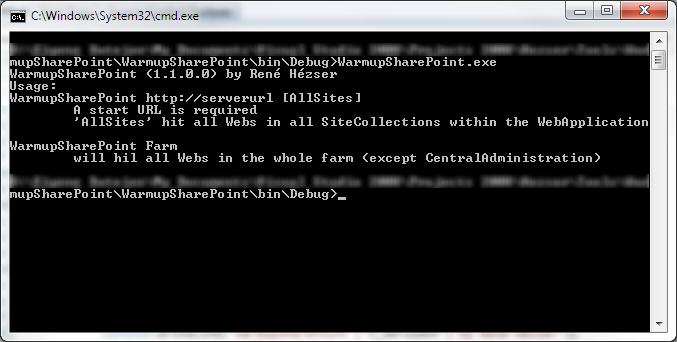
This program has been updated. You can not omit a start Url, and specify “Farm” as parameter. This way, all sites in all sitecollections in all webapplications in all… 🙂 will be warmed up.
The warmup will use a HttpRequest to query all homepages. It will not hit every page in the pages libraries, but hitting each web is sufficient for most scenarios.
What to know about the feature folder
One of the first things I used to tell guys new to SharePoint development is: Never ever name the folder of your feature “Feature1”. If you create a solution with WSPBuilder, or did some time ago with VS 2008, you have to rename the folders immediately!
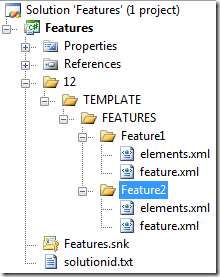
This is how a typical SharePoint project looks like, if you create features. I guess most of us have used the mighty WSPBuilder (
http://wspbuilder.codeplex.com) for developing with SharePoint.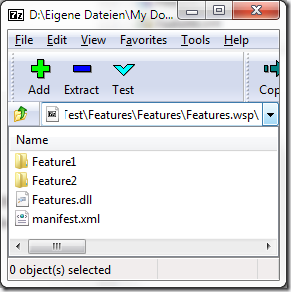
SPUrlUtility.CombinePath
Here is another “watch out” for using the SharePoint object model.
SPUrlUtility.CombineUrl(web.Url, string.Empty)
The line above will throw an exception, as CombinUrl doesn’t like empty strings. 🙂
StaticName != InternalName
Recently I was trying to fetch a SPField from a SPWeb object. I had SharePoint 2010, so I decided to use the new SPFieldCollection.TryGetFieldByStaticName() Method.
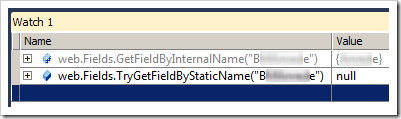
You can imagine how surprised I was, that I couldn’t get the field I was looking for. What do we learn? Well, the StaticName of an SPField is not necessarily the InternalName!
Here is a link to the MSDN about SPField.StaticName: http://msdn.microsoft.com/en-us/library/microsoft.sharepoint.spfield.staticname.aspx
Watch out for ContentTypeBindings
If you don’t know ContentTypeBindings, take a short look at: http://msdn.microsoft.com/en-us/library/aa543598.aspx
“Content type binding enables you to provision a content type on a list defined in the onet.xml schema.”
So we can assign content types to newly created lists. That’s cool 🙂 The ContentTypeBinding feature can, of coarse, contain multiple content types which are bound to multiple lists. Like this:
<Elements xmlns="http://schemas.microsoft.com/sharepoint/">
   <ContentTypeBinding
      ContentTypeId="0x0100yourGuid"
      ListUrl="Pages" />
   <ContentTypeBinding
      ContentTypeId="0x0100anotherGuid"
      ListUrl="Pages" />
   <ContentTypeBinding
      ContentTypeId="0x0100yetAnotherGuid"
      ListUrl="Lists/YourList" />
</Elements>
There is however, a limitation! Do not configure more then one ContentTypeBinding feature for a newly created page! You will get a save conflict Exception, when you provision a new web.
Check, if you are within a modal dialog
By now, you probably know that the modal framework from SharePoint 2010 is a great thing 🙂
In case you need to find out if the context is within a modal dialog, you can query for the URL parameter “IsDlg”.
if (Page.Request["IsDlg"] != null)
{
   // within a modal dialog
}
else
{
   // not within a modal dialog
}
Empty Admin Recycle Bin items
What is it?
Usually the size of the recycle bin is not relevant. But on development machines, you don’t want lots of files in there, which make your databases grow without actually used data.
What do you do? Go to the recycle bin, click on “Site Collection Recycle Bin”. The two stages of the recycle bin can be managed independently.
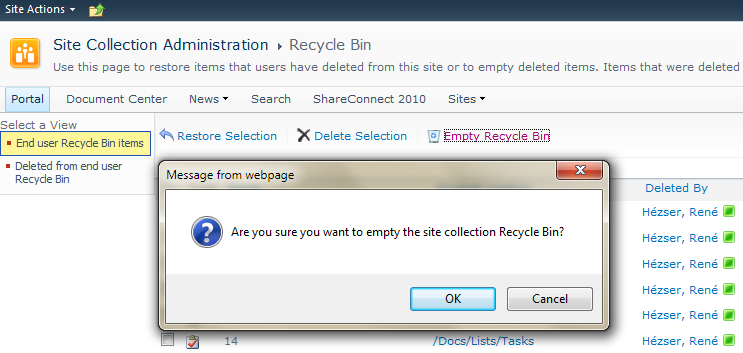
The two views on the left let you switch between the first- and second stage. All items from the first stage can be moved to the second stage with one click (+ 1 confirmation). But if the items are in the second stage, you can only delete 200 items at a time by selecting all and delete them in batches. An option to delete all items is missing (in the GUI).
Update to SharePointMasterpage Tool
I’ve updated my tool to set the masterpage on SharePoint webs and subwebs to the same masterpage.
PortalSiteMapProvider.GetCachedListItemsByQuery
With MOSS 2007 or SharePoint Server 2010 you can use the PoraltSiteMapProvider of the Microsoft.SharePoint.Publishing.dll assembly to retrieve cached listitems.
<span style="color:#606060" id=lnum1> 1:</span> PortalSiteMapProvider ps = PortalSiteMapProvider.WebSiteMapProvider;
<span style="color:#606060" id=lnum2> 2:</span> var pNode = ps.FindSiteMapNode(web.ServerRelativeUrl) as PortalWebSiteMapNode;
<span style="color:#606060" id=lnum3> 3:</span> var query = new SPQuery
<span style="color:#606060" id=lnum4> 4:</span> {
<span style="color:#606060" id=lnum5> 5:</span> Query = "<Where><Neq><FieldRef Name='ID' /><Value Type='Counter'>0</Value></Neq></Where>"
<span style="color:#606060" id=lnum6> 6:</span> };
<span style="color:#606060" id=lnum7> 7:</span> SiteMapNodeCollection quoteItems = ps.GetCachedListItemsByQuery(pNode, "Top Seiten", query, web);In my case, I didn’t need any special where clause. I wanted to retrieve all items, so I left the Query property empty. And because I needed only three columns, I specified the ViewFields property of the SPQuery object.
CKS:EBE 3.0-Enhanced Blog Edition 3.0
Like many other blogs running SharePoint, my blog uses the EBE to add more functionality to the default SharePoint blog.
And since I am one of the developers of the EBE 3.0, I’m glad that we announce the release of the next release. Version 3 brings along many new features and improvements of already implemented features.
New Features
*Ability to theme wiki pages
*Ability to export post to PDF
*Localization (French, Spanish)
*Technorati Links from post categories
*Ability to bookmark post with Twitter
*Centralized Theming – Ability to create a theme library at the root and allow sub blog sites to use the common theme library.
*The ability to add an XML feed control
*Logging of pingbacks and trackback errors to SharePoint Logs directory
*Support of feature stapling
*Preliminary SharePoint 2010 Beta 3 compatible (with web.config edits)
*EBE caching and performance validation
*Performance increases for page loads less than <3 sec
Note: Some features are specific to certain themes
SPListItem.GetItemByUniqueId
Did you know you can fetch an item by its UniqueId even if it is in the recycle bin?
You can even update its data while it is already recycled. I wonder if there is a scenario, where you would want to modify an already recycled ListItem…
SharePoint 2010 SDK
The Microsoft SharePoint 2010 Software Development Kit (SDK) contains conceptual overviews, programming tasks, samples, and references to guide you in developing solutions based on SharePoint 2010 products and technologies.
You can grab it here: http://www.microsoft.com/downloads/details.aspx?displaylang=en&FamilyID=f0c9daf3-4c54-45ed-9bde-7b4d83a8f26f
The download contains the SDK for SPF and SPS. No need to download two separate files anymore.
The SharePoint Developer Center can be found here: http://msdn.microsoft.com/en-us/sharepoint/default.aspx
The IWebPartField Interface versus the ASP.NET Lifecycle
A Webpart receives a filter value through the IWebPartField interface. The example over at MSDN was simple and clean. So I adopted the code to my Webpart.
A common scenario would be to create controls based on the received filter value. E.g. query a list for the passed filter value, and display the item from the query.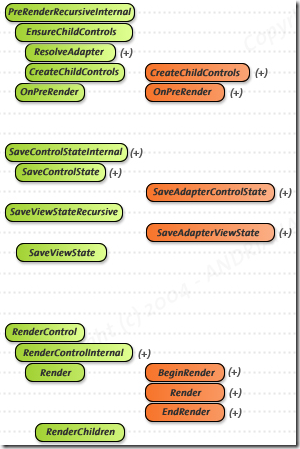
Problem
From the ASP.NET Lifecycle we know how to deal with controls. Create them in CreateChildControls, assign values in OnPreRender and let them being rendered in RenderContents. Now we have a problem. The passed value in our Webpart is not available at any place, where we can still add controls to the page. If we try to do in RenderContens, they are not shown. It’s too late.
Modify Overwrite Policy for an EventLog created by an EventLogInstaller
Developing a Windows Service is a common task. Creating an EventLog for this service also is a common practice. The EventLog can be created with a ServiceInstaller (a class which inherits from System.Configuration.Install.Installer).
This is how an Eventlog can be added during the installation with a custom Installer class:
public Installer()
   {
      Installers.Add(new EventLogInstaller
               {
                  Source = "EventLogSource",
                  Log = "EventLogName"
               });
The EventLogInstaller class does not allow to set the overwrite mode.
Visual Studio 2010 RC
I’ve just seen that the RC is available via MSDN.
Silverlight 4 is not supported in the RC it says in the notes. Have to try SharePoint Development against the Beta 2…