Azure

Deploy ARM template to a specific region

Introduction

The Azure Resource Manager uses management endpoints to receive requests. This service is resilient and deployed to all regions and offers control plane operations, which are sent to management.azure.com. Talking to any endpoint is fine and you do not need to use a region-specific URL if you deploy to Azure with ARM, Bicep or Terraform.

In case you want to send a request to a region, this post shows you how you can do this.

Renew AWS SessionToken and store values in Azure KeyVault

Why do you need this?

Using temporary session tokens sounds like a good way to e.g. import data from S3 in Azure Data Factory, like it is described here Copy data from Amazon Simple Storage Service (S3) – Azure Data Factory | Microsoft Docs. Azure Data Factory can use secrets stored in Azure KeyVault for authentication (see here Store credentials in Azure Key Vault – Azure Data Factory | Microsoft Docs).

Properties for IoT Messages in Azure Stream Analytics

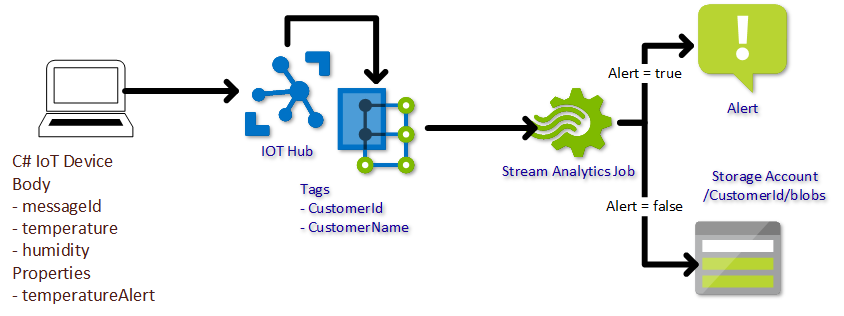
In this post I want to show how to use properties that are added to messages that IoT devices are sending to Azure IoT Hub in Stream Analytics. And while talking about properties, let’s even use message enrichment 🙂

Stream Analytics Architecture

Sample Message

The green properties will be added by the Message enrichment feature of IoT Hub, as the data is not most likely not known on the IoT device or does not need to be transferred with each message.

Configure Azure IoT Edge for downstream devices

A lot of documentation and posts are available to setup an Azure IoT Edge to act as an IoT Hub for downstream devices. In order to get it up and running in a dev environment, I had to do some more research.

My setup is a RaspberryPi 3 with Raspbian stretch and an Azure IoT DevKit which looks like this. And please remember the setup I used is for development only. I’ve used symmetric key authentication for the IoT Device. In a production scenario you would probably use certificate based authentication and no self signed certificates for the TLS encryption.

Azure SQL with AAD authentication

I though this had to be an easy task. Well, actually it is. If you find the right documentation and read it in the correct order 🙂

Basically I wanted to be able to login with my AAD (Azure Active Directory) user.

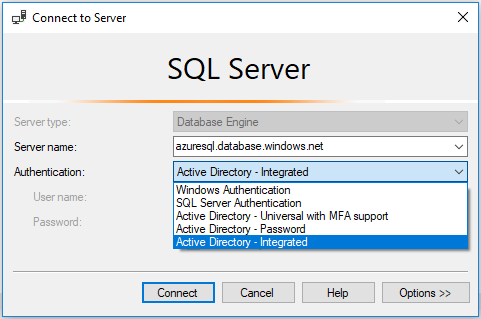
In the first step, the database needs to be configured for Azure Active Directory in order to add users in the second step.

Azure Table Storage REST Api not returning data

Today I wanted to query entities of an Azure Table via REST Api and did not get any results.

Looking over the query over and over again did not solve the problem. Sometimes I did not get any items back.

The “sometimes” depended on the query. I checked each part. Partition Key, string and date columns. Everything looked all right. And then it hit me.

I did not get a result, if there was too much data. Specifying the $top option to 1000 will always return data.

No Default Subscription?

Set-AzureWebsite : No default subscription has been designated. Use Select-AzureSubscription -Default to set the default subscription.

*doh* Again I’ve used PowerShell comandlets for Azure classic instead of Resource Manager 🙁

Reminder: Always check for the magic “Rm” chars in the command, if a resource cannot be found.

Azure Meetup OWL

Nicht vergessen. Morgen findet das Azure Meetup zum Thema Build, Test und Deployment mit Azure in Bielefeld statt.

Meetup #2 – Build, Test und Deployment mit Azure

<p style="margin:5px 0;font-size:16px">
  Wednesday, Oct 11, 2017, 7:00 PM
</p>

<p style="margin: 0 0 5px;">
  <span style="font-size:14px">Arvato Bielefeld / Sennestadt</span><br /><span style="font-size:12px;">Fuggerstraße 11 Bielefeld, DE</span>
</p>

<p>
  <span style="color:#4F8A10;font-size:16px;">17 Mitglieder Went</span>
</p>

<div style="margin:5px 0 10px" class="mu_clearfix">
  <div class="photo">
    <img src="https://secure.meetupstatic.com/photos/member/8/e/6/b/thumb_268416459.jpeg" />
  </div>
  
  <div class="photo">
    <img src="https://secure.meetupstatic.com/photos/member/d/1/a/2/thumb_271253666.jpeg" />
  </div>
  
  <div class="photo">
    <img src="https://secure.meetupstatic.com/photos/member/d/8/f/a/thumb_268735546.jpeg" />
  </div>
  
  <div class="photo">
    <img src="https://secure.meetupstatic.com/photos/member/d/2/5/a/thumb_271253850.jpeg" />
  </div>
  
  <div class="photo">
    <img src="https://secure.meetupstatic.com/photos/member/5/d/3/9/thumb_271223865.jpeg" />
  </div>
  
  <div class="photo">
    <img src="https://secure.meetupstatic.com/photos/member/4/a/c/0/thumb_271399136.jpeg" />
  </div>
  
  <div class="photo">
    <img src="https://secure.meetupstatic.com/photos/member/2/a/e/d/thumb_267190989.jpeg" />
  </div>
  
  <div class="photo">
    <img src="https://secure.meetupstatic.com/photos/member/c/1/7/9/thumb_263269529.jpeg" />
  </div>
  
  <div class="photo">
    <img src="https://secure.meetupstatic.com/photos/member/e/7/a/6/thumb_250559302.jpeg" />
  </div>
  
  <div class="photo">
    <img src="https://secure.meetupstatic.com/photos/member/a/b/e/8/thumb_270884008.jpeg" />
  </div></p>
</div>

<p style="line-height:16px">
  Liebe Azure OWL Community,am[masked] wird unser zweites Azure OWL Meetup durchgeführt.Diesmal soll es hauptsächlich um Build, Test und Deployment auf der Azure Platform gehen.Tyler von Microsoft wird uns einen Vortrag zu Build, Test und Deployment vorstellen und speziell auf Delivery Pipelines mit Docker, Kubernetes und Vistual Studio Team&#8230;
</p></p>

Check out this Meetup →

HowTo use Azure cmdlets in Azure Schedule

A Runbook schedule can be triggered every hour. If you need a smaller interval, like every minute, you can use the Azure Scheduler to do so.
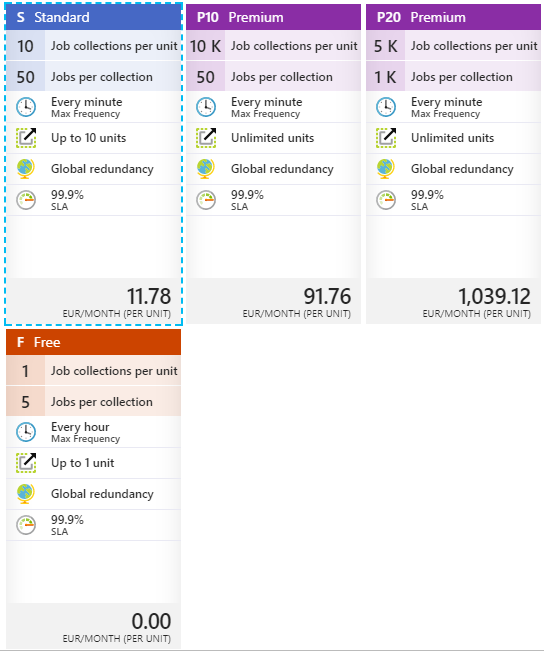
So I went to the Azure Portal, created an Azure Schedule instance (with a job collection tier of at least basic, to be able to create schedules that are triggered every minute) and called a Runbook via webhook.
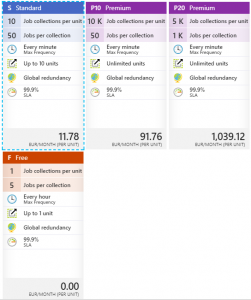
The Runbook contains a cmdlet that results in an error 🙁
Get-AzureRmMetric : The term 'Get-AzureRmMetric' is not recognized as the name of a cmdlet, function, script file, or<br /> operable program. Check the spelling of the name, or if a path was included, verify that the path is correct and try<br /> again.
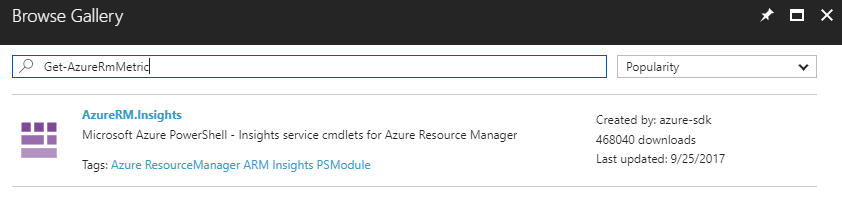
Azure cmdlets can be made available through the Automation Account the Runbook is using. The “Browse Gallery” link will let you find and choose the necessary cmdlets.
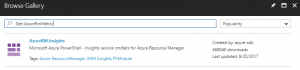
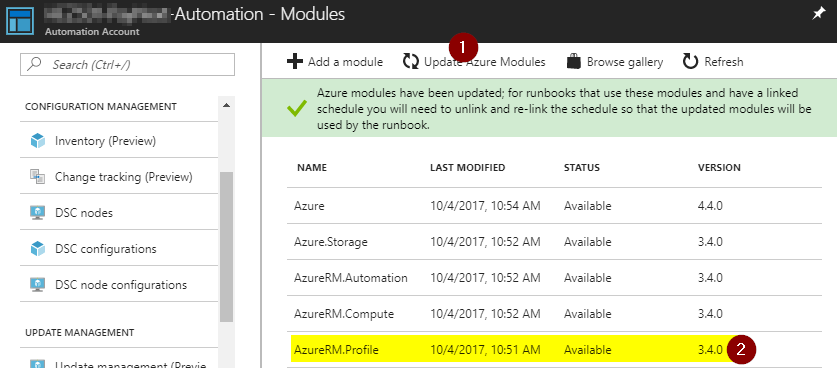
The error message above appears, because a) the cmdlet was not installed and b) the referenced version of AzureRM.profile was to old. Fortunately the problem can be resolved easily by upgrading the Azure modules.
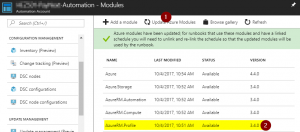
After all modules are up to date, I could add the desired module and my runbook wasn’t complaining anymore 🙂

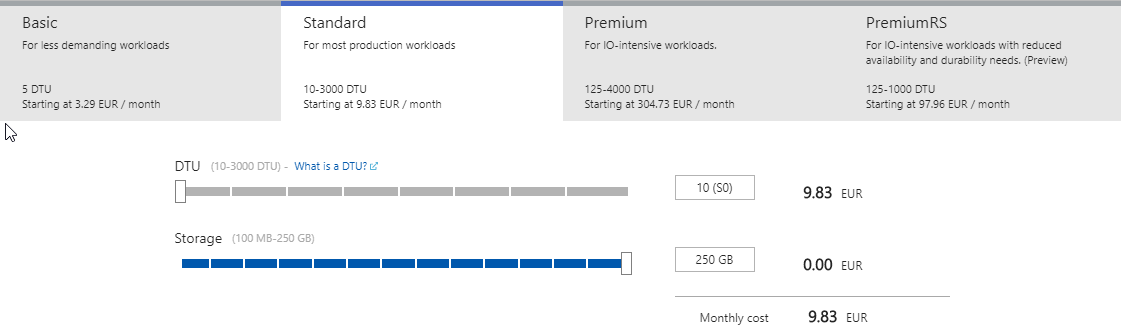
Azure SQL – Standard Tier IDs

In case you need the ServiceObjectiveId for SQL standard tiers, here is the list for you.

Tier name ServiceObjectiveId
Standard (S0) f1173c43-91bd-4aaa-973c-54e79e15235b
Standard (S1) 1b1ebd4d-d903-4baa-97f9-4ea675f5e928
Standard (S2) 455330e1-00cd-488b-b5fa-177c226f28b7
Standard (S3) 789681b8-ca10-4eb0-bdf2-e0b050601b40
Standard (S4) 3cf14e1a-0a5d-408c-bbc7-f63c5282f735
Standard (S6) ab69b4e3-d7cc-4aa5-87a6-f8b50615a03c
Standard (S7) b6ca0894-d2f0-4e40-99f5-0f8a93cc2437
Standard (S9) 0efa88e9-99ff-4e36-a148-8c4b20c0826c
Standard (S12 98100e8b-2f8a-4a81-9eb5-4d1e675c5a29

Usually you could change the tier within the Azure Portal. To change them via PowerShell, you can use the above IDs.

Connection Problems to a Secure Service Fabric Cluster

To be able to connect to a secure Service Fabric Cluster via PowerShell, you need to import the certificate specified into your personal certificate store. Otherwise an Exception will be thrown. Unfortunately the Exception does not point into the right direction 🙁

So in case you get an Exception like this

Connect-ServiceFabricCluster : An error occurred during this operation. Please check the trace logs for more details.
At line:1 char:1
+ Connect-ServiceFabricCluster -ConnectionEndpoint xyz-sf-de …
+ ~~~~~~~~~~~~~~~~~~~~~~~~~~~~~~~~~~~~~~~~~~~~~~~~~~~~~~~~~~~~~~~~~~~~~
+ CategoryInfo : InvalidOperation: (:) [Connect-ServiceFabricCluster], FabricException
+ FullyQualifiedErrorId : CreateClusterConnectionErrorId,Microsoft.ServiceFabric.Powershell.ConnectCluster

Azure Meetup OWL

Am 13.7. wird das erste Treffen des Azure Meetups OWL stattfinden. Wir sind derzeit noch auf der Suche nach einem Ort und den Themen 🙂
Vermutlich wird es um Chatbots und Machine Learning gehen. Wir werden aber auch auf euer Feedback eingehen um Themen für die nächsten Treffen zu finden.

Wenn ihr dabei sein möchtet, meldet euch bitte über die Meetup Seite an.

Update:

Ort: Arvato Systems, An der Autobahn 100, Gütersloh, Tower I