Das neue Jahre bringt neue Aufgaben

Nach fast 8 Jahren bei der Firma Net at Work, startet für mich ein neues Kapitel. Auch auf diesem Wege möchte ich mich noch einmal bei allen Kollegen und Kunden für die Zusammenarbeit bedanken.

Ab heute hat es mich beruflich nach Berlin verschlagen. Dort habe ich bei der ITaCS angedockt. Ich freue mich auf neue Projekte und Herausforderungen.

Ach ja. Ich wünsche allen Lesern ein Frohes Neues Jahr!
Update: WarmupScript

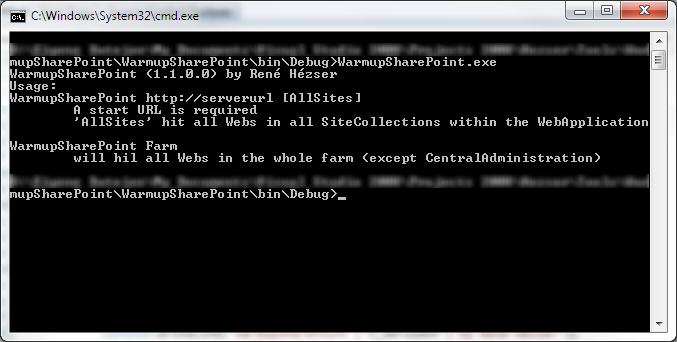
A long time ago, I posted a program which will hit all your sites. With parameters you can specify to hit all sites within a sitecollection.

image

This program has been updated. You can not omit a start Url, and specify “Farm” as parameter. This way, all sites in all sitecollections in all webapplications in all… 🙂 will be warmed up.

The warmup will use a HttpRequest to query all homepages. It will not hit every page in the pages libraries, but hitting each web is sufficient for most scenarios.

What to know about the feature folder

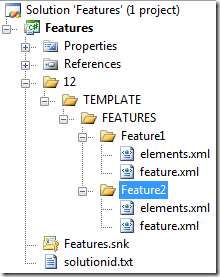
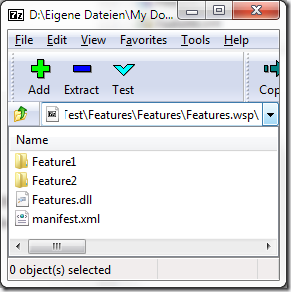
One of the first things I used to tell guys new to SharePoint development is: Never ever name the folder of your feature “Feature1”. If you create a solution with WSPBuilder, or did some time ago with VS 2008, you have to rename the folders immediately!

image

This is how a typical SharePoint project looks like, if you create features. I guess most of us have used the mighty WSPBuilder ( http://wspbuilder.codeplex.com) for developing with SharePoint.image

Use Powershell ISE for SharePoint 2010

To be able to use the ISE for SharePoint, you can configure it to load the SharePoint cmdlets automatically.

Scot Hillier wrote a great article about it. Read “Setting up PowerShell ISE for SharePoint 2010”.

If you only want to use the SharePoint cmdlets once, you can register them with this two lines:

If ((Get-PSSnapIn -Name Microsoft.SharePoint.PowerShell -ErrorAction SilentlyContinue) -eq $null )
{ Add-PSSnapIn -Name Microsoft.SharePoint.PowerShell }

SharePoint 2010 and HTML5

“v5.master” is a simple HTML5 master page designed for SharePoint 2010. It makes good use of the amazing new features of both HTML5 and CSS3, including CSS3 media queries. The master page is extremely simplistic in nature, and is truly meant to serve as a framework for building your own SharePoint 2010 customizations.

Here comes some good news for SharePoint and HTML 5. If you want to build your masterpage for HTML 5, you can: http://kyleschaeffer.com/sharepoint/v5-responsive-html5-master-page/

SPUrlUtility.CombinePath

Here is another “watch out” for using the SharePoint object model.

SPUrlUtility.CombineUrl(web.Url, string.Empty)

The line above will throw an exception, as CombinUrl doesn’t like empty strings. 🙂

Updates for SharePoint 2010 Products, changed update strategy!

The latest updates can be found on this technet website: http://technet.microsoft.com/en-us/sharepoint/ff800847

I was looking for the August 2011 updates. They are not released yet. But I found an interesting text on the page:

The packaging of cumulative updates changed as of August 31, 2011. The following packages are provided for cumulative updates:

  • SharePoint Foundation 2010
  • SharePoint Foundation 2010 + SharePoint Server 2010
  • SharePoint Foundation 2010 + SharePoint Server 2010 + Project Server 2010

As a result of the new packaging, it is no longer necessary to install the SharePoint Foundation cumulative update and then install the SharePoint Server cumulative update.

Mastering your Hyper-V R2 Core Server

If you like – and use – Hyper-V is out of scope of this post. So let’s assume you have a Hyper-V core installation, as it is free and works great 🙂

Microsoft® Hyper-V™ Server 2008 R2 is a stand-alone hyper-visor based virtualization product which includes Live migration.

Download: http://www.microsoft.com/download/en/details.aspx?displaylang=en&id=3512 (about 1GB)

OK. That was the marketing part.

Many people have great respect for a server, which has no GUI. At least not the way we know “Windows Servers”.

StaticName != InternalName

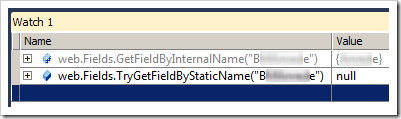
Recently I was trying to fetch a SPField from a SPWeb object. I had SharePoint 2010, so I decided to use the new SPFieldCollection.TryGetFieldByStaticName() Method.

image

You can imagine how surprised I was, that I couldn’t get the field I was looking for. What do we learn? Well, the StaticName of an SPField is not necessarily the InternalName!

Here is a link to the MSDN about SPField.StaticName: http://msdn.microsoft.com/en-us/library/microsoft.sharepoint.spfield.staticname.aspx

Watch out for ContentTypeBindings

If you don’t know ContentTypeBindings, take a short look at: http://msdn.microsoft.com/en-us/library/aa543598.aspx

“Content type binding enables you to provision a content type on a list defined in the onet.xml schema.”

So we can assign content types to newly created lists. That’s cool 🙂  The ContentTypeBinding feature can, of coarse, contain multiple content types which are bound to multiple lists. Like this:

<Elements xmlns="http://schemas.microsoft.com/sharepoint/">
   <ContentTypeBinding 
      ContentTypeId="0x0100yourGuid" 
      ListUrl="Pages" />
   <ContentTypeBinding 
      ContentTypeId="0x0100anotherGuid" 
      ListUrl="Pages" />
   <ContentTypeBinding 
      ContentTypeId="0x0100yetAnotherGuid" 
      ListUrl="Lists/YourList" />
</Elements>

There is however, a limitation! Do not configure more then one ContentTypeBinding feature for a newly created page! You will get a save conflict Exception, when you provision a new web.

Availability

You might have noticed, that my website has been offline for a few days.

The telephone line has been cut last week. It has not been activated at our new house, as planed. Today the line was switched on, an the blog is available again 🙂

Searchscope contains no elements

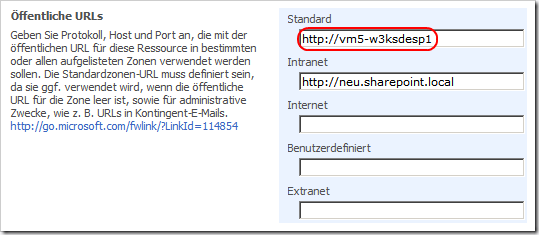
With Alternate Access Mappings you add more URLs to a SharePoint webapplication.

image

If you plan to use an alternate URL, you should use only the default URL in rules for a search scope. Otherwise the scope will not contain any items.