.NET goes OpenSource!

Das sind doch mal hervorragende Neuigkeiten!

Microsoft hat im Rahmen seiner Online-Konferenz connect(); am Mittwoch bekannt gegeben, dass das komplette .NET Framework zukünftig als Open-Source-Software unter der MIT-Lizenz stehen wird.

Quelle: http://www.heise.de/newsticker/meldung/Microsoft-NET-wird-komplett-Open-Source-2452033.html

Das freut mich als Entwickler natürlich sehr. Dann können meine PI’s bald noch mehr durch Mono 🙂

Bisher wird per USB/RS232 der Stromzähler über die Infrarot-Schnittstelle ausgelesen 😉
Why I prefer WebApplication deployments over GAC deployments

This article is written with scope on SharePoint 2013. With SP 2013 the default TrustLevel in the web.config is set to “FullTrust”. On previous version the value is “WSS_Minimal”.

When you develop Farm-Solutions for SharePoint, you can deploy assemblies to the Global Assembly Cache (GAC) or configure the solution for a “bin-Deployment”.

The bin-way puts assemblies into the bin folder of the WebApplication, where the solution is deployed to.

You can switch the target of the assemblies by modifying the properties of a SharePoint project. The default value is GlobalAssemblyCache.

Custom field and UpdateFieldValueInItem()

Recently I was developing a custom field. To store modified values, the UpdateFieldValueInItem method has to be overwritten.

In a normal way of clicking the submit/save button, the method is called and I can adjust the value for the field within the current item. The changes are submitted to the database later.

But what if you want to modify items outside of the current item? Sure, you can do so would you think. But you’ll need to consider the scenario that the user does not click submit/save. The method is called on every postback. The PeoplePicker will cause a postback, when it validates its values. There might be other controls as well, which behave this way.

Creating a lookup field via elements.xml

This is another post to help me remember. And as a reference for all of you, who cannot remember how to create a SPFieldLookup via XML.

<Field ID="{8b26ec41-b6c3-4327-0066-0c18c0768626}" Name="InternalName" StaticName="InternalName" DisplayName="Display Name" Type="Lookup" ShowField="Title" Mult="TRUE" List="Lists/LookupList" Overwrite="TRUE" />

When you provision a SPField via features, do not forget to add Overwrite=”TRUE”! Otherwise you’ll get an exception like this:

0x8107058aFehler beim Binden des Inhaltstyps ‘0x010200C7A18EB120BB4A00892E9E1EE9481C9B0067E475B6FDD54048B347370871443CAD’ an die Liste ‘/sites/rhtest/Lists/LookupList’ für ‘http://rhdevsp2013/sites/rhtest’. Ausnahme ‘0x80070057’.

Unfortunately the MSDN is not very specific about the Overwrite property:

What is Dependency Injection?

This post will help you understand what DI (Dependency Injection) is, and how easy you can adopt the design patterns to create flexible and testable code. For a definition take a look at this Wikipedia article.

From the three types of Dependency Injection

  • constructor injection
  • setter injection
  • interface injection

this post covers the interface type.

The example will deal with a SharePoint list. This list can either be the posts list of a blog, or the comments list. The distinction is necessary, as both lists have different fields, which might be used for querying data later.

Migrate SharePoint Blog to WordPress

As promised here, this is a follow-up post with the tool I developed for the SharePoint to WordPress migration.

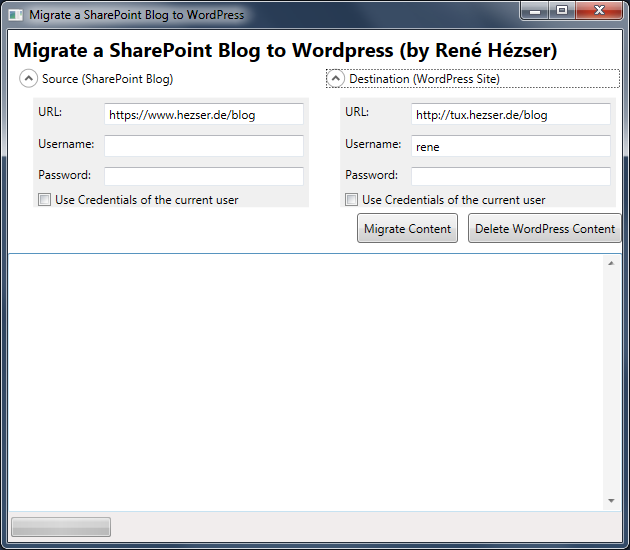
First, a screenshot:

Migrate SharePoint ot WordPress Screenshot

What is it, that we have to cover with a migration? Copying the posts is not enough. So I came up with this features:

Features

  • Copy posts
  • Copy comments
  • Copy resources like images and downloads
  • Create needed tags and categories
  • Modify links to local resource
  • deal with https, if links are absolute on the source blog and mixed with http
  • Using web services to connect to source and destination
  • URL rewriting (covered by a WordPress Plugin)
  • Delete all content from the destination blog (for migration testing)
  • Replace strings (with Regex)
  • a nice (WPF) GUI

Description

Originally I’ve build a plain console application. Then I thought that a console application would possibly scare some users. And after some time I wanted to do some WPF again. So I created a WPF application, to wrap all the functionality into a GUI. This way it will be easier to use for the folks out there, who do not like black console applications 😉 Since I am using web services to connect to both blogging platforms, the tool can be executed on any client computer. No access to a server session is required.

ChangePassword Webpart – new version available

The ChangePassword WebPart on CodePlex has been downloaded over 20.000 times. The new version has a couple of new features:

  • Easy Installation
  • SharePoint 2010 and 2013 (Foundation and Server)
  • Password strength indicator
  • Plugin support to extend functionality by custom code1
  • Warning if an unsecured connection is used
  • Copyright hint can be removed1
  • Auditing of password changes (and attempts)
  • Logging into the SharePoint logs

This is how it might look on your SharePoint:
ITaCS Password Changer
Documentation and downloads are available here.

A new home for this blog

After many years of SharePoint as blogging platform, I decided to move to WordPress. There are several reasons for the decision.

One would be that I want to get rid of my server at home.

Another is SharePoint and its blogging capabilities. As you probably know, I’ve worked on the CKS:EBE (Community Kit for SharePoint – Enhanced Blog Edition) blogging extension for SharePoint blogs some years ago. It is awesome to see that the default blog can be extended to such an extend. I’ve even made it compatible with SharePoint 2013. WordPress offers far more functionality with so many Plugins and Themes available.

TFS Migration from On-Premise to Visual Studio Online

Having a server at home that hosts a TFS is nice. But really necessary? Not really. So I decided to move all my sources to Visual Studio Online.

Visual Studio Online Basic is free for the first 5 users. That’s enough for me.

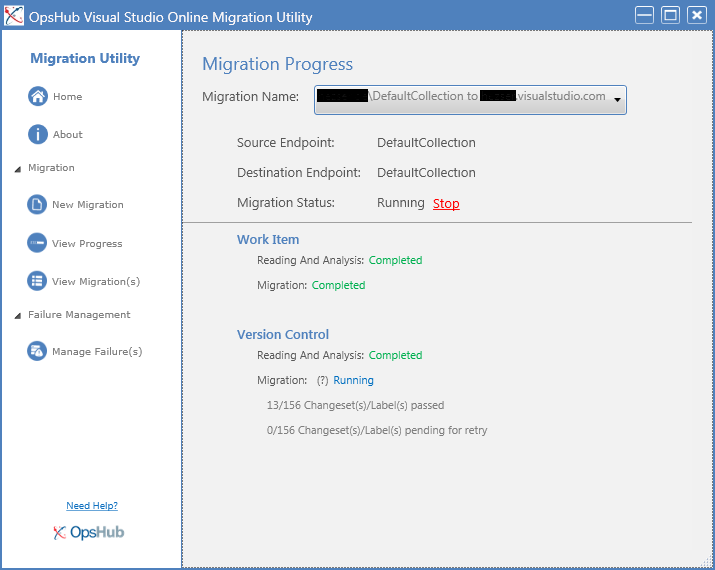
The migration process is straight forward easy with a tool that is installed on my computer. The process is described here. Another post can be found here.

image

During the pre migration steps a user mapping is performed, connections verified and a few other things. The process itself takes some time. I have 32MB in 4680 files and it took about half an hour. Another service on my server that isn’t needed anymore 🙂

Using TLS with SmtpClient

A rather small change to your code can increase security by sending E-Mails via an encrypted connection.

Recently I stumbled across code, that send E-Mails with the System.Net.Mail.SmtpClient class. That piece of code did not try to communicated encrypted with the receiving SMTP server. So I changed that, to enable a TLS connection.

try
{
  var message = new MailMessage();
  _smtpClient.EnableSsl = true;
  _smtpClient.Send(message);
}
catch (SmtpException ex)
{
  // if the recpient mailserver does not support SSL, send without encryption
  _smtpClient.EnableSsl = false;
  _smtpClient.Send(message);
}

The change in my code was to enable TLS be default, and turn it off in case the receiving SMTP server does not support it. Everything else is untouched, which results in a small change in code to increase security.

Useful JavaScript to know when working with SharePoint Display Templates

This post has some really great examples for JavaScript helper methods and available properties for working with Display Templates in SharePoint 2013.

http://dotnetmafia.com/blogs/dotnettipoftheday/archive/2014/02/26/useful-javascript-for-working-with-sharepoint-display-templates-spc3000-spc14.aspx

If you ever had to decide if your script is running on a SharePoint Foundation, use this one:

// Determine if the host is SharePoint Foundation
if (!Srch.U.isSPFSKU()) { }

SharePoint App Deployment fails

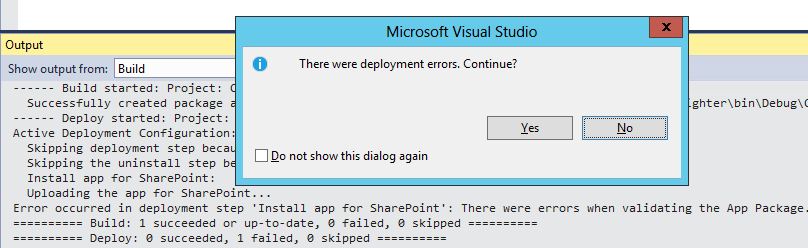
Visual Studio does not tell you much if an app deployment fails.

image

Fortunately SharePoint will log more information about the problem that occurred during the app deployment in the ULS-Log.

So if you run into the “There were deployment errors.” exception, take a look at the ULS-Log. In this particular case SharePoint didn’t like my JavaScript:

App Packaging: CreatePackage: Unexpected exception: There were errors when validating the App package: There were errors when validating the App Package. Other warnings / errors associated with this exception:  Custom action urls must start with "http:", "https:", "~appWebUrl" or "~remoteAppUrl".  The url "javascript:DoSomething();" is not in the right format.

The solution for warming up SharePoint

Most SharePoint Farms will have a solution for the long loading time after an Application Pool recycle or iisreset running. There are many different ways to preload websites, so your users have faster load times. So why another solution?

There are some questions, that I think have not been dealt with before:

  • Most solutions require some sort of Timer to be started (e.g. a Scheduled Task)
  • When should the warmup occur?
  • What about multiple WebFrontend Servers?
  • How about Claims support?
  • Which URLs have to be called? What about extended WebApplications?
  • New WebApplications require the warmup tool to be adjusted
  • Manuell warmup after Deployments
  • What about search?
  • Did the Farm warmup correctly?

Years ago I developed a console application, which warms up SharePoint by calling each Site within a SiteCollection. It has bee updated multiple times with new features.