Resitor values for blinking Christmas Tree

I bought a DIY blinking Christimas Tree. Unfortunately it did not contain any assembly instructions 🙁

So I looked for the part number CTR-30B, which is printed on both parts of the tree. I found a couple of instructions. After I soldered the tree, I saw that the colors were not evenly bright. I adjusted the values of the resitors and want to share the values.

R2: 330
R4: 560
R6: 2k
Upload files to NodeMCU from Windows Bash

Uploading files to a NodeMCU ESP8266 can be done with the Java tool ESPlorer. If you want to automate this process, you’ll want to use something else.

A quick research brought up NodeMCU-Uploader, which is a python script. On my Windows machine, I’ve got the bash installed. Naturally I want to use it 🙂

Fortunately the bash allows access to the COM ports. You have to modify the permissions for the device though.

No Default Subscription?

Set-AzureWebsite : No default subscription has been designated. Use Select-AzureSubscription -Default to set the default subscription.

*doh* Again I’ve used PowerShell comandlets for Azure classic instead of Resource Manager 🙁

Reminder: Always check for the magic “Rm” chars in the command, if a resource cannot be found.

Azure Meetup OWL

Nicht vergessen. Morgen findet das Azure Meetup zum Thema Build, Test und Deployment mit Azure in Bielefeld statt.

Meetup #2 – Build, Test und Deployment mit Azure

<p style="margin:5px 0;font-size:16px">
  Wednesday, Oct 11, 2017, 7:00 PM
</p>

<p style="margin: 0 0 5px;">
  <span style="font-size:14px">Arvato Bielefeld / Sennestadt</span><br /><span style="font-size:12px;">Fuggerstraße 11 Bielefeld, DE</span>
</p>

<p>
  <span style="color:#4F8A10;font-size:16px;">17 Mitglieder Went</span>
</p>

<div style="margin:5px 0 10px" class="mu_clearfix">
  <div class="photo">
    <img src="https://secure.meetupstatic.com/photos/member/8/e/6/b/thumb_268416459.jpeg" />
  </div>
  
  <div class="photo">
    <img src="https://secure.meetupstatic.com/photos/member/d/1/a/2/thumb_271253666.jpeg" />
  </div>
  
  <div class="photo">
    <img src="https://secure.meetupstatic.com/photos/member/d/8/f/a/thumb_268735546.jpeg" />
  </div>
  
  <div class="photo">
    <img src="https://secure.meetupstatic.com/photos/member/d/2/5/a/thumb_271253850.jpeg" />
  </div>
  
  <div class="photo">
    <img src="https://secure.meetupstatic.com/photos/member/5/d/3/9/thumb_271223865.jpeg" />
  </div>
  
  <div class="photo">
    <img src="https://secure.meetupstatic.com/photos/member/4/a/c/0/thumb_271399136.jpeg" />
  </div>
  
  <div class="photo">
    <img src="https://secure.meetupstatic.com/photos/member/2/a/e/d/thumb_267190989.jpeg" />
  </div>
  
  <div class="photo">
    <img src="https://secure.meetupstatic.com/photos/member/c/1/7/9/thumb_263269529.jpeg" />
  </div>
  
  <div class="photo">
    <img src="https://secure.meetupstatic.com/photos/member/e/7/a/6/thumb_250559302.jpeg" />
  </div>
  
  <div class="photo">
    <img src="https://secure.meetupstatic.com/photos/member/a/b/e/8/thumb_270884008.jpeg" />
  </div></p>
</div>

<p style="line-height:16px">
  Liebe Azure OWL Community,am[masked] wird unser zweites Azure OWL Meetup durchgeführt.Diesmal soll es hauptsächlich um Build, Test und Deployment auf der Azure Platform gehen.Tyler von Microsoft wird uns einen Vortrag zu Build, Test und Deployment vorstellen und speziell auf Delivery Pipelines mit Docker, Kubernetes und Vistual Studio Team&#8230;
</p></p>

Check out this Meetup →

HowTo use Azure cmdlets in Azure Schedule

A Runbook schedule can be triggered every hour. If you need a smaller interval, like every minute, you can use the Azure Scheduler to do so.
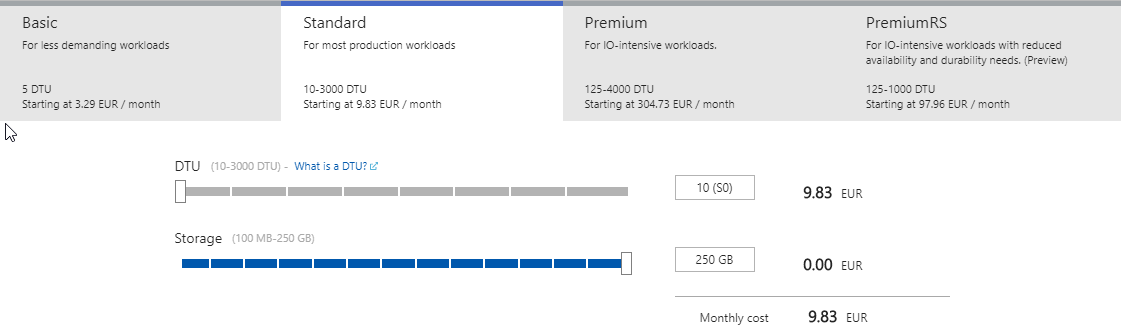
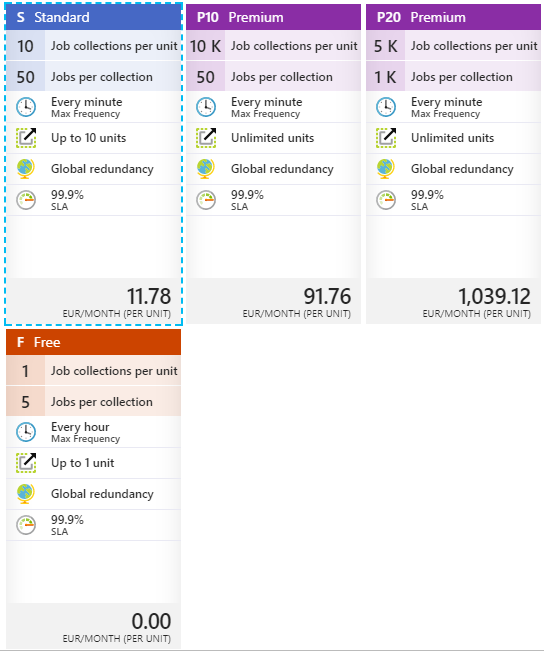
So I went to the Azure Portal, created an Azure Schedule instance (with a job collection tier of at least basic, to be able to create schedules that are triggered every minute) and called a Runbook via webhook.

The Runbook contains a cmdlet that results in an error 🙁
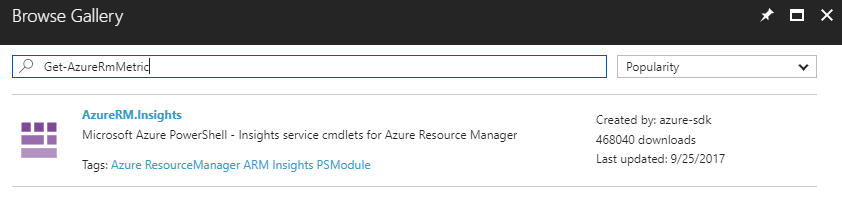
Get-AzureRmMetric : The term 'Get-AzureRmMetric' is not recognized as the name of a cmdlet, function, script file, or<br /> operable program. Check the spelling of the name, or if a path was included, verify that the path is correct and try<br /> again.
Azure cmdlets can be made available through the Automation Account the Runbook is using. The “Browse Gallery” link will let you find and choose the necessary cmdlets.

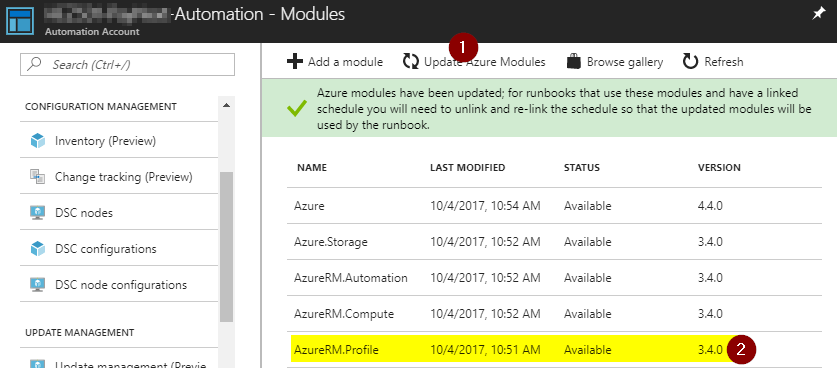
The error message above appears, because a) the cmdlet was not installed and b) the referenced version of AzureRM.profile was to old. Fortunately the problem can be resolved easily by upgrading the Azure modules.

After all modules are up to date, I could add the desired module and my runbook wasn’t complaining anymore 🙂

Azure SQL – Standard Tier IDs

In case you need the ServiceObjectiveId for SQL standard tiers, here is the list for you.

Tier name ServiceObjectiveId
Standard (S0) f1173c43-91bd-4aaa-973c-54e79e15235b
Standard (S1) 1b1ebd4d-d903-4baa-97f9-4ea675f5e928
Standard (S2) 455330e1-00cd-488b-b5fa-177c226f28b7
Standard (S3) 789681b8-ca10-4eb0-bdf2-e0b050601b40
Standard (S4) 3cf14e1a-0a5d-408c-bbc7-f63c5282f735
Standard (S6) ab69b4e3-d7cc-4aa5-87a6-f8b50615a03c
Standard (S7) b6ca0894-d2f0-4e40-99f5-0f8a93cc2437
Standard (S9) 0efa88e9-99ff-4e36-a148-8c4b20c0826c
Standard (S12 98100e8b-2f8a-4a81-9eb5-4d1e675c5a29

Usually you could change the tier within the Azure Portal. To change them via PowerShell, you can use the above IDs.

Connection Problems to a Secure Service Fabric Cluster

To be able to connect to a secure Service Fabric Cluster via PowerShell, you need to import the certificate specified into your personal certificate store. Otherwise an Exception will be thrown. Unfortunately the Exception does not point into the right direction 🙁

So in case you get an Exception like this

Connect-ServiceFabricCluster : An error occurred during this operation. Please check the trace logs for more details.
At line:1 char:1
+ Connect-ServiceFabricCluster -ConnectionEndpoint xyz-sf-de …
+ ~~~~~~~~~~~~~~~~~~~~~~~~~~~~~~~~~~~~~~~~~~~~~~~~~~~~~~~~~~~~~~~~~~~~~
+ CategoryInfo : InvalidOperation: (:) [Connect-ServiceFabricCluster], FabricException
+ FullyQualifiedErrorId : CreateClusterConnectionErrorId,Microsoft.ServiceFabric.Powershell.ConnectCluster

Guest Post on the Arvato Systems Cloud Blog

I’ve published an article on the Arvato Systems Cloud Blog (German) and Arvato Systems Blog (English).

Geld sparen mit serverloser Architektur

Ihr Unternehmen plant eine großangelegte Digitalkampagne zur Vermarktung eines neuen Produktes? Sie sind nicht sicher, ob die aktuelle Architekturlösung den Ansprüchen ihrer geplanten Kampagne gerecht werden kann? Bei einem Ausbau Ihrer Infrastruktur würden hohe Kosten auf Sie zukommen?

How a serverless architecture can help you scale easily and save costs during your next marketing campaign

Is scaling up your existing infrastructure very expensive? Are you not sure if your infrastructure can meet the demands of your next big marketing campaign? Get to know an alternative to scale up your current environment for a short period.

Azure Meetup OWL

Am 13.7. wird das erste Treffen des Azure Meetups OWL stattfinden. Wir sind derzeit noch auf der Suche nach einem Ort und den Themen 🙂
Vermutlich wird es um Chatbots und Machine Learning gehen. Wir werden aber auch auf euer Feedback eingehen um Themen für die nächsten Treffen zu finden.

Wenn ihr dabei sein möchtet, meldet euch bitte über die Meetup Seite an.

Update:

Ort: Arvato Systems, An der Autobahn 100, Gütersloh, Tower I

Widgets instead of Add-Ins/Apps?

The concept of Add-Ins (formally knows as Apps) in SharePoint puts logic as HTML and CSS to another page. This page is then rendered as iFrame to another SharePoint page. This approach has advantages and disadvantages. You have to decide yourself.

A very promising way to put stuff (or WebParts) onto a SharePoint page is the Widget Wrangler.

More information can be found on https://dev.office.com/blogs/introducing-widget-wrangler.

Conceptually Widget Wrangler implementation is based on similar thinking as PnP App Script Part implementation, which was released few years back as part of the PnP patterns (or at the time it was call App Model Samples). Advantages of this model is that you do not have deal with iFrame implementations and functionalities can be fully responsive, where needed. Also implementation of the capabilities is much simpler when your JavaScript is directly embedded to the page rendering logic without additional complexity.

Change in the User Resolution in SharePoint 2013 People Picker

After a SharePoint 2010 to SharePoint 2013 migration our users complained, that in the multiple Active Directory domain environment they havethe People Picker does not resolve the users the same way it did earlier. Only a subset of the users was resolved, users from a few domains were not included in the results at all.

Read more about it here.

Treffen der SharePoint UserGroup OWL

Liebe SharePoint UserGroup,

es ist so weit. Nach einigen Abstimmungsrunden möchten wir Sie nun am Dienstag, 01. September 2015 zu unserem nächsten Treffen der SharePoint UserGroup OWL herzlich nach Gütersloh einladen.

Die Agenda steht nun bereit und sieht folgende Vorträge vor:

Ab in die Cloud – Migrationserfahrungen (Referent: René Hézser, arvato Systems)

Vorstellung von Nintex für Office 365 (live) (Referent: Henning Eiben, Busitec)

Das Treffen findet wie beim letzten Mal auf dem Campus von arvato Systems im Raum Barcelona / Madrid im Tower I  statt und startet ab 18 Uhr. Um Ihnen einen reibungslosen Zutritt zum Firmengelände zu gewähren, bitten wir um Ihre namentliche Anmeldung auf Xing, damit wir Sie beim Pförtner vormerken und natürlich auch für Ihr leibliches Wohl sorgen können.