
Create a simple Webpart HOWTO
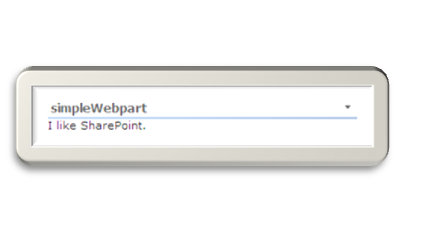
In this blog post, I want to show you how to create a simple Webpart. All you need is a Visual Studio 2005 (e.g. the express version) and of course SharePoint.
- Start your VS and create a new “Class Library”
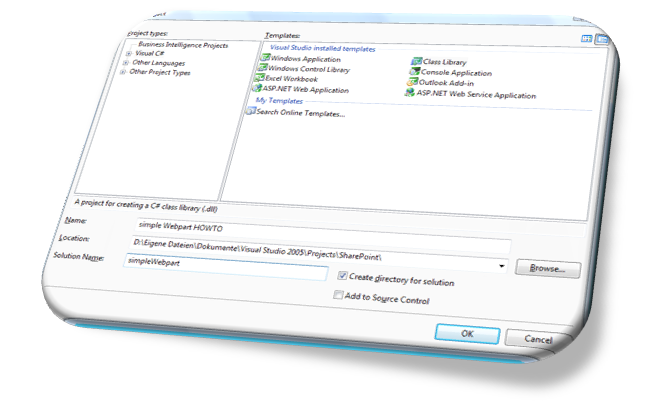
-
Add a reference to the Microsoft.SharePoint.dll. We will create a SharePoint Webpart, to be able to add Properties.
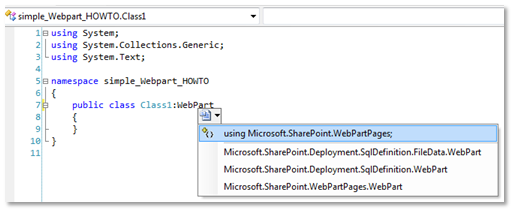
- To display some text, override the render method. You have to create a reference to the Microsoft.Web.dll, and type using System.Web.UI;
-
{
Wiki Page
Reporting Services and XML Datasource
Querying a XML Datasource
Query:
«/span>Query>
«/span>SoapAction>
http://ns.tld/MethodName</SoapAction>
«/span>Method
Namespace="
http://ns.tld/"
Name="
MethodName" />
«/span>ElementPath
IgnoreNamespaces="True">*</ElementPath>
</Query>
Passing Parameters
You only have to define your parameters in the parameter tab of your dataset. They are passed automatically to the Webservice Method. If you want to define your parameter yourself and not use a Reporting Services Parameter, just type
Create VB.NET Code for Reporting Services
To use custom code in a Report, you can past VB.NET Code into the Report properties. But what if you can only write C# and not VB.NET?
Here is the answer: http://authors.aspalliance.com/aldotnet/examples/translate.aspx
This great .NET translator lets you translate C# into VB.NET J
Wiki mit Bildern Update
Falls bei der Benutzung des Webparts ein Fehler wie:
Fehler bei der Anforderung des Berechtigungstyps Microsoft.SharePoint.Security.SharePointPermission, Microsoft.SharePoint.Security, Version=12.0.0.0, Culture=neutral, PublicKeyToken=71e9bce111e9429c.
auftritt, muss der Trustlevel in der web.config auf Full gesetzt werden.
Zum vollständigen Beitrag: http://www.hezser.de
Update 23. Apr 2008:
Ich habe eine neue Version bereitgestellt.
Sending Email from SharePoint
You can configure a task list, to send an email if you assign a task to somebody. This works fine if this somebody has an internal email address.
If you happen to have an account inside the environment of the SharePoint Server, and configure it to have an external email address, sending an email to this account might fail. In the SharePoint Logs there is an entry:
03/12/2007 14:40:42.29 OWSTIMER.EXE (0x059C) 0x14E8 Windows SharePoint Services E-Mail 8gsf High #160009: Die E-Mail-Adresse ‘somebody@somewhere.tld’ ist unbekannt. (something like: the email address ‘somebody@somewhere.tld’ is unknown)
SharePoint Designer, default.master and access denied
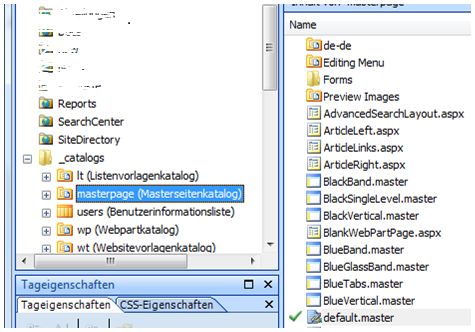
If you want to modify the default.master masterpage in the root site of a sitecollection, you have to be a sitecollection owner. Otherwise you get an “access denied” error if you try to open, or check out the default.master.
C#, fast assignment
Here is a short way to declare a variable and set a value according to a condition:
bool var = (something == true) ? true : false;
The long way would be:
bool var;
if (something == true)
{
var = true;
}
else
{
var = false;
}
I like the short way. You have to decide for yourself
**Update:
**
This was a bad example. If you want to set a bool, just type:
SharePoint Event Handler
If you want to modify the current listitem, the OnAfterChange Event will trigger again.
You can avoid this by disabling the trigger before the update:
this.DisableEventFiring();
item.SystemUpdate(false);
this.EnableEventFiring();
Remove Server from Farm
After adding a new Server to the SharePoint farm, I removed the old one.
The central administration page was not accessible. It said “error 500” in the browser. By changing the admin port via “stsadm -o setadminport -port 12345” and back to the original port, I was able to regain access to the central administration page.
Testlink to Yvonne for EBE Tracking Test: http://yvonneharryman.wordpress.com/2009/06/28/sharepoint-beacon-is-the-new-home-for-my-blog-regarding-sharepoint/
Remove Server from Farm
After adding a new Server to the SharePoint farm, I removed the old one.
The central administration page was not accessible. It only said “error 500” in the browser. By changing the admin port via “stsadm -o setadminport -port 12345” and back to the original port, I was able to regain access to the central administration page.
Reporting on SharePoint Lists
You can do Reporting on SharePoint Lists with SQL Server Reporting Services 2005 quite easy.
- Configure the Datasource with integrated Security
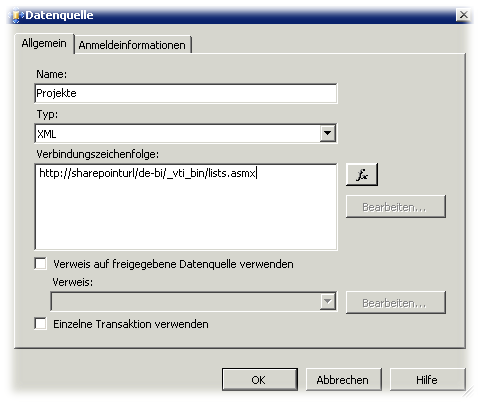
-
Define a query like
</div> <Query> <SoapAction>http://schemas.microsoft.com/sharepoint/soap/GetListItems</SoapAction> <Method Namespace="http://schemas.microsoft.com/sharepoint/soap/" Name="GetListItems"> <Parameters> <Parameter Name="listName"> <DefaultValue>SharePoint List Name</DefaultValue> </Parameter> </Parameters> </Method> <ElementPath IgnoreNamespaces="True">*</ElementPath> </Query>- Hit the “Field Refresh” Button to get the Field from your SharePoint List

- Drag your Fields in the Report
- Use the Code to eliminate “ID;#” and “”,"" from your Fields
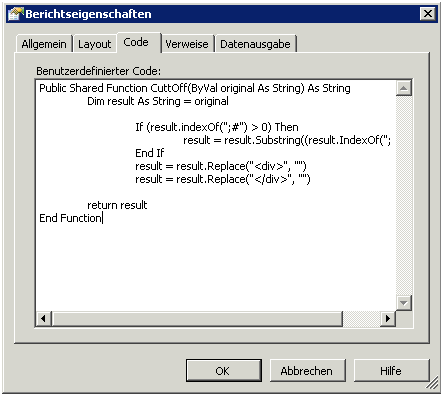
Use “=Code.CuttOff(Fields!ows_LinkTitle.Value)” in your Report to display your Fields
- Hit the “Field Refresh” Button to get the Field from your SharePoint List
Webpart, Properties and default value
If you write a Webpart with custom properties, you have to take care of the default value.
[WebBrowsable(true),
DefaultValue(“value”),
Personalizable(true),
WebDisplayName(“some property”),
WebDescription(“Description of the property”)]
public
string PropertyName
{
get { return _ PropertyName; }
set { _ PropertyName = value; }
}
Please do not specify a default value, which you might actually use. The default property value will not be saved, if you choose to configure it with the default value!
Wiki mit Bildern
Bei einem Blog Eintrag kann man Bilder mit an den Eintrag anfügen. Dies ist jedoch bei der Wiki Vorlage der Windows SharePoint Services V3 nicht möglich.
Um dieses Manko zu beseitigen, habe ich ein Webpart geschrieben. Dieses wird in die editform.aspx der Wiki List eingebaut. Danach kann man bequem über die Pflegemaske der Wiki Einträge Bilder an einen Wiki Beitrag anfügen. Die Bilder werden automatisch in eine Bildbibliothek hochgeladen.
Error 6483
Auf einem Server habe im Ereignisprotokoll immer wieder eine Meldung mit der ID 6483 gefunden:
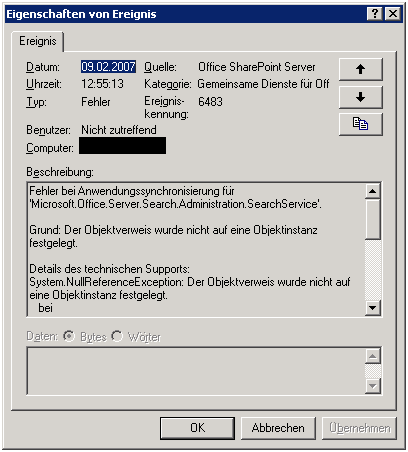
Quelle: Office SharePoint Server
Kategorie: Gemeinsamte Dienste
Ereigniskennung: 6483
Zur Behebung des Problems habe ich versucht eine Reparaturinstallation durchzuführen. Jedoch ist diese mit Fehlermeldungen abgebrochen:
