
Setting up Reporting Services with not default database name
Setting up the Reporting Services with a non default database name requires that you create a Script, and change the database names in this script, because otherwise the creation of the databases fails.
Before you can generate the Script, start up the Reporting Services Service in the first Dialog of the Wizard!
In the “Database Setup” Dialog of the Reporting Services Configuration Wizard hit the “Script” Button. (My Database Name is “ReportServer2005).
Get default page Url
l know it is not a smooth approach, but a working one. How do you get the default Url from an SPWeb? If you have the publishing feature activated, you can use PublishingWeb.DefaultPage property. But not for WSS.
1: internal static string GetDefaultWebUrl(string webUrl)
<pre style="border-bottom-style:none;padding-bottom:0px;line-height:12pt;border-right-style:none;background-color:#f4f4f4;margin:0em;padding-left:0px;width:100%;padding-right:0px;font-family:consolas, 'Courier New', courier, monospace;border-top-style:none;color:black;font-size:8pt;border-left-style:none;overflow:visible;padding-top:0px"><span style="color:#606060">   2:</span> {</pre>

<pre style="border-bottom-style:none;padding-bottom:0px;line-height:12pt;border-right-style:none;background-color:white;margin:0em;padding-left:0px;width:100%;padding-right:0px;font-family:consolas, 'Courier New', courier, monospace;border-top-style:none;color:black;font-size:8pt;border-left-style:none;overflow:visible;padding-top:0px"><span style="color:#606060">   3:</span>     WebRequest request = WebRequest.Create(webUrl);</pre>

<pre style="border-bottom-style:none;padding-bottom:0px;line-height:12pt;border-right-style:none;background-color:#f4f4f4;margin:0em;padding-left:0px;width:100%;padding-right:0px;font-family:consolas, 'Courier New', courier, monospace;border-top-style:none;color:black;font-size:8pt;border-left-style:none;overflow:visible;padding-top:0px"><span style="color:#606060">   4:</span>     request.Credentials = CredentialCache.DefaultCredentials;</pre>

<pre style="border-bottom-style:none;padding-bottom:0px;line-height:12pt;border-right-style:none;background-color:white;margin:0em;padding-left:0px;width:100%;padding-right:0px;font-family:consolas, 'Courier New', courier, monospace;border-top-style:none;color:black;font-size:8pt;border-left-style:none;overflow:visible;padding-top:0px"><span style="color:#606060">   5:</span>     <span style="color:#0000ff">using</span> (WebResponse response = request.GetResponse())</pre>

<pre style="border-bottom-style:none;padding-bottom:0px;line-height:12pt;border-right-style:none;background-color:#f4f4f4;margin:0em;padding-left:0px;width:100%;padding-right:0px;font-family:consolas, 'Courier New', courier, monospace;border-top-style:none;color:black;font-size:8pt;border-left-style:none;overflow:visible;padding-top:0px"><span style="color:#606060">   6:</span>     {</pre>

<pre style="border-bottom-style:none;padding-bottom:0px;line-height:12pt;border-right-style:none;background-color:white;margin:0em;padding-left:0px;width:100%;padding-right:0px;font-family:consolas, 'Courier New', courier, monospace;border-top-style:none;color:black;font-size:8pt;border-left-style:none;overflow:visible;padding-top:0px"><span style="color:#606060">   7:</span>         <span style="color:#0000ff">return</span> response.ResponseUri.LocalPath;</pre>

<pre style="border-bottom-style:none;padding-bottom:0px;line-height:12pt;border-right-style:none;background-color:#f4f4f4;margin:0em;padding-left:0px;width:100%;padding-right:0px;font-family:consolas, 'Courier New', courier, monospace;border-top-style:none;color:black;font-size:8pt;border-left-style:none;overflow:visible;padding-top:0px"><span style="color:#606060">   8:</span>     }</pre>

<pre style="border-bottom-style:none;padding-bottom:0px;line-height:12pt;border-right-style:none;background-color:white;margin:0em;padding-left:0px;width:100%;padding-right:0px;font-family:consolas, 'Courier New', courier, monospace;border-top-style:none;color:black;font-size:8pt;border-left-style:none;overflow:visible;padding-top:0px"><span style="color:#606060">   9:</span> }</pre></p>
Error 0x80020009
I am sure you all know the Best Practices: Using Disposable Windows SharePoint Services Objects Guide from Microsoft. If not, read it 🙂
Please be carefull what objects you dispose after you don’t need them anymore. If you dispose the SPContext.Current.Site object, you might get strange behaviours. e.g. you might not be able to save Webpart properties. Doing so, will generate an error:
Cannot save the property settings for this Web Part. Exception occurred. (Exception from HRESULT: 0x80020009 (DISP_E_EXCEPTION))
Using the SharePoint SiteMapProvider
Did you ever wanted to create a Webpart for site navigation? Well, you can use the SPSiteMapProvider from SharePoint.
In your Webpart you could use this code to access the SPSiteMapProvider.
1: SPSiteMapProvider sitemapProvider = (SPSiteMapProvider)SiteMap.Providers["SPSiteMapProvider"];
<pre style="padding-right:0px;padding-left:0px;font-size:8pt;padding-bottom:0px;margin:0em;overflow:visible;width:100%;color:black;border-top-style:none;line-height:12pt;padding-top:0px;font-family:consolas, 'Courier New', courier, monospace;border-right-style:none;border-left-style:none;background-color:#f4f4f4;border-bottom-style:none"><span style="color:#606060">   2:</span> SiteMapDataSource datasource = <span style="color:#0000ff">new</span> SiteMapDataSource();</pre>

<pre style="padding-right:0px;padding-left:0px;font-size:8pt;padding-bottom:0px;margin:0em;overflow:visible;width:100%;color:black;border-top-style:none;line-height:12pt;padding-top:0px;font-family:consolas, 'Courier New', courier, monospace;border-right-style:none;border-left-style:none;background-color:white;border-bottom-style:none"><span style="color:#606060">   3:</span> datasource.Provider = sitemapProvider;</pre>
This Datasource can be the datasource for a regular ASP.NET Treeview Control:
Many SharePoint Features
CodePlex has a project for SharePoint 2007 Features. Within this workplace there are features like:
- Ajax Config Feature
- Content Type Hierarchy Feature
- Debug Config Feature
- Debugger Feature
- Features Source Code
- Log Viewer Feature
- Manage Configuration Modifications
- Manage Form Users Feature
- Manage Hierarchical Object Store Feature
- Manage Layouts Site Map Feature
- Minimal Master
- Minimal Publishing Site
- Placeholder Master Feature
- Presence Contact List Feature
- Print List Feature
- Task Alert Feature
- Task Mover Feature
- Theme Changer Feature
- Window Links Feature
Especially the Ajax Config Feature is great. In the future I will release more Webparts based on Ajax. This makes it much more easier to deploy them 🙂
SharePoint – External Storage Provider
As you probably know, you can store documents on e.g. a fileserver instead of your SQL content databases. To make it short, some key features:
- Storing blobs not in your content database, but e.g. in a local folder, or a network share
- With the current version only the SPFarm is supported. Meaning ALL content will be stored externally
- After you have implemented an external storage provider, all new documents will be stored in this place. To move old documents, you could do a Backup/Retore of your content.
- Changing a document will create a new blob and not disposing the old one. You have to do this manually (you can implement garbage collection)!
- With the next SharePoint release you might have to rewrite your storage provider, because it will not remain syntactically consistent
- External Storing of Binary Large Objects (BLOBs) in Windows SharePoint Services
I found an interesting project on CodePlex
SharePoint Server TechCenter
Within the “SharePoint Serever TechCenter” a new page “SharePoint Products and Technologies Service Pack 1 Resource Center” started, which shows some interesting information about the SP1 for WSS and MOSS.
SharePoint Products and Technologies Service Pack 1 Resource Center
Office 2007 SP1 released
Updated WikiWebpart + Tool to install it
I updated my WikiWebpart. You can now download it as a SharePoint Solution.
Steps to install the solution:
- Install the solution via “stsadm -o addsolution -filename RH.WikiWebpart.wsp”
-
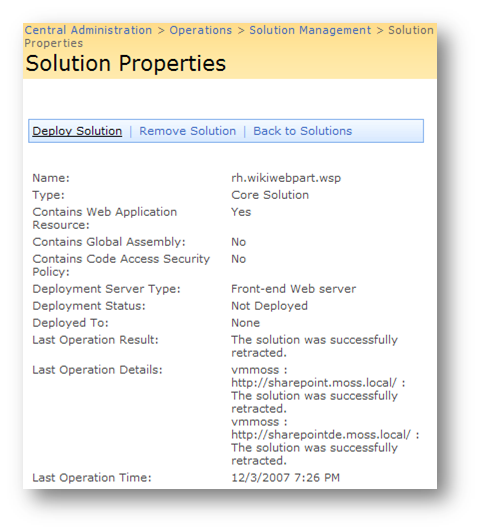
Go to your "Central Administration > Operations" and deploy the solution
1.
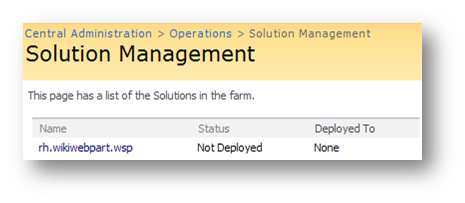
*
-
Go to “Site Actions > Site Settings > Site Collection Administration > Site collection features” and active the feature

HowTo Create a contact form
A contact form is a must have on all websites. You can realize such a form with build in functionality, even if you have anonymous “logins” on your SharePoint site.
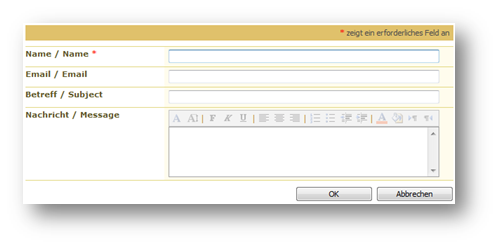
Steps to create a contact form:
- Create a custom list, and configure it with all the fields you need.
- Change the security settings in the advanced settings for the new contact list
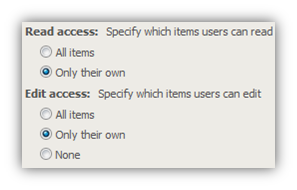
- Create a link in your navigation to the NewForm.aspx like
http://www.hezser.dehttp://www.hezser.de/blog/files/www.hezser.de
The source QueryString is important if you have anonymous access enabled, because otherwise your visitors will be redirected to the lists default view page after submitting the contact form entry
Now everything is set up for your contact form. But how do you get knowledge of a new item in your list? You can not configure an alert, because you are only allowed to view your own posts. But you can add the RSS feed for the list into your Outlook to be notified if someone tries to contact you.
Microsoft Knowledgebase articles for SharePoint
Two RSS feeds for every SharePoint Administrator are:
SharePointConsole
I wrote a Console application, which will allow you do some common tasks for your SharePoint environment. stsadm lacks some functionality like recyling all list items from a list…
Just copy the exe to your SharePoint Server, and execute it with an account which has the appropriate rights on your farm.
Usage:
SharePointConsole http://siteurl[/weburl] Command [Parameter1 Parameter2]
The SharePointConsole has the following parameters:
- EnumContentTypes
- CreateContentType
- RenameContentType
- DeleteContentType
- DeleteAllListItems
- ShowInNewForm
- ShowInEditForm
- ShowInDisplayForm
- DeleteAllVersions
- RecycleAllVersions
- SetTitleWithFilename
- SetSearchCenterUrl
- SystemUpdate
- FeatureManager
- EmptyRecycleBin
EnumContentType:
Returns all content types from the specified sitecollection.
HowTo create an object if you only have its type as string
Sometimes you have only the type of an object, which you want to create. Meaning you want to create an object dynamically. This is how you would achieve your goal:
In my case I wanted to create a SPField from its typename.
1: string typename = “Microsoft.SharePoint.SPFieldText, Microsoft.SharePoint, “+
<span class=lnum> 2: </span> <span class=str>"Version=11.0.0.0, Culture=neutral, PublicKeyToken=71e9bce111e9429c"</span>;
3: Type t = Type.GetType(typename, true, true);
<span class=lnum> 4: </span><span class=kwrd>object</span> newObject = System.Activator.CreateInstance(t,
5: BindingFlags.SetProperty, new object[] { fields, "Title" });
I know one constructor for a SPField is to create a new object with the SPFieldCollection and its name.
Create an audience which contains an Active Directory Group
In the SDK are examples on how to create an audience which adds a rule like:
1: AudienceRuleComponent r1 = new AudienceRuleComponent("FirstName", "Contains", "John");
But how do you create a rule which takes the membership of an Active Directory Group? Well, look at this:
1: string groupName = "CN=Users,CN=Builtin,DC=domain,DC=tld";
<pre style="padding-right:0px;padding-left:0px;font-size:8pt;padding-bottom:0px;margin:0em;overflow:visible;width:100%;color:black;border-top-style:none;line-height:12pt;padding-top:0px;font-family:consolas, 'Courier New', courier, monospace;border-right-style:none;border-left-style:none;background-color:#f4f4f4;border-bottom-style:none"><span style="color:#606060"> 2:</span> AudienceRuleComponent r1 = <span style="color:#0000ff">new</span> AudienceRuleComponent(<span style="color:#006080">"DL"</span>, <span style="color:#006080">"Member of"</span>, groupName);</pre>
To get the ‘distinguishedName’ from a group, you can use ADSI Edit (open up a MMC and add the ADSI Edit Snap-In).
Another place, another proxy
Do you connect to different networks regularly? Well, I do. Switching the proxy each time is annoying. Here is the solution:
Marco wrote a great tool, which will switch your IE proxy based on the Gateway IP or the DNS Suffix 🙂
Have a look at it: http://blog.mwiedemeyer.de/2007/08/16/ProxySwitcherV102.aspx
Quote:
Proxy Switcher is a little helper tool for switching between different proxy settings.
If you are at many locations, e.g. at work, home, hotel, etc. you may be tired of setting (and rember) proxy settings for the different locations.