
WSSWiki
There is a Wiki out there with code samples and articles about SharePoint. Check it out at http://www.wsswiki.com/
Technorati Tags: SharePoint,WSSWiki
There is a Wiki out there with code samples and articles about SharePoint. Check it out at http://www.wsswiki.com/
After you install a hotfix or update for SharePoint, you have to run the SharePoint Configuration Wizard. Sometimes it is aborting with an error. You will get a link to a log file. This is something like “PSCDiagnostics_10_17_2008_16_53_57_799_923424762.log”.
In my case I got a timeout error:
———————————————————-
10/17/2008 16:55:59 1 ERR Fehler beim Initialisieren des Updates der SharePoint-Produkte und -Technologien.
Eine Ausnahme vom Typ ‘System.ServiceProcess.TimeoutException’ wurde ausgelöst. Weitere Ausnahmeinformationen: Der Vorgang wurde nicht abgeschlossen, da der Timeout abgelaufen ist.
System.ServiceProcess.TimeoutException: Der Vorgang wurde nicht abgeschlossen, da der Timeout abgelaufen ist.
bei System.ServiceProcess.ServiceController.WaitForStatus(ServiceControllerStatus desiredStatus, TimeSpan timeout)
bei Microsoft.SharePoint.PostSetupConfiguration.ServiceHelper.Stop(String serviceName)
bei Microsoft.SharePoint.PostSetupConfiguration.InitializeTask.StopServicesListedInRegistry(RegistryHelper registry)
bei Microsoft.SharePoint.PostSetupConfiguration.InitializeTask.StopAllServices()
bei Microsoft.SharePoint.PostSetupConfiguration.InitializeTask.PrepareForUpgrade()
bei Microsoft.SharePoint.PostSetupConfiguration.InitializeTask.Run()
bei Microsoft.SharePoint.PostSetupConfiguration.TaskThread.ExecuteTask()
Are you looking for a Sourcecontrol for your projects? Well, I was. Here is where I ended up: SourceGear Vault. It will store the your sourcecode in a SQL table, use the IIS for access, and brings along a client and Visual Studio integration. What could you want more?
And the best of it, it is free!
Quote:
Somebody said that Vault is free for a single user. Is this true? Yes. Both Fortress and Vault are free for use by a single user. Simply install the product and do not enter any serial numbers at all. When no serial numbers are present, Fortress and Vault behave as if there is exactly one user license. Note that this free license does not apply when the product is used by more than one person. If you have two people who need to use Vault, you will need to purchase two initial licenses. If you enter a serial number containing only one license, then the product will still have exactly one license present.
As you might already know, you can create new fields with SPFieldCollection.AddFieldAsXml(string schema). The schema contains the formula for the calculated field. There are some points to take care of, before you can add the field:
Changing the fieldnames is an easy task. If you read the schema from a field and want to create a new one with the same formula, you will get something like “=if(fieldA,1,2)”.
From now on there will be cumulative updates (formerly know as hotfix) every two months.
The first cumulative update is the August 26 updates for WSS and MOSS. These updates are only recommended, if you are experiencing the described problems. They will be included in the SP2.
Source: Microsoft SharePoint Team Blog
The next generation Wiki Webpart is there! Sounds good J The (stupid) name remains, but the core has changed.
What is it?
With the Wiki Webpart you can upload images and documents from a Wiki edit page into existing picture/document libraries. After the file has been uploaded, a link will be inserted into the Wiki Content.
This is either a or a tag, depending on the uploaded file.
Herzlichen Glückwunsch an das Konrad Motorsport Team zum Meistertitel im Porsche Supercup 2008!
Im letzten Rennen reichte der Sieg von Nicolas Armindo und der 6. Platz von Sean Edwards damit sich das Team aus Verl in der Meisterschaftswertung von Platz 4 auf den ersten Platz vorarbeiten konnte.

Quelle: http://www.porsche.com/germany/sportandevents/motorsport/racing/pmsc/gallery
Technorati Tags: [Porsche Supercup][2],[Konrad Motorsport][3]
[2]: http://technorati.com/tag/Porsche Supercup [3]: http://technorati.com/tag/Konrad Motorsport
Categorizing posts with keywords is not new. There are solutions which create a new column for your blog, where you can define categories.
 My Webpart will look in your posts for Technorati links. Many posts are tagged with Technorati links, so that you can look for a tag, and find posts on many blogs for this tag.
You can create Technorati links with the Live Writer, if you want to blog with it.
As Jeremy Sublett wrote in his post Getting Date Information From Photos in SharePoint it would be great if SharePoint would respect the Exif data from a picture uploaded to a picture library. So I took his solution as starting point to wrap this functionality into a feature, which can be configured for each picture library.
So what does it do?
The “Date Picture Taken” value will be used from the Exif data of a picture after it has been uploaded.
I get plenty of questions on how to add, deploy or activate a SharePoint Solution.
Solution
A SharePoint solution is a *.wsp file (which is a cab file) which contains at least one feature.
Feature
A feature adds new functionality to your SharePoint farm. It can be wrapped inside a solution file, or be deployed by adding files to your SharePoint servers.
Installing a Solution
To install a solution to your SharePoint farm, copy the wsp file to one of your SharePoint servers, and run “stsadm -o addsolution -filename yoursolution.wsp”.
You have developed a Webpart or some other program, and want the user to be able to check for updates?
 In my case I want the user to check for updates for my Webparts.
If you click the “Check for updates” Button in the Webpart properties, the latest version from will be shown.
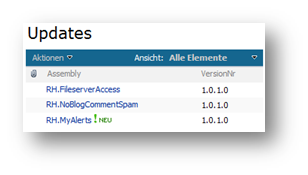
Set up an “Updates” list
To find the latest version, I have set up a SharePoint list with two fields. The title always exists. I renamed it to be “Assembly”. The second column we need is the version. Here I store values which can be interpreted as a Version object.
Now it is official. Installing SharePoint with a SQL Server 2008 is supported (with the SharePoint Services SP1!)
See SQL Server 2008 Support for SharePoint Products and Technologies.
 Enabling remote access for SQL Server 2008 is slightly different from how you were enabling remote access in SQL Server 2005.
In the “Sql Server Configuration Manager” go to “SQL Server Network Configuration” and enable the TCP/IP Protocol.
I wonder where this point will be hidden in the next release of the SQL Server…
Warning:
Setting up the TFS is not an easy task. In our environment we have the Reporting Services and WSS installed on the TFS server. The TFS and SharePoint databases are on a separate SQL Server. Reporting Services databases are locally stored.
If you now try to install the SP1, it will reconfigure your Reporting Services so that the databases are on the remote SQL Server. Of course that won’t work! So the upgrade fails with an error
The SP1 is available through MSDN. See http://blogs.msdn.com/msdnsubscriptions/archive/2008/08/11/visual-studio-2008-service-pack-1-files-are-also-now-available.aspx and http://msdn.microsoft.com/en-us/vstudio/products/cc533447.aspx
You will need it to install the Reporting Services 2008 add-in into your existing Visual Studio 2008 installation.