Azure IoT Edge not starting

Sometimes a permission denied is a permission denied 🙁

[INFO] - Starting Azure IoT Edge Security Daemon<br>[INFO] - Version - 1.0.10~rc1<br>[INFO] - Using config file: /etc/iotedge/config.yaml<br>[INFO] - Configuring /var/lib/iotedge as the home directory.<br>[INFO] - Configuring certificates…<br>[INFO] - Transparent gateway certificates not found, operating in quick start mode…<br>[INFO] - Finished configuring provisioning environment variables and certificates.<br>[INFO] - Initializing hsm…<br>[INFO] - Finished initializing hsm.<br>[INFO] - Provisioning edge device…<br>[INFO] - Starting provisioning edge device via manual mode using a device connection string…<br>[INFO] - Manually provisioning device "iotedgedevice" in hub "iothub.azure-devices.net"<br>[INFO] - Finished provisioning edge device.<br>[INFO] - Initializing the module runtime…<br>[INFO] - Initializing module runtime…<br>[INFO] - Using runtime network id azure-iot-edge<br>[WARN] - Could not initialize module runtime<br>[WARN] - caused by: Container runtime error<br>[WARN] - caused by: error trying to connect: Permission denied (os error 13)<br>[ERR!] - The daemon could not start up successfully: Could not initialize module runtime<br>[ERR!] - caused by: Could not initialize module runtime<br>[ERR!] - caused by: Container runtime error<br>[ERR!] - caused by: error trying to connect: Permission denied (os error 13)
Properties for IoT Messages in Azure Stream Analytics

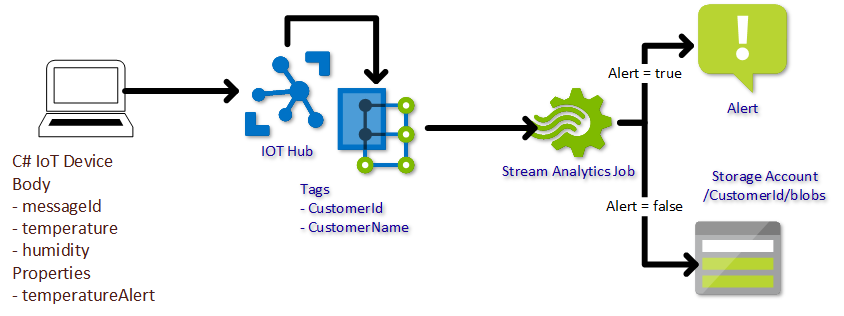
In this post I want to show how to use properties that are added to messages that IoT devices are sending to Azure IoT Hub in Stream Analytics. And while talking about properties, let’s even use message enrichment 🙂

Stream Analytics Architecture

Sample Message

The green properties will be added by the Message enrichment feature of IoT Hub, as the data is not most likely not known on the IoT device or does not need to be transferred with each message.

VisionAI DevKit won’t deploy a module

Today my VisionAI DevKit was not deploying a module. In the logs (sudo journalctl -u iotedge -f) I could see the deployment was received:

Successfully pulled image machinelearndfd8df7d.azurecr.io/mobilenetimagenet:3<br>Creating module VisionSampleImagenet…<br>Could not create module VisionSampleImagenet<br>caused by: No such image: machinelearndfd8df7d.azurecr.io/mobilenetimagenet:3

Strange. During troubleshooting I started docker images and saw a lot of older images and versions. After deleting a log of them with docker image rm xyz the deployment succeeded and the module started. 🙂

Configure Azure IoT Edge for downstream devices

A lot of documentation and posts are available to setup an Azure IoT Edge to act as an IoT Hub for downstream devices. In order to get it up and running in a dev environment, I had to do some more research.

My setup is a RaspberryPi 3 with Raspbian stretch and an Azure IoT DevKit which looks like this. And please remember the setup I used is for development only. I’ve used symmetric key authentication for the IoT Device. In a production scenario you would probably use certificate based authentication and no self signed certificates for the TLS encryption.

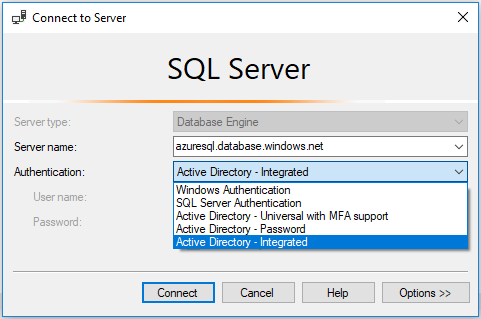
Azure SQL with AAD authentication

I though this had to be an easy task. Well, actually it is. If you find the right documentation and read it in the correct order 🙂

Basically I wanted to be able to login with my AAD (Azure Active Directory) user.

In the first step, the database needs to be configured for Azure Active Directory in order to add users in the second step.

Two Hackathons in a week

What a week. Two hackathons (‘hack’+marathon) in a row. That was exhausting.

  • A three day hackathon with my colleges from Arvato Systems and a customer. We’ve used Cognitive services with 8 different programming languages and created great PoCs.


  • The second hackathon was about Azure Stack with Microsoft.
  • Azure Meetup OWL

    Es ist wieder soweit. Am 18.7. um 18h treffen wir uns wieder.

    Die Themen:

    • Azure Stack – René Hézser
    • Terraform – Tyler Ayers

    Auch dieses Mal sind wir wieder zu Gast bei Arvato Systems. D.h. dass ich eine namentliche Anmeldung benötige.

    Deshalb meldet euch bitte über unser Meetup ( https://www.meetup.com/Azure-Meetup-OWL/events/251641785/) oder per E-Mail an.


    Was ist Cloud-native? – Die Muttersprache der Cloud

    Im Zeitalter der Digitalen Transformation umschwirren uns unzählige neue Buzzwords. Bei „Cloud-Native“ sprechen wir dabei keineswegs von einer weiteren Etage auf dem Turm zu Babel, sondern vielmehr von einem essentiellen Bestandteil der Digitalisierung, nämlich der Muttersprache der Cloud.

    Ich habe wieder einen Beitrag auf dem Arvato Cloud Blog geschrieben:

    https://it.arvato.com/cloud-blog/de/2018/04/was-ist-cloud-native—die-muttersprache-der-cloud.html

    Azure Table Storage REST Api not returning data

    Today I wanted to query entities of an Azure Table via REST Api and did not get any results.

    Looking over the query over and over again did not solve the problem. Sometimes I did not get any items back.

    The “sometimes” depended on the query. I checked each part. Partition Key, string and date columns. Everything looked all right. And then it hit me.

    I did not get a result, if there was too much data. Specifying the $top option to 1000 will always return data.

    Meetup #4 – Thema: Azure IoT Hub, MQTT

    Am 24. Januar ist es wieder soweit.

    https://www.meetup.com/Azure-Meetup-OWL/events/244924594/

    Themen:

    René Hézser – Arvato Systems

    Vorstellung Azure IoT Hub, Anbindung eines ESP8266 mit LED und Sensor an den IoT Hub

    Dennis Hering – Microsoft Deutschland GmbH

    Grundlagen / Funktionsweisen von MQTT,
    “Last Will and Testament (LWT)” – Best Practices und Code Patterns

    Bitte denkt an die Anmeldung über die Webseite, damit wir euch beim Pförtner anmelden können.