Deleting many ListItems / SPFiles

Deleting a large amount of items in SharePoint can take some time. There are several ways on how to delete items:

  1. Deleting items using the OM with list.Items.DeleteItemById(itemID);
    • Deleting items using the SharePoint Webservices

      • Deleting items using the OM with web.ProcessBatchData(caml);
list.Items.DeleteItemById(itemID);

You should not use the Items property of a SPList multiple time. Instead create a variable, which stores list.Items and use it instead.

Deleting items using the SharePoint Webservices

FilterParts for SharePoint

A while ago Microsoft released some filter Webparts on MSDN.

SharePoint Filter Webparts including:
– BDC MultiFilter: Similar to the BDC Data Item Builder web part provided with MOSS 2007 Enterprise Edition, except it provides up to 4 additional filter connections containing BDC entity attributes to allow display of more entity-related data
– ShowFilter: Diagnostic display of any filter connected
– ShowFilterMap: Displays a Virtual Earth map when passed a filter containing a street address
– ShowFilterSearch: Displays MOSS search results when passed a filter connection containing a search query

SharePoint Konferenz 2009

Die SharePoint Konferenz 2009 findet am 11. und 12. Februar in München statt.

Auf der Konferenz werde ich einen Vortrag “Best Practices in der Webpart-Entwicklung” halten.

Voraussichtlich werde ich die folgenden Themen behandeln:

· Fallen umgehen und Probleme vermeiden

· Logging in das SharePoint Log

· Webparts mit eigenen ToolParts

· Nutzung “ToHtml” Funktionen

· Berechtigungsprüfung

· Code Ausführung mit erweiterten Berechtigungen

· SharePoint Webcontrols

· SPContext – wo bin ich

Announcing SPDisposeCheck tool for SharePoint Developers

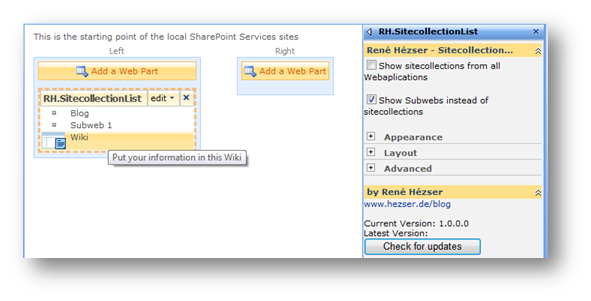
Webpart to show Sitecollections/Subwebs

This Webpart will show Sitecollections from the current Webapplication or Subwebs from the current web.

In the Webpart properties you can choose what the Webpart will show.

It uses the Logo URL of websites, if they are specified. The description of the website will show up as tooltip.

I am using the RepeatedControls class to build the items. This class really makes it easy to add entries by moving the layout functionality into an own class.

How-To create a JavaScript tooltip / popup

If you want to create a tooltip to show additional information, you can use the SharePoint functionality to do so. E.g. on a list of websites you could show the website’s description, if the user moves the mouse over the element.

The JavaScript which will show the “Open Menu” text is “MMU_PopMenuIfShowing(this);”. It is referenced on all SharePoint sites through the call to Init.js in the header.

Update packages for the 2007 Microsoft Office and Servers

Microsoft has released many updates for Office 2007.

SharePoint relevant updates:

SharePoint Bug with MultiValue Fields

imageImagine you have a list (or document library) which has lots of items. Nothing fancy here. Now add a lookup or user field and allow it to contain multiple values.

Inside a view for this list you can filter e.g. for the title column. The filter dropdown shows all possible values for the column. image


Here comes the clue. If the item count of the list reaches a number somewhere between 400 and 500 items, the filter dropdown changes. You will get an option to show all filter values. This is for performance reasons.