
Content Deployment Error (stsadm –o export)
Recently I wanted to copy a subweb to a new site collection, so it will there be the rootweb. How can the web be moved? stsadm export is your friend. At least I thought…
Error: Specified cast is not valid.
at Microsoft.SharePoint.Library.SPRequestInternalClass.GetFileAsByteArray(String bstrUrl, String bstrWebRelativeUrl, Boolean bHonorLevel, Byte iLevel, OpenBinaryFlags grfob)
at Microsoft.SharePoint.Library.SPRequest.GetFileAsByteArray(String bstrUrl,String bstrWebRelativeUrl, Boolean bHonorLevel, Byte iLevel, OpenBinaryFlags grfob)
at Microsoft.SharePoint.Deployment.AttachmentsSerializer.GetDataFromDataSet(Object obj, SerializationInfo info, StreamingContext context)
FatalError: Specified cast is not valid.
at Microsoft.SharePoint.Library.SPRequestInternalClass.GetFileAsByteArray(String bstrUrl, String bstrWebRelativeUrl, Boolean bHonorLevel, Byte iLevel, OpenBinaryFlags grfob)
at Microsoft.SharePoint.Library.SPRequest.GetFileAsByteArray(String bstrUrl,String bstrWebRelativeUrl, Boolean bHonorLevel, Byte iLevel, OpenBinaryFlags grfob)
at Microsoft.SharePoint.Deployment.AttachmentsSerializer.GetDataFromDataSet(Object obj, SerializationInfo info, StreamingContext context)
at Microsoft.SharePoint.Deployment.AttachmentsSerializer.GetObjectData(Object obj, SerializationInfo info, StreamingContext context)
at Microsoft.SharePoint.Deployment.XmlFormatter.SerializeObject(Object obj, ISerializationSurrogate surrogate, String elementName, Boolean bNeedEnvelope)
at Microsoft.SharePoint.Deployment.XmlFormatter.WriteArray(Object array, String name, Type objectType)
at Microsoft.SharePoint.Deployment.XmlFormatter.SerializeObject(Object obj, ISerializationSurrogate surrogate, String elementName, Boolean bNeedEnvelope)
at Microsoft.SharePoint.Deployment.XmlFormatter.Serialize(Stream serializationStream, Object topLevelObject)
at Microsoft.SharePoint.Deployment.ObjectSerializer.Serialize(DeploymentObject deployObject, Stream serializationStream)
at Microsoft.SharePoint.Deployment.SPExport.SerializeObjects()
at Microsoft.SharePoint.Deployment.SPExport.Run()
Office 2007 + SharePoint Document Library = Prompt for Credentials
Problem:
Even if you configure your SharePoint site as Intranet in the Internet Explorer, you will be prompted for user credentials when you open an Office document with Office 2007.
This is true, if you haven’t configured a proxy in your browser, access your SharePoint site with a FQDN (fully qualified domain name) and you are using Windows Vista or Windows 7.
Cause:
(Quote from the KB aticle below) In Windows Vista, Internet Explorer uses the Web Client service when you use Internet Explorer to access a WebDAV resource. The Web Client Service uses Windows HTTP Services (WinHTTP) to perform the network I/O to the remote host. WinHTTP sends user credentials only in response to requests that occur on a local intranet site. However, WinHTTP does not check the security zone settings in Internet Explorer to determine whether a Web site is in a zone that lets credentials be sent automatically…
SharePoint 2010, was ist neu?
Microsoft hat 2 Dokument zum Download bereit gestellt, in denen neue Features beschrieben werden.
SharePoint Foundation 2010-Dokument: Neue Features in Microsoft SharePoint Foundation 2010
SharePoint Server 2010-Dokument: Neue Features in Microsoft SharePoint Server 2010
SharePoint Usergroup OWL
14 Teilnehmer. Super! Ich hoffe wir dürfen alle neuen Gesichter auch bei den nächsten Treffen begrüßen.

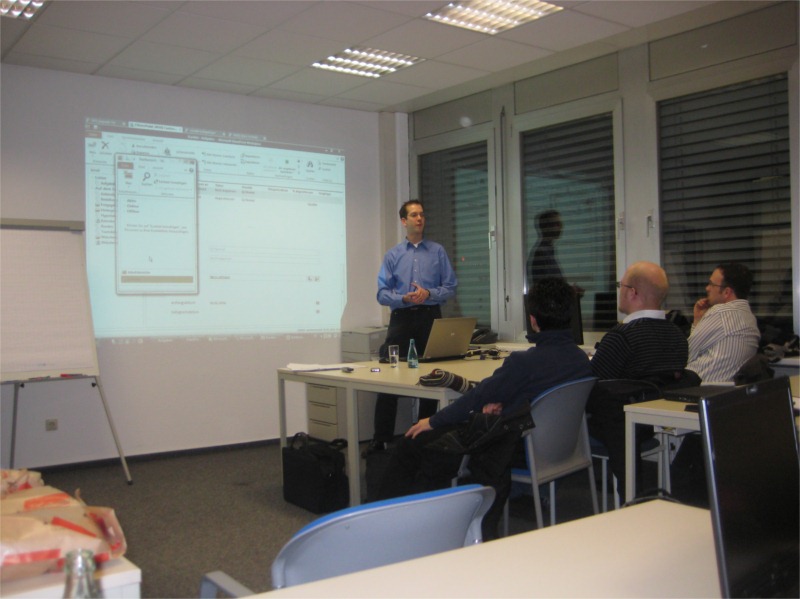
Nach meinem Vortrag über SharePoint 2010 haben wir in gemütlicher Runde weiter Themen und Fragen zum “Neuen” erörtert.
Bis zum nächsten Mal, oder nächte Woche in München 🙂
News about Memory Leaks in SharePoint
There is some interesting new information about SharePoint eating up memory. Take a look at the details in the post SharePoint’s Sasquatch Memory Leak over at Todd Carters blog.
The evil seems to be many HttpApplications, which are not disposed properly. So every request creates a new HttpApplication, which eats up our memory at the FE servers.
And by the way, it does not mean we don’t have to get rid of our SharePoint objects as well 🙂
Visual Studio 2010 RC
I’ve just seen that the RC is available via MSDN.
Silverlight 4 is not supported in the RC it says in the notes. Have to try SharePoint Development against the Beta 2…
Update to “Upload Files and Images” field type
I’ve fixed a bug with my [Custom Field – Upload Files and Images][1].
[1]: “Custom Field – Upload Files and Images”
OWL SharePoint Usergroup
Durch die Feiertage, den Jahreswechsel und einfach verdammt viel zu tun zu haben hat sich der Termin für das nächste SharePoint Usergroup Treffen in OWL leider hingezogen.
Doch jetzt steht er: Wir sind am 16.2.2010 wieder in Bielefeld bei der invent Software-Entwicklung GmbH zu Gast. Start ist wie immer 18h.
Eine Anfahrtsbeschreibung gibt es HIER, oder die Adresse für die Navis: Otto-Brenner-Str. 209, 33699 Bielefeld. Bitte gebt uns kurz per Email Bescheid wenn ihr kommt. Die Email Adresse gibt es auf der SharePointCommunity Seite: http://sharepointcommunity.de/groups/owl/default.aspx
SharePoint 2010 Contoso VM
First: The VM is great! Almost everything you’ll need to test or show off with is included in the VM.
Well, almost. There is some software I needed to install in order to get everything working. Here is a list of problems and solutions:
Problem: Cannot connect external lists to Outlook
Solution: Install SQL Compact Edition SP2
Problem: REST is not working
Solution: Install ADO.NET Data Services runtime
Problem: All sites are English. Not really a problem, but if you want to show SharePoint to your boss 🙂
Contoso SharePoint 2010 available
If you want to try SharePoint 2010 without the hassle of installing and configuring it with over 200 demo accounts, you can now download a preconfigured Hyper-V VM from Microsoft: http://www.microsoft.com/downloads/details.aspx?FamilyID=0c51819b-3d40-435c-a103-a5481fe0a0d2&displaylang=en
2 VMs are available for download.
Machine “a” contains the following:
- Windows Server 2008 SP2 Standard Edition x64, running as an Active Directory Domain Controller for the “CONTOSO.COM” domain with DNS and WINS
- Microsoft SQL Server 2008 SP2 Enterprise Edition with Analysis, Notification, and Reporting Services
- Microsoft Office Communication Server 2007 R2
- Visual Studio 2010 Beta 2 Ultimate Edition
- Microsoft SharePoint Server 2010 Enterprise Edition Beta 2
- Microsoft Office Web Applications Beta 2
- FAST Search for SharePoint 2010 Beta 2
- Microsoft Project Server 2010 Beta 2
- Microsoft Office 2010 Beta 2
- Microsoft Office Communicator 2007 R2
Machine “b” contains the following:
Office documents open read-only in SharePoint
Because there are many questions about this behavior, I want to blog about it.
You might have noticed, that if you simply click on a document, it will be opened in read-only mode. You have to use the dropdown and select “Edit in …” to open it with read-write access.
There is a Knowledgebase article available, which describes the problem and offers a solution: http://support.microsoft.com/kb/870853/en-us
To change the default behavior, you’ll have to change the registry on each client!
Remote Desktop and ClearType
Are you using an RDP connection to work on development systems? If so, don’t forget to turn on ClearType!
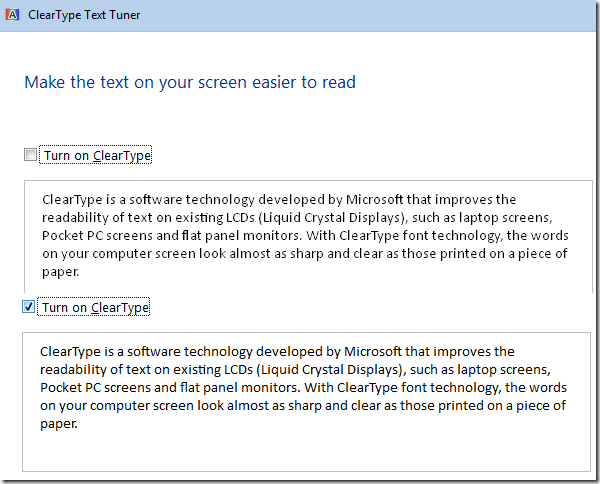
A picture says more than 1000 words…
Enabling the Developer Dashboard
Enabling the developer dashboard is very easy. It can be done via stsadm (or Powershell or the OM).
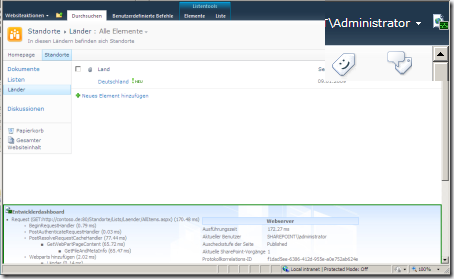
To enable it on demand means, that you will get a small icon at the top right corner next to your user name.
stsadm -o setproperty -pn developer-dashboard -pv OnDemand
WSS and MOSS are now SPF and SPS
Todd Bleeker posted an article about SharePoint Abbreviations.
To make it short: WSS isn’t anymore. We now call it SPF 2010. And MOSS is simply SPS 2010. So here is the naming history of SharePoint, or simply SP 🙂
SPS 2001 > SPS 2003 > MOSS 2007 > SPS 2010
OWC > STS > WSS > WSS v3 > SPF 2010
Google Analytics data in a SharePoint list
Jacob Reimers has written an C# API for accessing Google Analytics data.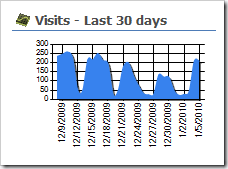
When I saw his post, I thought it would be great to fetch the latest data every day, and write it to a SharePoint list. Then you can use the data, without querying Google for every request.
You could then use the ChartPart for SharePoint to generate nice charts from your Google Analytics data.