WordPress

Redirect browser to a sub directory with WordPress

My blog is running with WordPress in the sub directory blog of my domain. If you, as a visitor, forget to enter /blog, this little index.php file in my root directory will redirect your browser to the sub directory.

<?php
@include("sitefunctions.php");
 
/* Move page with 301 http status code*/
movePage(301,"http://www.hezser.de/blog");
?>

You’ll need a sitefunction.php file with this content as well. The status code can be adjusted to your needs.

Migrate SharePoint Blog to WordPress

As promised here, this is a follow-up post with the tool I developed for the SharePoint to WordPress migration.

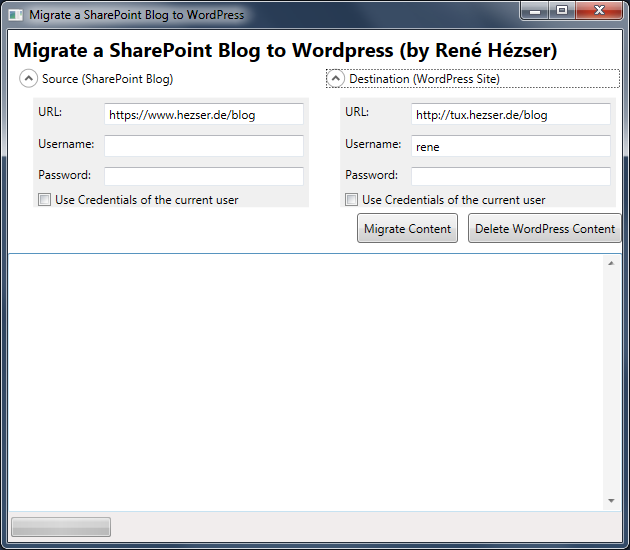
First, a screenshot:
Migrate SharePoint ot WordPress Screenshot

What is it, that we have to cover with a migration? Copying the posts is not enough. So I came up with this features:

Features

  • Copy posts
  • Copy comments
  • Copy resources like images and downloads
  • Create needed tags and categories
  • Modify links to local resource
  • deal with https, if links are absolute on the source blog and mixed with http
  • Using web services to connect to source and destination
  • URL rewriting (covered by a WordPress Plugin)
  • Delete all content from the destination blog (for migration testing)
  • Replace strings (with Regex)
  • a nice (WPF) GUI

Description

Originally I’ve build a plain console application. Then I thought that a console application would possibly scare some users. And after some time I wanted to do some WPF again. So I created a WPF application, to wrap all the functionality into a GUI. This way it will be easier to use for the folks out there, who do not like black console applications 😉 Since I am using web services to connect to both blogging platforms, the tool can be executed on any client computer. No access to a server session is required.

A new home for this blog

After many years of SharePoint as blogging platform, I decided to move to WordPress. There are several reasons for the decision.

One would be that I want to get rid of my server at home.

Another is SharePoint and its blogging capabilities. As you probably know, I’ve worked on the CKS:EBE (Community Kit for SharePoint – Enhanced Blog Edition) blogging extension for SharePoint blogs some years ago. It is awesome to see that the default blog can be extended to such an extend. I’ve even made it compatible with SharePoint 2013. WordPress offers far more functionality with so many Plugins and Themes available.