
Visual Studio 2015
Visual Studio 2015 has been released 😀 https://www.visualstudio.com
A detailed comparison of the version is available here.
Visual Studio 2015 has been released 😀 https://www.visualstudio.com
A detailed comparison of the version is available here.
Having a server at home that hosts a TFS is nice. But really necessary? Not really. So I decided to move all my sources to Visual Studio Online.
Visual Studio Online Basic is free for the first 5 users. That’s enough for me.
The migration process is straight forward easy with a tool that is installed on my computer. The process is described here. Another post can be found here.
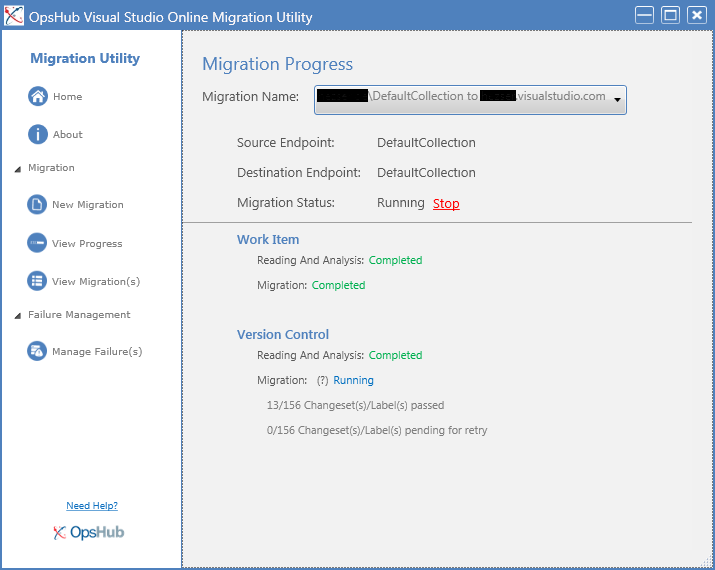
During the pre migration steps a user mapping is performed, connections verified and a few other things. The process itself takes some time. I have 32MB in 4680 files and it took about half an hour. Another service on my server that isn’t needed anymore 🙂
In this post I will show you how you can use MSBuild to target your project for .NET 3.5 or .NET 4.0 and use a separate app.config file for each.
My Warmup Tool is supposed to work with SP2010 and SP2013. To achieve that compatibility, I have to change the TargetFramework of the project to be able to compile, as well as the app.config so the application uses the desired Framework. I didn’t want to change the values every time manually. An automated solution has to be possible. And it is. Some little changes to the project file and MSBuild will do all the work for you 🙂
The new release brings support for Visual Studio 2013 🙂
The CKS – Development Tools Edition for Visual Studio 2012 and 2013 is a collection of Visual Studio templates, Server Explorer extensions and tools providing accelerated SharePoint 2010/2013 development based on Microsoft’s SharePoint 2010/2013 development tools.
http://visualstudiogallery.msdn.microsoft.com/cf1225b4-aa83-4282-b4c6-34feec8fc5ec?SRC=VSIDE
Visual Studio allow a F5 Deployment. I guess you all know that. The part where you have to think carefully is, when you add Features to your project.
Should you activate “Activate On Default”? Well, it depends (as always). Usually I don’t enable that setting, because features tend to be activated on scopes you won’t expect.
Take a WebApplication scoped feature for example. It might create SafeControl entries for your controls. Do you really want them to be added to an Extranet WebApplication if your solution is solely for an Intranet Application?
One of the first things I used to tell guys new to SharePoint development is: Never ever name the folder of your feature “Feature1”. If you create a solution with WSPBuilder, or did some time ago with VS 2008, you have to rename the folders immediately!
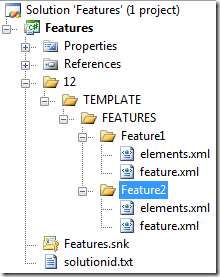
This is how a typical SharePoint project looks like, if you create features. I guess most of us have used the mighty WSPBuilder (
http://wspbuilder.codeplex.com) for developing with SharePoint.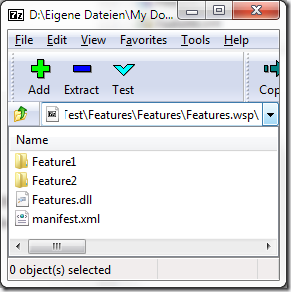
The RSS Feed Product Index offers a feed with new KB articles for many products.
SharePoint relevant feeds are:
Some SQL feeds:
And Visual Studio
A quick test shows that the just released Visual Studio 2010 works on my SP 2010 Beta 2 VM.
I could open a project, hit F5 to deploy it and debug successfully.
I’ve just seen that the RC is available via MSDN.
Silverlight 4 is not supported in the RC it says in the notes. Have to try SharePoint Development against the Beta 2…
As you can read on the Microsoft SharePoint Team Blog, a new version of the Visual Studio extensions have been released. This version is Community Technology Preview. And wow… yes… finally… x64 support!
The download is available here.
The final release of VSeWSS 1.3 is planned for the North American Spring of 2009.
Are you looking for a Sourcecontrol for your projects? Well, I was. Here is where I ended up: SourceGear Vault. It will store the your sourcecode in a SQL table, use the IIS for access, and brings along a client and Visual Studio integration. What could you want more?
And the best of it, it is free!
Quote:
Somebody said that Vault is free for a single user. Is this true? Yes. Both Fortress and Vault are free for use by a single user. Simply install the product and do not enter any serial numbers at all. When no serial numbers are present, Fortress and Vault behave as if there is exactly one user license. Note that this free license does not apply when the product is used by more than one person. If you have two people who need to use Vault, you will need to purchase two initial licenses. If you enter a serial number containing only one license, then the product will still have exactly one license present.
Warning:
Setting up the TFS is not an easy task. In our environment we have the Reporting Services and WSS installed on the TFS server. The TFS and SharePoint databases are on a separate SQL Server. Reporting Services databases are locally stored.
If you now try to install the SP1, it will reconfigure your Reporting Services so that the databases are on the remote SQL Server. Of course that won’t work! So the upgrade fails with an error
The SP1 is available through MSDN. See http://blogs.msdn.com/msdnsubscriptions/archive/2008/08/11/visual-studio-2008-service-pack-1-files-are-also-now-available.aspx and http://msdn.microsoft.com/en-us/vstudio/products/cc533447.aspx
You will need it to install the Reporting Services 2008 add-in into your existing Visual Studio 2008 installation.
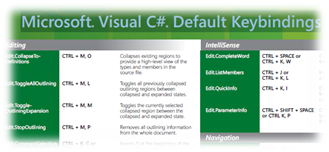
You can download an overview for Default Visual Studio 2005 Shortcuts for C+ here.
If you want to write your own Webpart, you can start from scratch with a Class Library, or use the templates from http://www.microsoft.com/downloads/details.aspx?FamilyID=19f21e5e-b715-4f0c-b959-8c6dcbdc1057&DisplayLang=en
The downside of this VS templates is, that they can only be used on a computer, which has SharePoint installed, and you cannot open a project created with the VS templates with a VS on which the templates are not installed.
Ishai Sagi wrote a great article about Webpart development. His article is about server side controls and data binding in Webparts.