Do you connect to different networks regularly? Well, I do. Switching the proxy each time is annoying. Here is the solution:
Marco wrote a great tool, which will switch your IE proxy based on the Gateway IP or the DNS Suffix 🙂
Have a look at it:
http://blog.mwiedemeyer.de/2007/08/16/ProxySwitcherV102.aspx
Quote:
Proxy Switcher is a little helper tool for switching between different proxy settings.
If you are at many locations, e.g. at work, home, hotel, etc. you may be tired of setting (and rember) proxy settings for the different locations.
For exception handling it is good practice to write errors to the eventlog.
EventLog.WriteEntry(“SharePoint.Error”, errorText, EventLogEntryType.Error);
Since SP1 for Windows Server 2003 “the normal user” is not allowed to write to the eventlog. James Kovacs wrote a great article about the problem.
(Remember to create your eventlog source, if you have your own!)
1: if(!EventLog.SourceExists(“SharePoint.Error”, ".")) {
<span class=lnum> 2: </span> EventLog.CreateEventSource(<span class=str>"SharePoint.Error"</span>, <span class=str>"Application"</span>, <span class=str>"."</span>);
3: }
On a newly installed Virtual Machine you don’t need any uninstall information from a servicepack, which consumes lots of diskspace. You can install the SP2 for Windows Server 2003 (R2) with the /nobackup parameter.
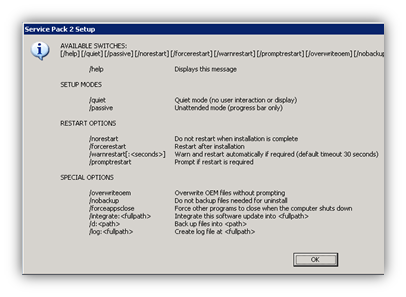
RESTART OPTIONS
/NORESTART:
No restart will take place. You will have to perform a manual restart yourself before the service pack installation can be considered complete.
/FORCERESTART:
A restart will automatically take place at the end of the installation.This will be handy if you automate the execution of UPDATE.EXE.
Instead of posting numerous Blog posts, I created a
Wiki-Website on which I will post information about SharePoint programming.
<p>
  <span style="color:white">Abkürzung</span>
</p></td>

<td style="padding-left:7px;padding-right:7px;border-top:solid white 1.0pt;border-left:none;border-bottom:solid white 3.0pt;border-right:solid white 1.0pt">
  <p>
    <span style="color:white">Produktname</span>
  </p>
</td>
|
<p>
  <span style="color:black">MOSS</span>
</p></td>

<td style="background:#cdddac;padding-left:7px;padding-right:7px;border-top:none;border-left:none;border-bottom:solid white 1.0pt;border-right:solid white 1.0pt">
  <p>
    <span style="color:black">Microsoft Office SharePoint Server 2007</span>
  </p>
</td>
|
<p>
  <span style="color:black">SPS</span>
</p></td>

<td style="background:#e6eed5;padding-left:7px;padding-right:7px;border-top:none;border-left:none;border-bottom:solid white 0.75pt;border-right:solid white 1.0pt">
  <p>
    <span style="color:black">SharePoint Portal Server</span>
  </p>
</td>
|
<p>
  <span style="color:black">SSRS</span>
</p></td>

<td style="background:#cdddac;padding-left:7px;padding-right:7px;border-top:none;border-left:none;border-bottom:solid white 1.0pt;border-right:solid white 1.0pt">
  <p>
    <span style="color:black">SQL Server Reporting Services</span>
  </p>
</td>
|
<p>
  <span style="color:black">WSS</span>
</p></td>

<td style="background:#e6eed5;padding-left:7px;padding-right:7px;border-top:none;border-left:none;border-bottom:solid white 1.0pt;border-right:solid white 1.0pt">
  <p>
    <span style="color:black">Windows SharePoint Services</span>
  </p>
</td>
|
Bei meiner Arbeit als Consultant für die Firma
Net at Work habe ich täglich mit SharePoint, SQL sowie Office Applikationen zu tun.
Einen Teil der Erkenntnisse möchte ich in diesem Blog weitergeben.
Zur Zeit habe ich u.a. folgende Microsoft Zertifizierungen: