SharePoint

SPList.DefaultView

The SDK says: “An SPView object that represents the default view.”

But if you want to change e.g. the ViewFields from the default view, you cannot use SPList.DefaultView.ViewFields.Add(fieldname);

Instead use

SPView defaultView = list.Views[list.DefaultView.ID];
defaultView.ViewFields.Add(fieldname); // internal field name
defaultView.Update();

to modify the default view. It seems the DefaultView property cannot modify the View itself.
Install SharePoint 2010 Language Pack on Windows 7

Microsoft has released Language Packs for SP 2010. Thank you. Now I can try to upgrade existing Installations 🙂

But wait. The Languages Packs won’t install on my Windows 7. It says they need a Windows Server 2008 x64. Right. But it’s the same with the Server itself. We have to modify the config file, to support an installation on a non Server OS.

Setting Up the Development Environment for SharePoint Server: http://msdn.microsoft.com/en-us/library/ee554869%28office.14%29.aspx

SPDispose or not to SPDispose

Roger Lamb has posted an article about SharePoint objects, which must not be disposed. He also wrote about changes to SP 2010 regarding disposing objects.

  • SPContext.Current.Site
  • SPContext.Current.Web
  • SPContext.Site
  • SPContext.Web
  • SPControl.GetContextWeb(..)
  • SPControl.GetContextSite(..)
  • SPFeatureReceiverProperties.Feature.Parent
  • SPItemEventProperties.ListItem.Web
  • SPList.BreakRoleInheritance()
    • Do not call list.ParentWeb.Dispose()
  • SPListEventProperties.Web
  • SPListEventProperties.List.Web
  • SPSite.RootWeb
    • Problems may occur when SPContext.Web has equality to the SPContext.Web.. make sure you dispose of SPSite and it will cleanup sub webs automatically
  • SPSite.LockIssue
  • SPSite.Owner
  • SPSite.SecondaryContact
  • SPWeb.ParentWeb
  • SPWebEventProperties.Web

More on his blog: http://blogs.msdn.com/rogerla/archive/2009/11/30/sharepoint-2007-2010-do-not-dispose-guidance-spdisposecheck.aspx

Installing SharePoint 2010 on Windows 7

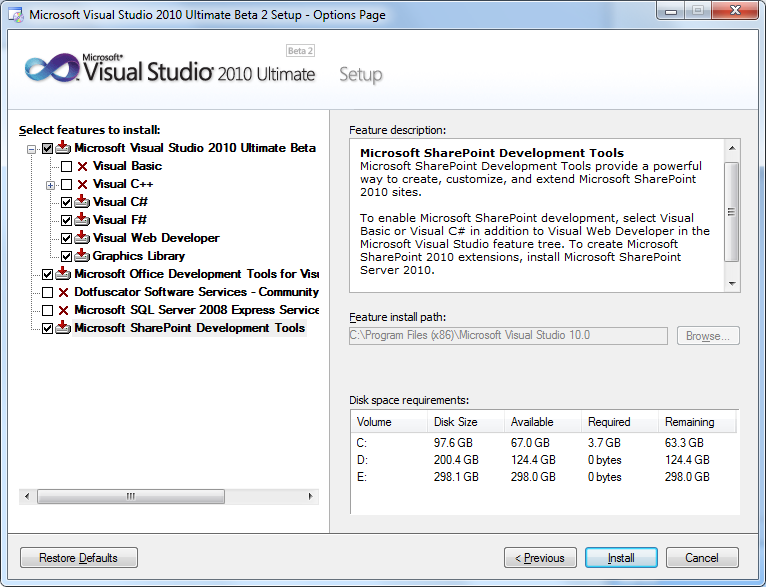
I guess everybody knows by now. But if not: The beta 2 of Visual Studio 2010 brings SharePoint Development tools as an option.

After all the Videos and Screencasts about SP 2010 development, I wanted to try it myself. So I installed VS 2010 on my notebook.

VS 2010 Setup

An SQL Server 2008 has already been installed. I’ll skip that part as well.

More on SharePoint 2010

SharePoint Konferenz 2010, ich bin dabei

Auch im nächsten Jahr ist die SharePoint Konferenz wieder in München. Und zwar am 24.-25. Februar 2010.

SPkonfBanner

Mit einer Session zum Thema “BCS und SharePoint auf dem Client” bin auch ich wieder mit dabei.

Der Business Data Catalog heisst jetzt Business Connectivity Service. Daten können nun nicht nur von anderen Datenquellen gelesen, sondern auch zurück geschrieben werden. SharePoint auf dem Client? Aber nicht mit Webservices, sondern mit einem kompletten Objektmodell. In Verbindung mit den BCS kann SharePoint mit Silverlight oder ein Client mit WPF alle Daten nutzen, die im SharePoint zur Verfügung stehen.

Beta?

Yes! The beta is available via MSDN 🙂

What beta? –> http://msdn.microsoft.com/en-us/subscriptions/subscription-downloads.rss

  • Office Search Server Express 2010 Beta (x64) – (English)
  • Office SharePoint Server 2010 Beta (x64) – (English)
  • Office SharePoint Foundation Server 2010 Beta (x64) – (English)
  • Office Web Applications 2010 Beta (x64) – (English)
  • FAST Search Server SharePoint 2010 Beta (x64) – (English)
  • Office SharePoint Designer 2010 Beta (x86 and x64) – (English)
  • and Office Client Applications

CodePlex project

Today I’ve created a CodePlex project for some of my SharePoint developments. Interesting to see what I’ve done so far 🙂

The link is http://renehezser.codeplex.com/

Webparts

  • [Access Fileserver Data via SharePoint][3]
  • [Display all my alerts][4]
  • [Webpart to show Sitecollections/Subwebs][5]
  • [TagCloud Webpart][6]
  • [Display a single ListItem][7]

Custom Fields

  • [Upload Files and Images][8]

Features

  • [.NET 3.5 and Silverlight][9]

Control Adapter

  • [Navigation for Wikis][10]

Event Handler

  • [Picture Library and Exif data][11]
  • [EventHandler which sends an Email for new/changed items][12]

Tools

Disable Loopback Check?

A while ago Microsoft released an update, which prevents that you can log on locally to a website which has a FQDN.

To resolve issues with e.g. the crawling a KB article has been published.

You receive error 401.1 when you browse a Web site that uses Integrated Authentication and is hosted on IIS 5.1 or a later version

You can disable the loopback check completely, or just for the used FQDNs. This would be the better way.