
SPWeb/SPSite.Dispose()
By now most of you should know that there is a SharePoint Diagnostics Tool. This really is a great tool, since it scans your assemblies for memory leaks.
You should also know, that there is an occasion you can create a memory leak which the tool will not recognize.
1: using (var site = new SPSite(“http://yoururl”))
<span class=lnum> 2: </span>{3: SPWeb web = null;
<span class=lnum> 4: </span> <span class=kwrd>try</span>
5: {
<span class=lnum> 6: </span> web = site.OpenWeb();
7: // do something with this web
<span class=lnum> 8: </span> <span class=rem>// ...</span>
9: // done. don't need it anymore. but i need another web
<span class=lnum> 10: </span> web = site.AllWebs[<span class=str>"webname"</span>];
11: }
<span class=lnum> 12: </span> <span class=kwrd>finally</span>
13: {
<span class=lnum> 14: </span> <span class=kwrd>if</span> (web != <span class=kwrd>null</span>) web.Dispose();
15: }
<span class=lnum> 16: </span>}
The SPWeb from line 6 will not be disposed in line 14, because in line 10 we assign another SPWeb to the web!
Publish Word documents to a SharePoint Wiki
How do you copy the content from a Word document to a Wiki library? A simple Copy&Paste does not work, as it omits the pictures from the document.
Andreas Strothmann has posted a interesting way for deploying Word docs to a Wiki library.
His steps are:
- Open your Word document
- Save it as docx if it is an old doc
- Publish the document to a SharePoint Blog
Note: the pictures included in the Word document will be uploaded to the Blog picture library! So do not delete the Blog site later, and make sure your Wiki visitors can read items from the picture library. - Open the Blog entry in your browser and click on the Edit Button
- Copy the whole entry
- Paste the clipboard to a Wiki page
SharePoint Designer for free?
As Bill Simser posts in his blog, the SharePoint Designer will be available for free download from April 1st.
SharePoint and Database Maintenance
In this post I would like to point to “an issue” with the Database Maintenance for Microsoft® SharePoint® Products and Technologies. It shows a stored procedure, which will defragment the index of a database.
How to defragment Windows SharePoint Services 3.0 databases and SharePoint Server 2007 databases
The problem is that it is mentioned nowhere, that the stored procedure requires the Enterprise version of the SQL Server 2005!
Issues in WSS V2
Responses to items in an Issue list (SPListIssue) are new version in WSS V3. WSS V2 lacks the ability to use versions for lists. So what did Microsoft do that an Issue list behaves like it is using versions?
In WSS V2 items in a single “thread” all have different ItemIDs. To group them together, all have the same IssueID. This is the ItemID from the original item.
A single issue in WSS V2 could look like this:
Apply a LDAP Filter for User Profile Import
With MOSS (Microsoft Office SharePoint Server 2007) you can import user profiles from an Active Directory or LDAP. By default, it will import user profiles from the current domain. The import will include all user objects, since the default LDAP filter is:
(&(objectCategory=Person)(objectClass=User))
Deactivated and deleted accounts will appear in the SharePoint user database.
The filter value can be adjusted, to only import active user objects.
(&(objectCategory=person)(objectClass=user)(!(userAccountControl:1.2.840.113556.1.4.803:=2))(!(IsDeleted=TRUE)))
New Server in the farm – Trial?
Imagine you have a working SharePoint Server Farm with a valid license. The great thing about SharePoint is that you can extend an existing farm with new servers, to split roles or increase performance/redundancy.
Now you add a new Server to the farm. So you install SharePoint, make sure it has the same patches installed as the rest of the farm, and add it to the farm by connecting it to the existing configuration database. But wait… what key did you use to install the server? Did you use the same product key as for the rest of the servers, or did you use a trial key, because it was written onto the CD?
SharePoint UserGroup in OWL?
Vor einiger Zeit hat Michael Greth einen Aufruf gestartet. Wer Interesse an einer regionalen UserGroup hat, sollte sich bei ihm melden.
Bisher sind schon einige regionale UserGroups gegründet worden. Eine Übersicht findet sich auf der SharePointCommunity.
Auf den o.g. Aufruf habe ich damals schon geantwortet. Jedoch hatten sich zu wenig Interessenten aus OWL (Raum Bielefeld, Paderborn, Gütersloh…) gemeldet. Zum Glück gab es die Abendveranstaltung der SharePointKonferenz 2009 in München. Dort habe ich mich u.A. mit Ingo Zimmermann unterhalten. Auch Ingo möchte gerne eine UserGroup in Reichweite haben.
Custom Field – Upload Files and Images
If you know my WikiWebpart or DiscussionListUploader, you know that there are some occasions where you want to upload a file, and place a link to it to another field.
The above solutions are only for the certain list type.
My new custom field can be used on every list or library!
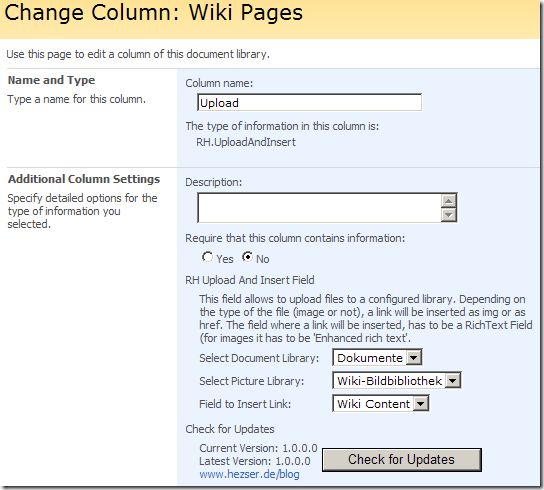
Just add the field to one of your lists/libraries:
How to use the SharePoint Web Controls – Update
My post How to use the SharePoint Web Controls has been updated.
It now shows how to use a generic control for each SPField, instead of picking the corresponding SharePoint Web Control.
1: BaseFieldControl webControl = field.FieldRenderingControl;
<span class=lnum> 2: </span>webControl.ListId = list.ID;
3: webControl.ItemId = item.ID;
<span class=lnum> 4: </span>webControl.FieldName = field.Title;
5: webControl.ID = GetControlID(field);
<span class=lnum> 6: </span>webControl.ControlMode = mode;
Thanks for all the great comments and ideas!
The file manifest.xml does not exist in the solution package
Creating a SharePoint solution file (which is a cab file renamed to wsp), can cause problems if the size of the file would exceed the space on an 1.44MB disk.
1.44MB? What the…? The default values for makecab, which is used for generating the cab file, will prevent the creation of a valid cab file 🙁
Thanks to Eugene Rosenfeld for finding this one.
SharePoint Konferenz
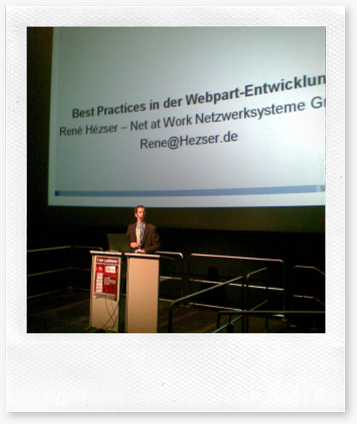
Dieser Post ist noch ein Nachtrag zur SharePoint Konferenz in München.
Mein Fazit zur Veranstaltung: Eine Gelungene Veranstaltung mit hochkarätigen Vorträgen!
Deshalb geht mein Dank an den Veranstalter mit seinem Team, die verschiedenen Sprecher und natürlich an die Teilnehmer der Konferenz. Ein Gedankenaustausch durch zahlreiche Gespräche zwischen den Beteiligten war jederzeit möglich. Allein diese Tatsache ist auf Konferenzen ein Grund zur Teilnahme. Wo sonst kann man sich mir so vielen Personen zum Thema SharePoint austauschen?
CKS:EBE
Finally I found the time to enable the Enhanced Blog Edition on my blog.
As you can see, the layout did change 🙂 The EBE also brings some new functionality like comment spam detection, trackbacks and a cleaner RSS feed.
So if you are using the old URL for my RSS feed, please update it to http://feeds2.feedburner.com/ReneHezser
The new feed URL may result in duplicate RSS items.
The EBE is not a final version. So if something is not working as expected, please let me know.
Next SharePoint
Here is some information about the next release of SharePoint.
FAST Search for SharePoint, a new search server that will add the high-end search capabilities of FAST ESP into Microsoft Office SharePoint Portal Server, will be available as a part of the next release of the Microsoft Office system.
As part of this vision, and feedback from a wide variety of customers, PerformancePoint scorecarding and dashboarding capabilities will now become part of SharePoint Enterprise CAL and available to customers who are on SharePoint SA.
SharePoint Konferenz Vortrag
Nach meiner Session auf der SharePoint Konferenz veröffentliche ich wie versprochen meinen Vortrag von inklusive dem Sourcecode. In der Solutions ist auch Code für einen Feature Receiver enthalten.
Update
Die restlichen Vorträge sind inzwischen zum Download auf einer Seite gesammelt worden:
http://live.sharepointcommunity.de/wiki/SKPPEDV2009/Forms/Downloads.aspx