
Using the SharePoint SiteMapProvider
Did you ever wanted to create a Webpart for site navigation? Well, you can use the SPSiteMapProvider from SharePoint.
In your Webpart you could use this code to access the SPSiteMapProvider.
1: SPSiteMapProvider sitemapProvider = (SPSiteMapProvider)SiteMap.Providers["SPSiteMapProvider"];
<pre style="padding-right:0px;padding-left:0px;font-size:8pt;padding-bottom:0px;margin:0em;overflow:visible;width:100%;color:black;border-top-style:none;line-height:12pt;padding-top:0px;font-family:consolas, 'Courier New', courier, monospace;border-right-style:none;border-left-style:none;background-color:#f4f4f4;border-bottom-style:none"><span style="color:#606060">   2:</span> SiteMapDataSource datasource = <span style="color:#0000ff">new</span> SiteMapDataSource();</pre>

<pre style="padding-right:0px;padding-left:0px;font-size:8pt;padding-bottom:0px;margin:0em;overflow:visible;width:100%;color:black;border-top-style:none;line-height:12pt;padding-top:0px;font-family:consolas, 'Courier New', courier, monospace;border-right-style:none;border-left-style:none;background-color:white;border-bottom-style:none"><span style="color:#606060">   3:</span> datasource.Provider = sitemapProvider;</pre>
This Datasource can be the datasource for a regular ASP.NET Treeview Control:
Updated WikiWebpart + Tool to install it
I updated my WikiWebpart. You can now download it as a SharePoint Solution.
Steps to install the solution:
- Install the solution via “stsadm -o addsolution -filename RH.WikiWebpart.wsp”
-
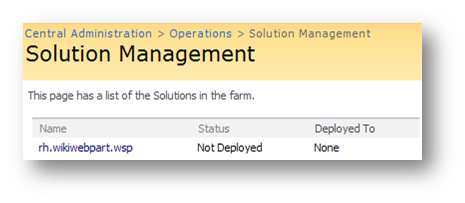
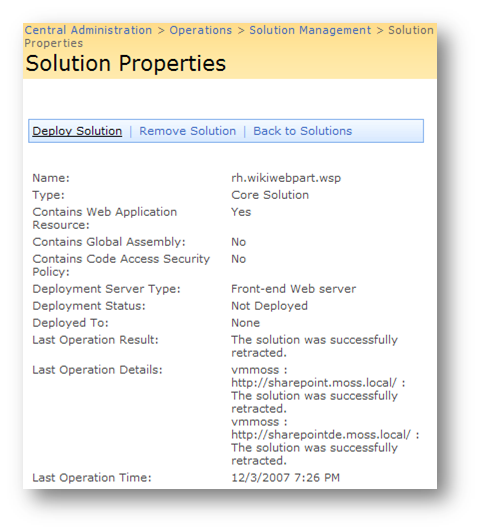
Go to your "Central Administration > Operations" and deploy the solution
1.
*
-
Go to “Site Actions > Site Settings > Site Collection Administration > Site collection features” and active the feature

SharePointConsole
I wrote a Console application, which will allow you do some common tasks for your SharePoint environment. stsadm lacks some functionality like recyling all list items from a list…
Just copy the exe to your SharePoint Server, and execute it with an account which has the appropriate rights on your farm.
Usage:
SharePointConsole http://siteurl[/weburl] Command [Parameter1 Parameter2]
The SharePointConsole has the following parameters:
- EnumContentTypes
- CreateContentType
- RenameContentType
- DeleteContentType
- DeleteAllListItems
- ShowInNewForm
- ShowInEditForm
- ShowInDisplayForm
- DeleteAllVersions
- RecycleAllVersions
- SetTitleWithFilename
- SetSearchCenterUrl
- SystemUpdate
- FeatureManager
- EmptyRecycleBin
EnumContentType:
Returns all content types from the specified sitecollection.
HowTo create an object if you only have its type as string
Sometimes you have only the type of an object, which you want to create. Meaning you want to create an object dynamically. This is how you would achieve your goal:
In my case I wanted to create a SPField from its typename.
1: string typename = “Microsoft.SharePoint.SPFieldText, Microsoft.SharePoint, “+
<span class=lnum> 2: </span> <span class=str>"Version=11.0.0.0, Culture=neutral, PublicKeyToken=71e9bce111e9429c"</span>;
3: Type t = Type.GetType(typename, true, true);
<span class=lnum> 4: </span><span class=kwrd>object</span> newObject = System.Activator.CreateInstance(t,
5: BindingFlags.SetProperty, new object[] { fields, "Title" });
I know one constructor for a SPField is to create a new object with the SPFieldCollection and its name.
Create an audience which contains an Active Directory Group
In the SDK are examples on how to create an audience which adds a rule like:
1: AudienceRuleComponent r1 = new AudienceRuleComponent("FirstName", "Contains", "John");
But how do you create a rule which takes the membership of an Active Directory Group? Well, look at this:
1: string groupName = "CN=Users,CN=Builtin,DC=domain,DC=tld";
<pre style="padding-right:0px;padding-left:0px;font-size:8pt;padding-bottom:0px;margin:0em;overflow:visible;width:100%;color:black;border-top-style:none;line-height:12pt;padding-top:0px;font-family:consolas, 'Courier New', courier, monospace;border-right-style:none;border-left-style:none;background-color:#f4f4f4;border-bottom-style:none"><span style="color:#606060"> 2:</span> AudienceRuleComponent r1 = <span style="color:#0000ff">new</span> AudienceRuleComponent(<span style="color:#006080">"DL"</span>, <span style="color:#006080">"Member of"</span>, groupName);</pre>
To get the ‘distinguishedName’ from a group, you can use ADSI Edit (open up a MMC and add the ADSI Edit Snap-In).
Display all my alerts
The "old" SharePoint Server 2003 offered the ability to display all alerts from a user on his/her MySite. MOSS and SharePoint 2010 lacks this functionality. So I wrote a Webpart, which will display all my alerts. Of course is multilingual. Currently there is English, German and Spanish language support included. And it will work on Windows SharePoint Services V3 as well ass SharePoint Foundation. You don’t need the Office Server / SharePoint Server 2010 for it 🙂
HowTo use the resource files from SharePoint
How about using the available resources from SharePoint to translate some basic words and sentences? Well, it is quite easy to use the available resources. You need the Microsoft.SharePoint.Intl.dll and some lines of code to use the already translated resources:
// define yourself variables
private readonly CultureInfo _Cult;
private readonly Assembly _SharePoint_Intl_Assembly;
private readonly ResourceManager _SharePoint_RM;
private readonly ResourceManager _SharePoint_WebPartPage_RM;

// initialize them in your constructor
_SharePoint_Intl_Assembly = Assembly.Load("Microsoft.SharePoint.intl, Version=12.0.0.0, Culture=neutral, PublicKeyToken=71e9bce111e9429c");
_SharePoint_RM = new ResourceManager("Microsoft.SharePoint", _SharePoint_Intl_Assembly);
_SharePoint_WebPartPage_RM = new ResourceManager("Microsoft.SharePoint.WebPartPages.strings", _SharePoint_Intl_Assembly);

// get the current culture
internal static CultureInfo GetCultureInfo()
{
	CultureInfo newCultureInfo;
	try
	{
		uint localeID = SPContext.Current.RegionalSettings.LocaleId;
		newCultureInfo = new CultureInfo((int)localeID);
	}
	catch
	{
		newCultureInfo = new CultureInfo(1033);
	}
	return newCultureInfo;
}

// use the resources
string test = _SharePoint_RM.GetString("ExpireDateInPast", _Cult);
// will result in 'The Expire date is in the past.'
But how do you know how the resource name for your translated text might be? Your friend and helper is the Reflector. Open up the ‘Microsoft.SharePoint.Intl.dll’ from the ‘C:\WINDOWS\assembly\GAC_MSIL\Microsoft.SharePoint.intl\12.0.0.0__71e9bce111e9429__71e9bce111e9429c’ folder (navigate to that path with cmd.exe and copy the dll to some safe place like c:\temp).
Custom assemblies for the Reporting Services 2005
Even if the Reporting Services are very powerfull, you might get to the point where you have to extend the building functionality. So why not write your own custom assembly with some additional code?
Create your assembly like this:
1: using System;<br> 2: using System.Security.Permissions;<br> 3: using Microsoft.SharePoint;<br> 4: <br> 5: public class MyNamespace<br> 6: {<br> 7: public class ReportingExtension<br> 8: {<br> 9: public ReportingExtension()<br> 10: {<br> 11: }<br> 12: <br> 13: public static string HelloWorld()<br> 14: {<br> 15: return "Hello World.";<br> 16: }<br> 17: <br> 18: [EnvironmentPermission(SecurityAction.Assert, Unrestricted = true)]<br> 19: [Microsoft.SharePoint.Security.SharePointPermission(SecurityAction.Assert, Unrestricted = true)]<br> 20: public static string getSomeListItem(string url, int itemID)<br> 21: {<br> 22: string returnvalue = string.Empty;<br> 23: try<br> 24: {<br> 25: using (SPSite site = new SPSite(url))<br> 26: using (SPWeb web = site.OpenWeb())<br> 27: {<br> 28: // do something<br> 29: returnvalue = "";<br> 30: }<br> 31: }<br> 32: catch (Exception ex)<br> 33: {<br> 34: return ex.ToString();<br> 35: }<br> 36: <br> 37: return returnvalue;<br> 38: }<br> 39: }<br> 40: }
Updated Wiki Webpart
Please use my custom field type. It is more flexible –> http://www.hezser.de
I updated my Wiki Webpart. For all of you who don’t know what it does:
The normal Wiki Edit Form misses the ability to upload pictures. My Webpart, which has to be included to the EditForm.aspx, allows you to upload a picture. It also creates a link in your Wiki post, which displays the uploaded image.
This release of the Webpart is multi lingual. Meaning it will present text to the user in english and german. If you would like this Webpart in your language, drop me a note 🙂
updated SDKs
The updated SDKs are now available for downloading.
Get form Url from a list
Whenever you have an ID from a list item, you might want to create a link to its DispForm or EditForm. But how do you get the Url to the forms?
1: SPList list = something;
<span class=lnum> 2: </span>list.Forms[PAGETYPE.PAGE_DISPLAYFORM].Url;
Create an eventlog entry
For exception handling it is good practice to write errors to the eventlog.
EventLog.WriteEntry(“SharePoint.Error”, errorText, EventLogEntryType.Error);
Since SP1 for Windows Server 2003 “the normal user” is not allowed to write to the eventlog. James Kovacs wrote a great article about the problem.
(Remember to create your eventlog source, if you have your own!)
1: if(!EventLog.SourceExists(“SharePoint.Error”, ".")) {
<span class=lnum> 2: </span> EventLog.CreateEventSource(<span class=str>"SharePoint.Error"</span>, <span class=str>"Application"</span>, <span class=str>"."</span>);
3: } How to get LookupField Information from a listItem
If you want the ID or the value form a LookupField, you can get it easily with this code snippet:
SPListItem item = getitsomewhare… SPFieldLookupValue lf = (SPFieldLookupValue) item.ParentList.Fields.GetField(_FieldName).GetFieldValue( item.GetFormattedValue(_FieldName));
if you got the field, fetch its properties via
if (lf == null) { int itemID = lf.LookupId; string itemValue = lf.LookupValue; }
Have fun ;-)
Display a website, which requires authentification
I started to write a Webpart, which shows the content of a remote website. You can specify logon information, as well as proxy information.
**It is not ready yet! But I was asked for it. So I will publish it unfinished!
**

Get a listitem by ID
Fetching a listitem by ID will generate an error, if the a listitem with the ID does not exist. To avoid this exception, you can get a listitem by id by searching for it:
private SPListItem GetListItem(SPList List, int ListItemID) { try { string defaultView = List.DefaultView.Title; SPQuery query = new SPQuery(List.Views[defaultView]); string caml =String.Format("
", {0}
ListItemID); query.Query = caml; SPListItemCollection results = List.GetItems(query); if (results.Count == 1) { return results[0]; } } catch (Exception ex) { _ErrorMessage +=
String.Format(“List "{0}" does not contain an item with the id "{1}".
{2}",
List.Title, ListItemID, ex.Message); } return null; }