
PortalSiteMapProvider.GetCachedListItemsByQuery
With MOSS 2007 or SharePoint Server 2010 you can use the PoraltSiteMapProvider of the Microsoft.SharePoint.Publishing.dll assembly to retrieve cached listitems.
<span style="color:#606060" id=lnum1> 1:</span> PortalSiteMapProvider ps = PortalSiteMapProvider.WebSiteMapProvider;
<span style="color:#606060" id=lnum2> 2:</span> var pNode = ps.FindSiteMapNode(web.ServerRelativeUrl) as PortalWebSiteMapNode;
<span style="color:#606060" id=lnum3> 3:</span> var query = new SPQuery
<span style="color:#606060" id=lnum4> 4:</span> {
<span style="color:#606060" id=lnum5> 5:</span> Query = "<Where><Neq><FieldRef Name='ID' /><Value Type='Counter'>0</Value></Neq></Where>"
<span style="color:#606060" id=lnum6> 6:</span> };
<span style="color:#606060" id=lnum7> 7:</span> SiteMapNodeCollection quoteItems = ps.GetCachedListItemsByQuery(pNode, "Top Seiten", query, web);In my case, I didn’t need any special where clause. I wanted to retrieve all items, so I left the Query property empty. And because I needed only three columns, I specified the ViewFields property of the SPQuery object.
CKS:EBE 3.0-Enhanced Blog Edition 3.0
Like many other blogs running SharePoint, my blog uses the EBE to add more functionality to the default SharePoint blog.
And since I am one of the developers of the EBE 3.0, I’m glad that we announce the release of the next release. Version 3 brings along many new features and improvements of already implemented features.
New Features
*Ability to theme wiki pages
*Ability to export post to PDF
*Localization (French, Spanish)
*Technorati Links from post categories
*Ability to bookmark post with Twitter
*Centralized Theming – Ability to create a theme library at the root and allow sub blog sites to use the common theme library.
*The ability to add an XML feed control
*Logging of pingbacks and trackback errors to SharePoint Logs directory
*Support of feature stapling
*Preliminary SharePoint 2010 Beta 3 compatible (with web.config edits)
*EBE caching and performance validation
*Performance increases for page loads less than <3 sec
Note: Some features are specific to certain themes
SPListItem.GetItemByUniqueId
Did you know you can fetch an item by its UniqueId even if it is in the recycle bin?
You can even update its data while it is already recycled. I wonder if there is a scenario, where you would want to modify an already recycled ListItem…
SharePoint 2010 SDK
The Microsoft SharePoint 2010 Software Development Kit (SDK) contains conceptual overviews, programming tasks, samples, and references to guide you in developing solutions based on SharePoint 2010 products and technologies.
You can grab it here: http://www.microsoft.com/downloads/details.aspx?displaylang=en&FamilyID=f0c9daf3-4c54-45ed-9bde-7b4d83a8f26f
The download contains the SDK for SPF and SPS. No need to download two separate files anymore.
The SharePoint Developer Center can be found here: http://msdn.microsoft.com/en-us/sharepoint/default.aspx
The IWebPartField Interface versus the ASP.NET Lifecycle
A Webpart receives a filter value through the IWebPartField interface. The example over at MSDN was simple and clean. So I adopted the code to my Webpart.
A common scenario would be to create controls based on the received filter value. E.g. query a list for the passed filter value, and display the item from the query.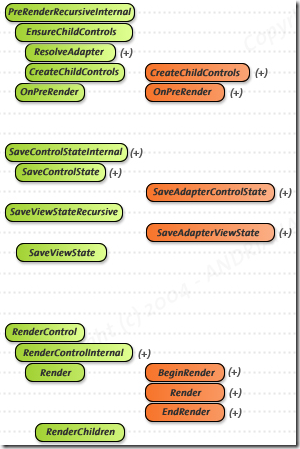
Problem
From the ASP.NET Lifecycle we know how to deal with controls. Create them in CreateChildControls, assign values in OnPreRender and let them being rendered in RenderContents. Now we have a problem. The passed value in our Webpart is not available at any place, where we can still add controls to the page. If we try to do in RenderContens, they are not shown. It’s too late.
Modify Overwrite Policy for an EventLog created by an EventLogInstaller
Developing a Windows Service is a common task. Creating an EventLog for this service also is a common practice. The EventLog can be created with a ServiceInstaller (a class which inherits from System.Configuration.Install.Installer).
This is how an Eventlog can be added during the installation with a custom Installer class:
public Installer()
   {
      Installers.Add(new EventLogInstaller
               {
                  Source = "EventLogSource",
                  Log = "EventLogName"
               });
The EventLogInstaller class does not allow to set the overwrite mode.
Visual Studio 2010 RC
I’ve just seen that the RC is available via MSDN.
Silverlight 4 is not supported in the RC it says in the notes. Have to try SharePoint Development against the Beta 2…
Update to “Upload Files and Images” field type
I’ve fixed a bug with my [Custom Field – Upload Files and Images][1].
[1]: “Custom Field – Upload Files and Images”
Google Analytics data in a SharePoint list
Jacob Reimers has written an C# API for accessing Google Analytics data.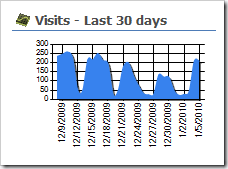
When I saw his post, I thought it would be great to fetch the latest data every day, and write it to a SharePoint list. Then you can use the data, without querying Google for every request.
You could then use the ChartPart for SharePoint to generate nice charts from your Google Analytics data.
Anwendungsentwicklung mit SharePoint 2010
Fabian hat es auf seinem Blog schon geschrieben. Deshalb werde ich auch über unser Projekt bloggen.
Zusammen schreiben wir ein Buch zum Thema Anwendungsentwicklung mit SharePoint 2010. Das Buch richtet sich an Entwickler, Anwender und Administratoren und hat das Ziel, Wege aufzuzeigen, mit denen Unternehmenslösungen mit SharePoint 2010 realisiert werden können.
SPFarm.Local is null?
It took me some time to find the solution to a problem, where a WPF application could not connect to a local SharePoint farm via SPFarm.Local. It always returned null.
Windows 7 was not the problem. I copied my application to a Windows Server 2008 VM to test.
In case somebody has the same problem, here is the solution:
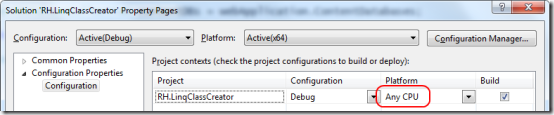
Make sure you have set the Platform to “Any CPU” and not x86 if you are using x64 assemblies.
SPDispose or not to SPDispose
Roger Lamb has posted an article about SharePoint objects, which must not be disposed. He also wrote about changes to SP 2010 regarding disposing objects.
- SPContext.Current.Site
- SPContext.Current.Web
- SPContext.Site
- SPContext.Web
- SPControl.GetContextWeb(..)
- SPControl.GetContextSite(..)
- SPFeatureReceiverProperties.Feature.Parent
- SPItemEventProperties.ListItem.Web
- SPList.BreakRoleInheritance()
- Do not call list.ParentWeb.Dispose()
- SPListEventProperties.Web
- SPListEventProperties.List.Web
- SPSite.RootWeb
- Problems may occur when SPContext.Web has equality to the SPContext.Web.. make sure you dispose of SPSite and it will cleanup sub webs automatically
- SPSite.LockIssue
- SPSite.Owner
- SPSite.SecondaryContact
- SPWeb.ParentWeb
- SPWebEventProperties.Web
More on his blog: http://blogs.msdn.com/rogerla/archive/2009/11/30/sharepoint-2007-2010-do-not-dispose-guidance-spdisposecheck.aspx
Getting started with Silverlight development
Tim Heuer has written 7 posts about Silverlight development. So if you haven’t started with Silverlight but plan to, have a look at his post series.
- Part 1: Really getting started – the tools you need and getting your first Hello World
- Part 2: Defining UI Layout – understanding layout and using Blend to help
- Part 3: Accessing data – how to get data from where
- Part 4: Binding the data – once you get the data, how can you use it?
- Part 5: Integrating additional controls – using controls that aren’t a part of the core
- Part 6: Polishing the UI with styles and templates
- Part 7: Taking the application out-of-browser
CodePlex project
Today I’ve created a CodePlex project for some of my SharePoint developments. Interesting to see what I’ve done so far 🙂
The link is http://renehezser.codeplex.com/
Webparts
- [Access Fileserver Data via SharePoint][3]
- [Display all my alerts][4]
- [Webpart to show Sitecollections/Subwebs][5]
- [TagCloud Webpart][6]
- [Display a single ListItem][7]
Custom Fields
- [Upload Files and Images][8]
Features
- [.NET 3.5 and Silverlight][9]
Control Adapter
- [Navigation for Wikis][10]
Event Handler
- [Picture Library and Exif data][11]
- [EventHandler which sends an Email for new/changed items][12]
Tools
Develop your own Windows Service
Writing a Windows Service is very easy. Deploying it with a Setup is an easy task as well.
But be careful what option you set for the failure behavior!
In my case I installed the service with “Windows Installer XML (WiX) toolset”.

Do not use critical as ErrorControl value. It will force a reboot of the server, if the services fails to start.
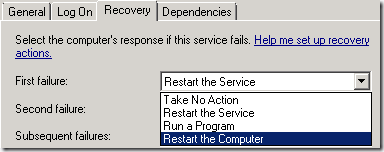
Fortunately booting with “Last known good configuration” worked for me and I could uninstall the service…