Development

Two Hackathons in a week

What a week. Two hackathons (‘hack’+marathon) in a row. That was exhausting.

  • A three day hackathon with my colleges from Arvato Systems and a customer. We’ve used Cognitive services with 8 different programming languages and created great PoCs.


  • The second hackathon was about Azure Stack with Microsoft.
  • Widgets instead of Add-Ins/Apps?

    The concept of Add-Ins (formally knows as Apps) in SharePoint puts logic as HTML and CSS to another page. This page is then rendered as iFrame to another SharePoint page. This approach has advantages and disadvantages. You have to decide yourself.

    A very promising way to put stuff (or WebParts) onto a SharePoint page is the Widget Wrangler.

    More information can be found on https://dev.office.com/blogs/introducing-widget-wrangler.

    Conceptually Widget Wrangler implementation is based on similar thinking as PnP App Script Part implementation, which was released few years back as part of the PnP patterns (or at the time it was call App Model Samples). Advantages of this model is that you do not have deal with iFrame implementations and functionalities can be fully responsive, where needed. Also implementation of the capabilities is much simpler when your JavaScript is directly embedded to the page rendering logic without additional complexity.

    Custom field and UpdateFieldValueInItem()

    Recently I was developing a custom field. To store modified values, the UpdateFieldValueInItem method has to be overwritten.

    In a normal way of clicking the submit/save button, the method is called and I can adjust the value for the field within the current item. The changes are submitted to the database later.

    But what if you want to modify items outside of the current item? Sure, you can do so would you think. But you’ll need to consider the scenario that the user does not click submit/save. The method is called on every postback. The PeoplePicker will cause a postback, when it validates its values. There might be other controls as well, which behave this way.

    What is Dependency Injection?

    This post will help you understand what DI (Dependency Injection) is, and how easy you can adopt the design patterns to create flexible and testable code. For a definition take a look at this Wikipedia article.

    From the three types of Dependency Injection

    • constructor injection
    • setter injection
    • interface injection

    this post covers the interface type.

    The example will deal with a SharePoint list. This list can either be the posts list of a blog, or the comments list. The distinction is necessary, as both lists have different fields, which might be used for querying data later.

    Migrate SharePoint Blog to WordPress

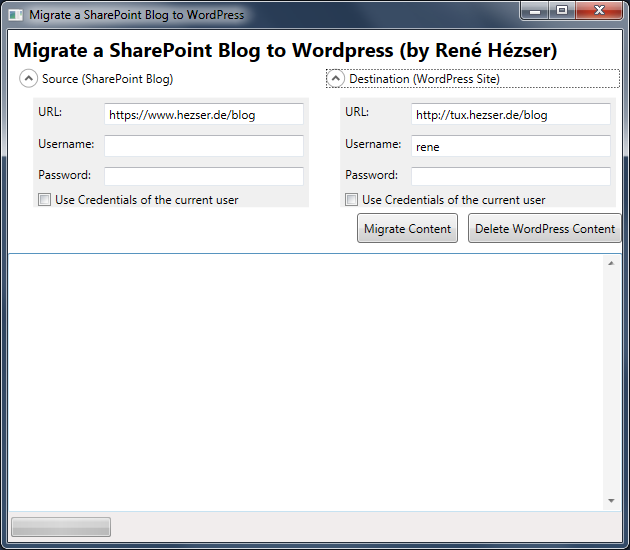
    As promised here, this is a follow-up post with the tool I developed for the SharePoint to WordPress migration.

    First, a screenshot:

    Migrate SharePoint ot WordPress Screenshot

    What is it, that we have to cover with a migration? Copying the posts is not enough. So I came up with this features:

    Features

    • Copy posts
    • Copy comments
    • Copy resources like images and downloads
    • Create needed tags and categories
    • Modify links to local resource
    • deal with https, if links are absolute on the source blog and mixed with http
    • Using web services to connect to source and destination
    • URL rewriting (covered by a WordPress Plugin)
    • Delete all content from the destination blog (for migration testing)
    • Replace strings (with Regex)
    • a nice (WPF) GUI

    Description

    Originally I’ve build a plain console application. Then I thought that a console application would possibly scare some users. And after some time I wanted to do some WPF again. So I created a WPF application, to wrap all the functionality into a GUI. This way it will be easier to use for the folks out there, who do not like black console applications 😉 Since I am using web services to connect to both blogging platforms, the tool can be executed on any client computer. No access to a server session is required.

    Using TLS with SmtpClient

    A rather small change to your code can increase security by sending E-Mails via an encrypted connection.

    Recently I stumbled across code, that send E-Mails with the System.Net.Mail.SmtpClient class. That piece of code did not try to communicated encrypted with the receiving SMTP server. So I changed that, to enable a TLS connection.

    try
    {
      var message = new MailMessage();
      _smtpClient.EnableSsl = true;
      _smtpClient.Send(message);
    }
    catch (SmtpException ex)
    {
      // if the recpient mailserver does not support SSL, send without encryption
      _smtpClient.EnableSsl = false;
      _smtpClient.Send(message);
    }

    The change in my code was to enable TLS be default, and turn it off in case the receiving SMTP server does not support it. Everything else is untouched, which results in a small change in code to increase security.

    The solution for warming up SharePoint

    Most SharePoint Farms will have a solution for the long loading time after an Application Pool recycle or iisreset running. There are many different ways to preload websites, so your users have faster load times. So why another solution?

    There are some questions, that I think have not been dealt with before:

    • Most solutions require some sort of Timer to be started (e.g. a Scheduled Task)
    • When should the warmup occur?
    • What about multiple WebFrontend Servers?
    • How about Claims support?
    • Which URLs have to be called? What about extended WebApplications?
    • New WebApplications require the warmup tool to be adjusted
    • Manuell warmup after Deployments
    • What about search?
    • Did the Farm warmup correctly?

    Years ago I developed a console application, which warms up SharePoint by calling each Site within a SiteCollection. It has bee updated multiple times with new features.

    Building a Visual Studio project for SP2010/SP2013 (.NET 3.5/4.0)

    In this post I will show you how you can use MSBuild to target your project for .NET 3.5 or .NET 4.0 and use a separate app.config file for each.

    My Warmup Tool is supposed to work with SP2010 and SP2013. To achieve that compatibility, I have to change the TargetFramework of the project to be able to compile, as well as the app.config so the application uses the desired Framework. I didn’t want to change the values every time manually. An automated solution has to be possible. And it is. Some little changes to the project file and MSBuild will do all the work for you 🙂

    SQL Access to Configuration DB required

    In many cases you pass an URL string to connect to SharePoint. In my case I wanted to verify the URL by using this code:

      1: Uri requestUri;
    
      2: if (!Uri.TryCreate(absoluteUrl, UriKind.Absolute, out requestUri))
    
      3:   throw new ArgumentException(absoluteUrl + " is no a valid URL.");
    
      4: 
    
      5: SPWebApplication webApplication = SPWebApplication.Lookup(requestUri);

    And here comes the “but”. I did not know that the account, which is executing the code, needs permissions to the Configuration Database!

    When a Feature gets installed

    Have you ever thought about the Features folder and when a folder will be created for one of you features? Well, I did 🙂

    Why is this relevant, anyway? To be able to activate a feature on a given scope, it has to be installed first. That’s why.

      <td valign="top">
        <strong>Result</strong>
      </td>
    </tr>
    
    <tr>
      <td valign="top">
        stsadm -o addsolution
      </td>
      
      <td valign="top">
        The solution is added to the farm. Features are not available
      </td>
    </tr>
    
    <tr>
      <td valign="top">
        stsadm -o deploysolution
      </td>
      
      <td valign="top">
        Feature folders are created and the Features are available for activation
      </td>
    </tr>
    
    <tr>
      <td valign="top">
        stsadm -o installfeature
      </td>
      
      <td valign="top">
        A feature with ID xyz has already been installed in this farm.  Use the force attribute to explicitly re-install the feature.
      </td>
    </tr>
    
    Action

    Great. After deploying the solution, the feature is automatically installed and can be used. I did expect this, because installing a feature is a rather uncommon task.

    Activating Features after Solution Deployment via VS

    Visual Studio allow a F5 Deployment. I guess you all know that. The part where you have to think carefully is, when you add Features to your project.

    Should you activate “Activate On Default”? Well, it depends (as always). Usually I don’t enable that setting, because features tend to be activated on scopes you won’t expect.

    The problem

    Take a WebApplication scoped feature for example. It might create SafeControl entries for your controls. Do you really want them to be added to an Extranet WebApplication if your solution is solely for an Intranet Application?

    SPQuery for my tasks

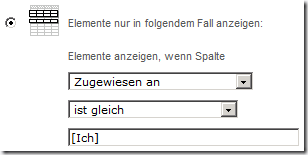
    Developing solution with multiple languages (or a language which is not English) sometimes can be a bit painful. To configure a Webpart to display only my tasks, I would filter for [Me] or [Ich].

    image

    To achieve the same via code / CAML, you can filter by UserID and not the string “Me”.

      1: <Where>
    
      2:   <Eq>
    
      3:     <FieldRef Name="AssignedTo" />
    
      4:     <Value Type="Integer">
    
      5:       <UserID />
    
      6:     </Value>
    
      7:   </Eq>
    
      8: </Where>
    
      9: <OrderBy>
    
     10:   <FieldRef Name="Status" />
    
     11:   <FieldRef Name="Priority" />
    
     12: </OrderBy>

    This is just a reminder for me, so I can find the information more quickly. But maybe this is useful for some of you as well 🙂